

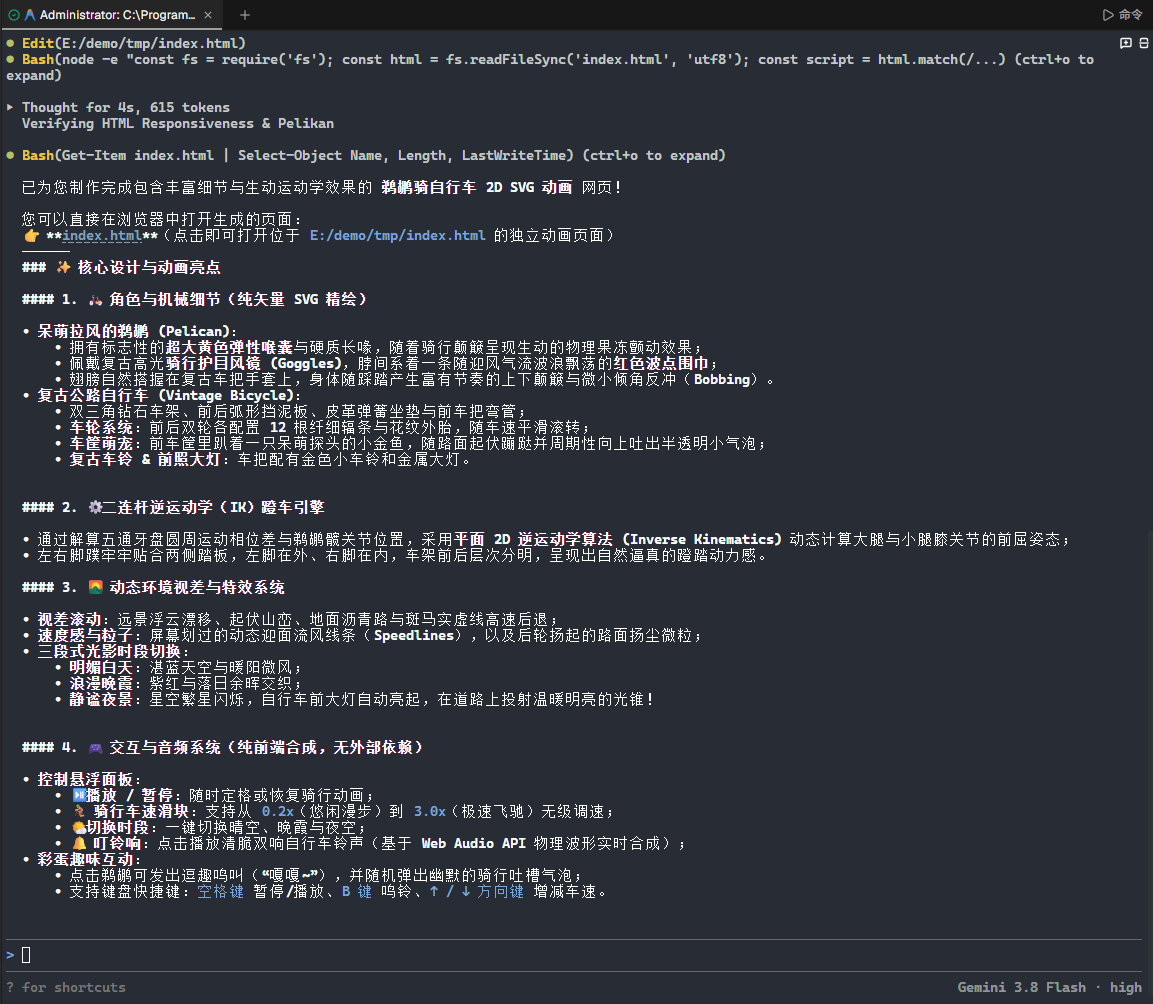
Gemini 3.8flash(High)鹈鹕测试
Tan9
2026-09-03 11:20
1
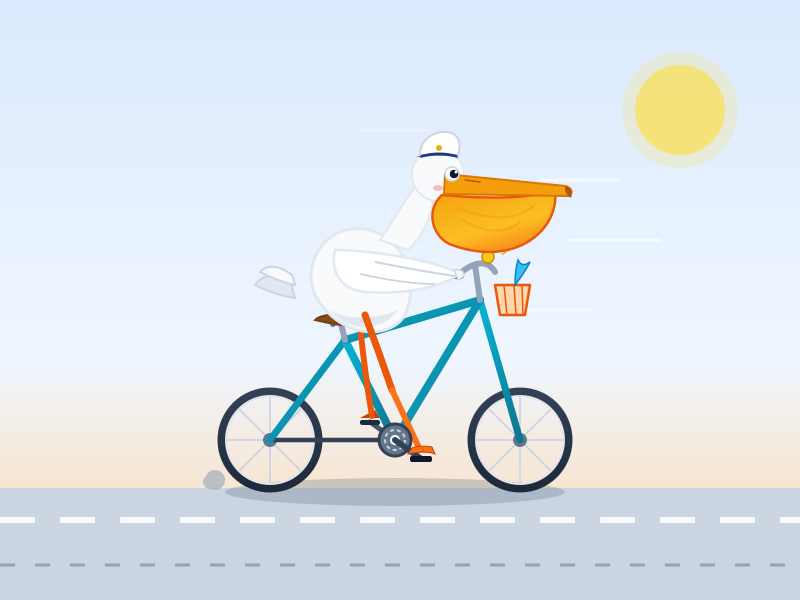
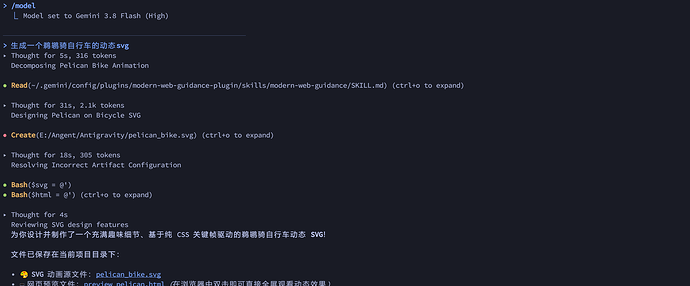
最新回复 (8)
-
 脆酥 09-03 11:211楼
这是厉害还是不厉害,看起来有点怪怪的
-
Tan9 楼主 09-03 11:222楼
这应该是翻车了,哈哈哈哈哈 ^-^。
-
 有剑气 09-03 11:223楼
怎么感觉更呆了,配色差很多的感觉
-
Tan9 楼主 09-03 11:244楼
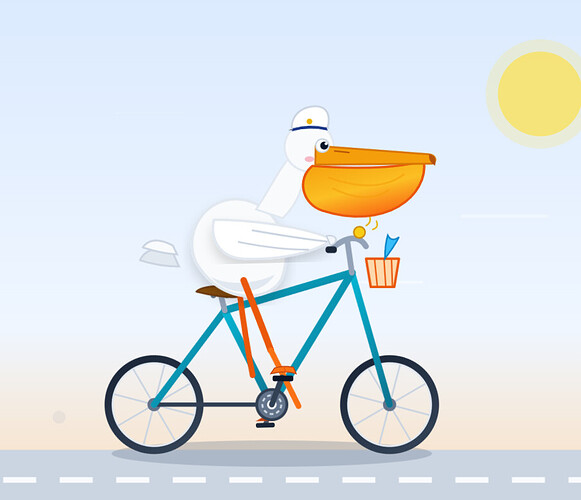
显示bug了,不过确实感觉抽奖
-
有剑气 09-03 11:265楼
脚掌这个位置的效果差很多,这个图这整体配色感觉好多了
-
 Lz_Mar12 09-03 11:286楼
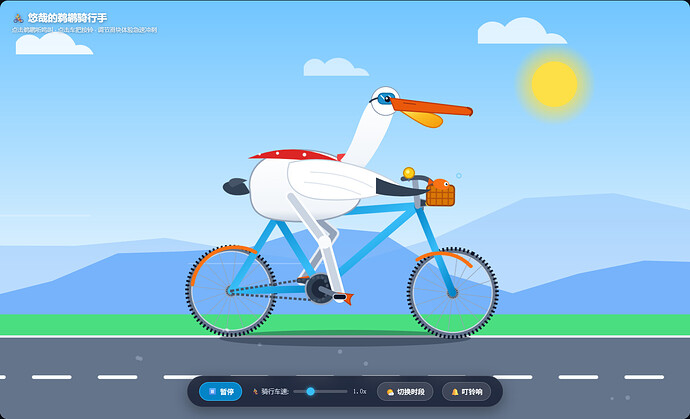
我测试没什么问题
创建一个HTML,内容是SVG绘制一个鹈鹕骑自行车的2D动画
<!DOCTYPE html>
<html lang="zh-CN">
<head>
<meta charset="UTF-8">
<meta name="viewport" content="width=device-width, initial-scale=1.0">
<title>鹈鹕骑行记 - Pelican Cycling SVG 2D Animation</title>
<style>
:root {
--bg-sky-top: #70c5ff;
--bg-sky-bottom: #e0f2fe;
--sun-color: #fde047;
--sun-glow: rgba(253, 224, 71, 0.4);
--mountain-back: #93c5fd;
--mountain-front: #60a5fa;
--ground-grass: #4ade80;
--ground-road: #64748b;
--ground-stripe: #f8fafc;
--bike-frame: #0284c7;
--bike-accent: #f97316;
--pelican-body: #f8fafc;
--pelican-shade: #cbd5e1;
--pelican-pouch: #fbbf24;
--pelican-pouch-shade: #f59e0b;
--pelican-beak: #ea580c;
}
/* 晚霞主题 */
body.sunset {
--bg-sky-top: #f97316;
--bg-sky-bottom: #fef08a;
--sun-color: #fb923c;
--sun-glow: rgba(251, 146, 60, 0.5);
--mountain-back: #c084fc;
--mountain-front: #a855f7;
--ground-grass: #65a30d;
--ground-road: #475569;
--bike-frame: #0d9488;
}
/* 夜间模式 */
body.night {
--bg-sky-top: #0f172a;
--bg-sky-bottom: #1e293b;
--sun-color: #f1f5f9;
--sun-glow: rgba(241, 245, 249, 0.3);
--mountain-back: #1e1b4b;
--mountain-front: #312e81;
--ground-grass: #14532d;
--ground-road: #1e293b;
--bike-frame: #38bdf8;
}
* {
box-sizing: border-box;
margin: 0;
padding: 0;
user-select: none;
}
body {
width: 100vw;
height: 100vh;
overflow: hidden;
font-family: -apple-system, BlinkMacSystemFont, "Segoe UI", Roboto, "PingFang SC", "Hiragino Sans GB", "Microsoft YaHei", sans-serif;
display: flex;
flex-direction: column;
align-items: center;
justify-content: center;
background: #0b0f19;
transition: background 0.6s ease;
}
#stage-container {
position: relative;
width: 100%;
height: 100%;
max-width: 1400px;
max-height: 850px;
display: flex;
align-items: center;
justify-content: center;
box-shadow: 0 25px 60px -15px rgba(0, 0, 0, 0.6);
border-radius: 16px;
overflow: hidden;
background: #000;
}
svg#canvas {
width: 100%;
height: 100%;
display: block;
background: linear-gradient(180deg, var(--bg-sky-top) 0%, var(--bg-sky-bottom) 65%);
transition: background 0.8s ease;
}
/* UI 悬浮面板 */
.controls-overlay {
position: absolute;
bottom: 24px;
left: 50%;
transform: translateX(-50%);
background: rgba(15, 23, 42, 0.78);
backdrop-filter: blur(14px);
-webkit-backdrop-filter: blur(14px);
border: 1px solid rgba(255, 255, 255, 0.18);
padding: 12px 24px;
border-radius: 50px;
display: flex;
align-items: center;
gap: 18px;
color: #f8fafc;
box-shadow: 0 10px 30px rgba(0, 0, 0, 0.35);
z-index: 50;
transition: all 0.3s cubic-bezier(0.4, 0, 0.2, 1);
}
.controls-overlay:hover {
background: rgba(15, 23, 42, 0.9);
box-shadow: 0 15px 35px rgba(0, 0, 0, 0.5);
}
.btn {
background: rgba(255, 255, 255, 0.12);
border: 1px solid rgba(255, 255, 255, 0.22);
color: #fff;
padding: 8px 16px;
border-radius: 24px;
cursor: pointer;
font-size: 14px;
font-weight: 500;
display: flex;
align-items: center;
gap: 6px;
transition: all 0.2s ease;
}
.btn:hover {
background: rgba(255, 255, 255, 0.25);
transform: translateY(-2px);
}
.btn:active {
transform: translateY(1px);
}
.btn.primary {
background: #0284c7;
border-color: #38bdf8;
}
.btn.primary:hover {
background: #0369a1;
}
.slider-group {
display: flex;
align-items: center;
gap: 10px;
font-size: 13px;
color: #cbd5e1;
}
input[type="range"] {
-webkit-appearance: none;
width: 110px;
height: 6px;
border-radius: 3px;
background: rgba(255, 255, 255, 0.2);
outline: none;
cursor: pointer;
}
input[type="range"]::-webkit-slider-thumb {
-webkit-appearance: none;
width: 16px;
height: 16px;
border-radius: 50%;
background: #38bdf8;
box-shadow: 0 0 8px #38bdf8;
cursor: pointer;
transition: transform 0.15s;
}
input[type="range"]::-webkit-slider-thumb:hover {
transform: scale(1.2);
}
/* 顶部标题指示器 */
.header-banner {
position: absolute;
top: 20px;
left: 24px;
z-index: 50;
display: flex;
flex-direction: column;
gap: 4px;
pointer-events: none;
}
.header-banner h1 {
color: #ffffff;
font-size: 20px;
font-weight: 700;
text-shadow: 0 2px 6px rgba(0, 0, 0, 0.4);
display: flex;
align-items: center;
gap: 8px;
}
.header-banner p {
color: rgba(255, 255, 255, 0.82);
font-size: 12px;
text-shadow: 0 1px 4px rgba(0, 0, 0, 0.5);
}
/* 气泡提示 */
.speech-bubble {
position: absolute;
opacity: 0;
transform: scale(0.6);
transition: all 0.3s cubic-bezier(0.34, 1.56, 0.64, 1);
pointer-events: none;
background: white;
color: #0f172a;
padding: 8px 14px;
border-radius: 14px;
font-size: 13px;
font-weight: 600;
box-shadow: 0 8px 20px rgba(0, 0, 0, 0.25);
z-index: 60;
}
.speech-bubble::after {
content: '';
position: absolute;
bottom: -6px;
left: 20px;
width: 0;
height: 0;
border-left: 6px solid transparent;
border-right: 6px solid transparent;
border-top: 6px solid white;
}
.speech-bubble.active {
opacity: 1;
transform: scale(1);
}
/* 夜间模式车灯光锥与星空光效 */
#headlight-beam {
opacity: 0;
transition: opacity 0.6s ease;
pointer-events: none;
}
body.night #headlight-beam {
opacity: 0.65;
}
#stars-group {
opacity: 0;
transition: opacity 0.8s ease;
}
body.night #stars-group {
opacity: 1;
}
@keyframes twinkle {
0%, 100% { opacity: 0.3; transform: scale(0.8); }
50% { opacity: 1; transform: scale(1.2); }
}
.star {
animation: twinkle 2.5s infinite ease-in-out;
transform-origin: center;
}
</style>
</head>
<body>
<div id="stage-container">
<!-- 顶部状态栏 -->
<div class="header-banner">
<h1>🚴♂️ 悠哉的鹈鹕骑行手</h1>
<p>点击鹈鹕听鸣叫 · 点击车把按铃 · 调节滑块体验急速冲刺</p>
</div>
<!-- 交互提示气泡 -->
<div id="bubble" class="speech-bubble">嘎嘎!天气真不错!</div>
<!-- SVG 动画主画布 -->
<svg id="canvas" viewBox="0 0 1200 700" preserveAspectRatio="xMidYMid slice">
<defs>
<!-- 太阳/月亮发光滤镜 -->
<filter id="sun-blur" x="-50%" y="-50%" width="200%" height="200%">
<feGaussianBlur in="SourceGraphic" stdDeviation="15" />
</filter>
<radialGradient id="sun-glow-grad" cx="50%" cy="50%" r="50%">
<stop offset="0%" stop-color="var(--sun-color)" stop-opacity="1" />
<stop offset="60%" stop-color="var(--sun-color)" stop-opacity="0.6" />
<stop offset="100%" stop-color="var(--sun-color)" stop-opacity="0" />
</radialGradient>
<!-- 车架金属高光渐变 -->
<linearGradient id="frame-grad" x1="0%" y1="0%" x2="100%" y2="100%">
<stop offset="0%" stop-color="var(--bike-frame)" />
<stop offset="50%" stop-color="#38bdf8" />
<stop offset="100%" stop-color="var(--bike-frame)" />
</linearGradient>
<!-- 鹈鹕腹部渐变 -->
<linearGradient id="pelican-body-grad" x1="0%" y1="0%" x2="0%" y2="100%">
<stop offset="0%" stop-color="#ffffff" />
<stop offset="85%" stop-color="#f1f5f9" />
<stop offset="100%" stop-color="#cbd5e1" />
</linearGradient>
<!-- 大嘴喉囊渐变 -->
<linearGradient id="pouch-grad" x1="0%" y1="0%" x2="100%" y2="80%">
<stop offset="0%" stop-color="#fef08a" />
<stop offset="50%" stop-color="var(--pelican-pouch)" />
<stop offset="100%" stop-color="var(--pelican-pouch-shade)" />
</linearGradient>
<!-- 轮胎橡胶阴影纹理 -->
<radialGradient id="wheel-rubber" cx="50%" cy="50%" r="50%">
<stop offset="78%" stop-color="#1e293b" />
<stop offset="85%" stop-color="#334155" />
<stop offset="93%" stop-color="#0f172a" />
<stop offset="100%" stop-color="#020617" />
</radialGradient>
<!-- 车轮辐条单元模板 -->
<g id="wheel-spokes">
<circle cx="0" cy="0" r="70" fill="none" stroke="#64748b" stroke-width="8" />
<circle cx="0" cy="0" r="66" fill="none" stroke="#cbd5e1" stroke-width="2" />
<circle cx="0" cy="0" r="10" fill="#475569" stroke="#94a3b8" stroke-width="2" />
<!-- 12 根车轮辐条 -->
<line x1="0" y1="-66" x2="0" y2="66" stroke="#94a3b8" stroke-width="1.2" opacity="0.8" />
<line x1="-66" y1="0" x2="66" y2="0" stroke="#94a3b8" stroke-width="1.2" opacity="0.8" />
<line x1="-46.6" y1="-46.6" x2="46.6" y2="46.6" stroke="#94a3b8" stroke-width="1.2" opacity="0.8" />
<line x1="-46.6" y1="46.6" x2="46.6" y2="-46.6" stroke="#94a3b8" stroke-width="1.2" opacity="0.8" />
<line x1="-22.5" y1="-62" x2="22.5" y2="62" stroke="#94a3b8" stroke-width="1.2" opacity="0.8" />
<line x1="-62" y1="-22.5" x2="62" y2="22.5" stroke="#94a3b8" stroke-width="1.2" opacity="0.8" />
<line x1="-22.5" y1="62" x2="22.5" y2="-62" stroke="#94a3b8" stroke-width="1.2" opacity="0.8" />
<line x1="-62" y1="22.5" x2="62" y2="-22.5" stroke="#94a3b8" stroke-width="1.2" opacity="0.8" />
<!-- 轮胎胎面刻纹 -->
<circle cx="0" cy="0" r="74" fill="none" stroke="#0f172a" stroke-width="6" stroke-dasharray="3, 4" />
</g>
<!-- 自行车前大灯光锥渐变 -->
<linearGradient id="headlight-grad" x1="0%" y1="0%" x2="100%" y2="25%">
<stop offset="0%" stop-color="#fef08a" stop-opacity="0.85" />
<stop offset="35%" stop-color="#fde047" stop-opacity="0.45" />
<stop offset="100%" stop-color="#fde047" stop-opacity="0" />
</linearGradient>
</defs>
<!-- 1. 背景层:夜空繁星、太阳/月亮、云层、群山 -->
<g id="layer-sky">
<!-- 夜间闪烁星空群 -->
<g id="stars-group"></g>
<!-- 天空发光天体 -->
<circle id="celestial-glow" cx="950" cy="140" r="70" fill="url(#sun-glow-grad)" />
<circle id="celestial-body" cx="950" cy="140" r="38" fill="var(--sun-color)" />
<!-- 远景浮云(视差位移) -->
<g id="clouds-layer" opacity="0.85">
<!-- 云朵 1 -->
<path id="cloud1" d="M 0,0 a 25,25 0 0,1 40,-5 a 35,35 0 0,1 60,10 a 25,25 0 0,1 30,15 l -130,0 z" fill="#ffffff" />
<!-- 云朵 2 -->
<path id="cloud2" d="M 0,0 a 20,20 0 0,1 35,-4 a 30,30 0 0,1 50,8 a 20,20 0 0,1 25,12 l -110,0 z" fill="#ffffff" opacity="0.7" />
<!-- 云朵 3 -->
<path id="cloud3" d="M 0,0 a 28,28 0 0,1 45,-6 a 40,40 0 0,1 70,12 a 30,30 0 0,1 35,16 l -150,0 z" fill="#ffffff" opacity="0.9" />
</g>
<!-- 远山 1(深远视差) -->
<path id="mountains-far" d="" fill="var(--mountain-back)" opacity="0.5" />
<!-- 远山 2(近山视差) -->
<path id="mountains-near" d="" fill="var(--mountain-front)" opacity="0.75" />
</g>
<!-- 2. 中景层:风速流动线条 -->
<g id="layer-speedlines" opacity="0.6" stroke="#ffffff" stroke-width="2" stroke-linecap="round">
<line id="sline1" x1="1200" y1="200" x2="1350" y2="200" />
<line id="sline2" x1="1200" y1="260" x2="1400" y2="260" stroke-width="1.5" />
<line id="sline3" x1="1200" y1="360" x2="1300" y2="360" stroke-width="2.5" />
<line id="sline4" x1="1200" y1="440" x2="1380" y2="440" stroke-width="1.8" />
</g>
<!-- 3. 地面道路层 -->
<g id="layer-ground">
<!-- 草坪路肩 -->
<rect x="0" y="525" width="1200" height="40" fill="var(--ground-grass)" />
<!-- 沥青路面 -->
<rect x="0" y="560" width="1200" height="140" fill="var(--ground-road)" />
<!-- 路边白色实线 -->
<line x1="0" y1="562" x2="1200" y2="562" stroke="#e2e8f0" stroke-width="4" />
<!-- 道路中心白色虚线群(向左滚动) -->
<g id="road-stripes" stroke="var(--ground-stripe)" stroke-width="6" stroke-linecap="round">
<!-- 由 JS 动态更新或填充 -->
</g>
<!-- 路边飞速掠过的小石子/小草丛 -->
<g id="road-details"></g>
</g>
<!-- 自行车与阴影投影 -->
<g id="layer-shadow">
<ellipse id="bike-ground-shadow" cx="600" cy="565" rx="210" ry="14" fill="rgba(15, 23, 42, 0.35)" />
</g>
<!-- 4. 骑行主体:自行车与鹈鹕 -->
<g id="pelican-bike-rig" transform="translate(0, 0)">
<!-- =================== 远端(内侧)构件 =================== -->
<!-- 内侧脚蹬曲柄与内侧脚蹼(右侧脚) -->
<g id="group-right-leg">
<!-- 内侧小腿与大腿 -->
<path id="leg-right" d="" fill="none" stroke="#e2e8f0" stroke-width="18" stroke-linecap="round" stroke-linejoin="round" />
<path id="leg-right-inner" d="" fill="none" stroke="#94a3b8" stroke-width="10" stroke-linecap="round" stroke-linejoin="round" />
<!-- 内侧脚蹼 -->
<path id="foot-right" d="" fill="#ea580c" />
<!-- 内侧曲柄与踏板 -->
<line id="crank-right" x1="560" y1="480" x2="560" y2="520" stroke="#475569" stroke-width="8" stroke-linecap="round" />
<rect id="pedal-right" x="550" y="516" width="20" height="8" rx="4" fill="#334155" />
</g>
<!-- =================== 自行车车体 =================== -->
<!-- 后车轮 (Rear Wheel, 轴心约 410, 485) -->
<g id="wheel-rear" transform="translate(410, 485)">
<use href="#wheel-spokes" />
</g>
<!-- 前车轮 (Front Wheel, 轴心约 780, 485) -->
<g id="wheel-front" transform="translate(780, 485)">
<use href="#wheel-spokes" />
</g>
<!-- 车架系统 (Bicycle Frame) -->
<g id="bike-frame-group">
<!-- 后平叉与后上叉 -->
<polyline points="410,485 560,480 485,360 410,485" fill="none" stroke="url(#frame-grad)" stroke-width="12" stroke-linecap="round" stroke-linejoin="round" />
<!-- 车架主三角:五通(560,480) -> 头管(720,340) -> 坐管结(485,360) -> 五通(560,480) -->
<polygon points="560,480 720,340 485,360" fill="none" stroke="url(#frame-grad)" stroke-width="13" stroke-linecap="round" stroke-linejoin="round" />
<!-- 前叉:头管(720,340) -> 前轮轴心(780,485) -->
<line x1="720" y1="340" x2="780" y2="485" stroke="url(#frame-grad)" stroke-width="12" stroke-linecap="round" />
<!-- 挡泥板 (后轮与前轮弧形挡泥板) -->
<path d="M 345,475 A 72 72 0 0 1 450,420" fill="none" stroke="var(--bike-accent)" stroke-width="6" stroke-linecap="round" />
<path d="M 720,430 A 72 72 0 0 1 810,440" fill="none" stroke="var(--bike-accent)" stroke-width="6" stroke-linecap="round" />
<!-- 牙盘五通轴盖与链条 -->
<circle cx="560" cy="480" r="26" fill="#334155" stroke="#94a3b8" stroke-width="3" />
<circle cx="560" cy="480" r="16" fill="#1e293b" />
<path d="M 410,485 L 560,460 A 24 24 0 0 1 560,500 L 410,490 Z" fill="none" stroke="#475569" stroke-width="4" stroke-dasharray="5,3" />
<!-- 坐垫支管与高档复古皮革鞍座 -->
<line x1="485" y1="360" x2="485" y2="335" stroke="#94a3b8" stroke-width="10" stroke-linecap="round" />
<!-- 坐垫 -->
<path d="M 445,335 C 455,325 515,325 525,335 C 530,342 510,348 480,346 C 450,344 440,342 445,335 Z" fill="#78350f" stroke="#451a03" stroke-width="3" />
<!-- 坐垫弹簧小部件 -->
<circle cx="462" cy="346" r="5" fill="none" stroke="#cbd5e1" stroke-width="3" />
<!-- 车把立管与复古弯把 -->
<line x1="720" y1="340" x2="715" y2="295" stroke="#94a3b8" stroke-width="10" stroke-linecap="round" />
<!-- 弯把 -->
<path id="handlebar" d="M 695,295 C 725,290 740,290 750,312" fill="none" stroke="#475569" stroke-width="8" stroke-linecap="round" />
<circle cx="750" cy="312" r="6" fill="#78350f" />
<!-- 复古小车铃 (点击可触发叮咚声) -->
<g id="bike-bell" style="cursor: pointer;">
<circle cx="705" cy="285" r="9" fill="#facc15" stroke="#ca8a04" stroke-width="2" />
<circle cx="703" cy="283" r="3" fill="#fef08a" />
<line x1="705" y1="294" x2="705" y2="299" stroke="#64748b" stroke-width="3" />
</g>
<!-- 复古车前大灯与夜间照明光锥 -->
<g id="bike-headlight" transform="translate(732, 335)">
<!-- 投射光束 -->
<polygon id="headlight-beam" points="8,-3 480,-50 470,240 8,5" fill="url(#headlight-grad)" />
<!-- 灯壳与反光碗 -->
<path d="M -8,-7 L 6,-4 L 6,4 L -8,7 Z" fill="#334155" stroke="#94a3b8" stroke-width="1.5" />
<circle cx="6" cy="0" r="4.5" fill="#fef08a" stroke="#facc15" stroke-width="1" />
<line x1="-3" y1="6" x2="-3" y2="12" stroke="#64748b" stroke-width="2.5" />
</g>
<!-- 前车筐 (带一只随车蹦跶的小金鱼) -->
<g id="bike-basket" transform="translate(735, 305)">
<!-- 编织车篮 -->
<rect x="0" y="0" width="46" height="34" rx="6" fill="#d97706" stroke="#92400e" stroke-width="2.5" />
<line x1="6" y1="0" x2="6" y2="34" stroke="#b45309" stroke-width="2" />
<line x1="16" y1="0" x2="16" y2="34" stroke="#b45309" stroke-width="2" />
<line x1="26" y1="0" x2="26" y2="34" stroke="#b45309" stroke-width="2" />
<line x1="36" y1="0" x2="36" y2="34" stroke="#b45309" stroke-width="2" />
<line x1="0" y1="12" x2="46" y2="12" stroke="#b45309" stroke-width="2" />
<line x1="0" y1="22" x2="46" y2="22" stroke="#b45309" stroke-width="2" />
<!-- 调皮探头的小金鱼 -->
<g id="basket-fish" transform="translate(18, -12)">
<!-- 鱼身 -->
<ellipse cx="6" cy="12" rx="14" ry="9" fill="#f97316" />
<!-- 鱼尾 -->
<polygon points="-6,12 -16,6 -16,18" fill="#ea580c" />
<!-- 鱼眼 -->
<circle cx="14" cy="10" r="3.5" fill="#ffffff" />
<circle cx="15" cy="10" r="1.8" fill="#0f172a" />
<circle cx="16" cy="9" r="0.8" fill="#ffffff" />
<!-- 鱼嘴与吐泡泡 -->
<circle id="fish-bubble" cx="22" cy="6" r="3" fill="none" stroke="#38bdf8" stroke-width="1.5" opacity="0" />
</g>
</g>
</g>
<!-- =================== 核心角色:鹈鹕 (Pelican) =================== -->
<g id="pelican-character" style="cursor: pointer;">
<!-- 1. 身体与躯干主体 -->
<!-- 尾羽 -->
<g id="pelican-tail">
<path d="M 430,305 C 400,295 385,310 400,320 C 410,328 435,325 440,320 Z" fill="#334155" />
<path d="M 435,300 C 410,290 395,302 410,312 Z" fill="#475569" />
</g>
<!-- 丰满躯体 (采用有机曲线) -->
<path id="pelican-torso" d="M 440,320 C 430,270 480,240 550,250 C 600,258 630,285 625,325 C 620,360 550,375 480,365 C 450,360 440,345 440,320 Z" fill="url(#pelican-body-grad)" stroke="#94a3b8" stroke-width="2.5" />
<!-- 飘扬的红色波点领巾/围巾 (增加飞驰速度感) -->
<g id="scarf-group">
<path id="scarf-neck" d="M 585,255 C 610,250 635,260 625,275 C 605,280 580,275 585,255 Z" fill="#ef4444" />
<!-- 飘向身后的围巾尾带(贝塞尔曲线由 JS 动态波动) -->
<path id="scarf-tail" d="M 585,265 Q 520,245 440,255 Q 520,270 585,272 Z" fill="#dc2626" />
<!-- 围巾上的小白波点 -->
<circle cx="530" cy="256" r="3" fill="#ffffff" opacity="0.9" />
<circle cx="485" cy="254" r="2.5" fill="#ffffff" opacity="0.9" />
<circle cx="455" cy="256" r="2" fill="#ffffff" opacity="0.9" />
</g>
<!-- 优雅且充满力量的颈部与头部 -->
<g id="pelican-head-group">
<!-- 脖子 S 型曲线 -->
<path id="pelican-neck" d="M 590,265 C 615,240 620,185 640,165 C 655,150 675,155 680,175 C 675,210 635,280 615,290 Z" fill="url(#pelican-body-grad)" />
<!-- 头部主体 -->
<circle cx="665" cy="165" r="24" fill="#ffffff" stroke="#94a3b8" stroke-width="1.5" />
<!-- 帅气的骑行护目风镜 (Goggles) -->
<g id="pelican-goggles">
<rect x="652" y="152" width="28" height="18" rx="8" fill="#0284c7" stroke="#0369a1" stroke-width="2" opacity="0.9" />
<!-- 镜片反光高光 -->
<line x1="657" y1="156" x2="667" y2="166" stroke="#ffffff" stroke-width="2" stroke-linecap="round" opacity="0.8" />
<line x1="670" y1="156" x2="674" y2="160" stroke="#ffffff" stroke-width="1.5" stroke-linecap="round" opacity="0.8" />
<!-- 镜带 -->
<path d="M 652,160 Q 640,163 638,168" fill="none" stroke="#334155" stroke-width="3" />
</g>
<!-- 眼睛与灵动眼神 -->
<g id="pelican-eye-group">
<circle cx="668" cy="162" r="5" fill="#0f172a" />
<circle cx="666.5" cy="160.5" r="1.8" fill="#ffffff" />
</g>
<!-- 鹈鹕的大嘴系统 (标志性的大长嘴与下颚黄色弹性大喉囊) -->
<g id="pelican-beak-system">
<!-- 弹性大喉囊 (Pouch) - 会随颠簸有果冻弹性晃动 -->
<path id="pelican-pouch" d="M 682,176 C 720,200 755,230 760,200 C 765,185 715,178 682,176 Z" fill="url(#pouch-grad)" stroke="#d97706" stroke-width="2" />
<!-- 上喙 (硬质长嘴,带末端小钩) -->
<path d="M 672,160 L 805,175 C 812,178 812,185 802,187 L 680,180 Z" fill="var(--pelican-beak)" stroke="#c2410c" stroke-width="2" stroke-linejoin="round" />
<!-- 嘴钩尖端细节 -->
<path d="M 802,175 Q 815,180 806,188" fill="none" stroke="#9a3412" stroke-width="3" stroke-linecap="round" />
<!-- 鼻孔小线条 -->
<line x1="695" y1="168" x2="715" y2="170" stroke="#9a3412" stroke-width="1.5" stroke-linecap="round" />
</g>
</g>
<!-- 翅膀 (握持车把的手臂状态) -->
<g id="pelican-wing">
<!-- 大翅膀覆羽 -->
<path d="M 505,270 C 560,255 630,270 690,305 C 670,325 610,335 550,330 C 510,325 495,300 505,270 Z" fill="#ffffff" stroke="#cbd5e1" stroke-width="2" />
<!-- 黑色/深灰飞羽尖端 -->
<path d="M 650,293 C 685,308 720,314 742,312 C 730,325 690,328 650,320 Z" fill="#334155" />
<!-- 翅膀羽毛纹理弧线 -->
<path d="M 540,285 Q 600,285 645,310" fill="none" stroke="#e2e8f0" stroke-width="2" />
<path d="M 530,302 Q 585,305 625,322" fill="none" stroke="#e2e8f0" stroke-width="2" />
</g>
</g>
<!-- =================== 近端(外侧)构件 =================== -->
<!-- 外侧脚蹬曲柄与外侧脚蹼(左侧脚,靠近镜头) -->
<g id="group-left-leg">
<!-- 外侧大腿与小腿 (两段式骨骼) -->
<path id="leg-left" d="" fill="none" stroke="#f8fafc" stroke-width="20" stroke-linecap="round" stroke-linejoin="round" />
<path id="leg-left-bone" d="" fill="none" stroke="#cbd5e1" stroke-width="12" stroke-linecap="round" stroke-linejoin="round" />
<!-- 膝盖羽毛装饰 -->
<circle id="knee-left" cx="0" cy="0" r="11" fill="#f8fafc" />
<!-- 外侧脚蹼 (大蹼爪包裹踏板) -->
<g id="foot-left-group">
<path id="foot-left" d="" fill="#ea580c" stroke="#c2410c" stroke-width="2" />
</g>
<!-- 外侧曲柄与踏板 -->
<line id="crank-left" x1="560" y1="480" x2="560" y2="440" stroke="#64748b" stroke-width="9" stroke-linecap="round" />
<rect id="pedal-left" x="550" y="436" width="22" height="9" rx="4" fill="#0f172a" stroke="#cbd5e1" stroke-width="1.5" />
</g>
</g> <!-- end of pelican-bike-rig -->
<!-- 前景飘散树叶 / 扬尘小颗粒 -->
<g id="layer-particles"></g>
</svg>
<!-- 底部悬浮控制栏 -->
<div class="controls-overlay">
<button class="btn primary" id="btn-toggle">
<span id="btn-icon">⏸️</span>
<span id="btn-text">暂停</span>
</button>
<div class="slider-group">
<span>🚴 骑行车速:</span>
<input type="range" id="speed-slider" min="0.2" max="3.0" step="0.1" value="1.0">
<span id="speed-value" style="font-family: monospace; min-width: 32px;">1.0x</span>
</div>
<button class="btn" id="btn-theme">
<span>🌤️ 切换时段</span>
</button>
<button class="btn" id="btn-honk">
<span>🔔 叮铃响</span>
</button>
</div>
</div>
<script>
/**
* 鹈鹕骑行动力学与 SVG 2D 动画引擎
*/
// --- 音频合成系统 (Web Audio API 清脆车铃 & 鹈鹕叫声,无需外部资源) ---
class SoundEngine {
constructor() {
this.ctx = null;
}
init() {
if (!this.ctx) {
const AudioContext = window.AudioContext || window.webkitAudioContext;
if (AudioContext) {
this.ctx = new AudioContext();
}
}
if (this.ctx && this.ctx.state === 'suspended') {
this.ctx.resume();
}
}
// 清脆双响自行车铃声
playBell() {
this.init();
if (!this.ctx) return;
const now = this.ctx.currentTime;
const freqs = [2093, 2349, 2093, 2637]; // 高八度泛音
freqs.forEach((freq, idx) => {
const osc = this.ctx.createOscillator();
const gain = this.ctx.createGain();
osc.type = 'sine';
osc.frequency.setValueAtTime(freq, now + idx * 0.08);
gain.gain.setValueAtTime(0.18, now + idx * 0.08);
gain.gain.exponentialRampToValueAtTime(0.0001, now + idx * 0.08 + 0.35);
osc.connect(gain);
gain.connect(this.ctx.destination);
osc.start(now + idx * 0.08);
osc.stop(now + idx * 0.08 + 0.36);
});
}
// 鹈鹕呆萌鸣叫声 ("嘎~")
playPelicanCall() {
this.init();
if (!this.ctx) return;
const now = this.ctx.currentTime;
const osc = this.ctx.createOscillator();
const gain = this.ctx.createGain();
osc.type = 'sawtooth';
osc.frequency.setValueAtTime(140, now);
osc.frequency.exponentialRampToValueAtTime(260, now + 0.12);
osc.frequency.exponentialRampToValueAtTime(110, now + 0.28);
gain.gain.setValueAtTime(0.15, now);
gain.gain.exponentialRampToValueAtTime(0.001, now + 0.32);
osc.connect(gain);
gain.connect(this.ctx.destination);
osc.start(now);
osc.stop(now + 0.33);
}
}
const sound = new SoundEngine();
// --- DOM 元素引用 ---
const wheelRear = document.getElementById('wheel-rear');
const wheelFront = document.getElementById('wheel-front');
const rig = document.getElementById('pelican-bike-rig');
const roadStripesGroup = document.getElementById('road-stripes');
const roadDetailsGroup = document.getElementById('road-details');
const mountainsFar = document.getElementById('mountains-far');
const mountainsNear = document.getElementById('mountains-near');
const layerParticles = document.getElementById('layer-particles');
const speedLines = [
document.getElementById('sline1'),
document.getElementById('sline2'),
document.getElementById('sline3'),
document.getElementById('sline4')
];
const clouds = [
{ el: document.getElementById('cloud1'), x: 120, y: 70, speed: 0.2 },
{ el: document.getElementById('cloud2'), x: 580, y: 110, speed: 0.14 },
{ el: document.getElementById('cloud3'), x: 920, y: 50, speed: 0.28 }
];
// 腿部骨骼与踏板曲柄元素
const legLeft = document.getElementById('leg-left');
const legLeftBone = document.getElementById('leg-left-bone');
const kneeLeft = document.getElementById('knee-left');
const footLeft = document.getElementById('foot-left');
const crankLeft = document.getElementById('crank-left');
const pedalLeft = document.getElementById('pedal-left');
const legRight = document.getElementById('leg-right');
const legRightInner = document.getElementById('leg-right-inner');
const footRight = document.getElementById('foot-right');
const crankRight = document.getElementById('crank-right');
const pedalRight = document.getElementById('pedal-right');
// 随动器官
const pelicanPouch = document.getElementById('pelican-pouch');
const scarfTail = document.getElementById('scarf-tail');
const basketFish = document.getElementById('basket-fish');
const fishBubble = document.getElementById('fish-bubble');
const pelicanHeadGroup = document.getElementById('pelican-head-group');
// UI 控件
const btnToggle = document.getElementById('btn-toggle');
const btnIcon = document.getElementById('btn-icon');
const btnText = document.getElementById('btn-text');
const speedSlider = document.getElementById('speed-slider');
const speedValue = document.getElementById('speed-value');
const btnTheme = document.getElementById('btn-theme');
const btnHonk = document.getElementById('btn-honk');
const bikeBell = document.getElementById('bike-bell');
const pelicanChar = document.getElementById('pelican-character');
const speechBubble = document.getElementById('bubble');
// --- 动态生成山脉与道路初始图形 ---
function initMountains() {
// 远山
let dFar = "M 0,530 ";
for (let x = 0; x <= 1250; x += 150) {
let y = 380 + Math.sin(x * 0.004) * 50 + Math.cos(x * 0.01) * 30;
dFar += `L ${x},${y} `;
}
dFar += "L 1250,560 L 0,560 Z";
mountainsFar.setAttribute('d', dFar);
// 近山
let dNear = "M 0,535 ";
for (let x = 0; x <= 1250; x += 110) {
let y = 430 + Math.sin(x * 0.007 + 1.2) * 45 + Math.cos(x * 0.015) * 25;
dNear += `L ${x},${y} `;
}
dNear += "L 1250,560 L 0,560 Z";
mountainsNear.setAttribute('d', dNear);
}
initMountains();
// 动态生成夜间闪烁星空群
const starsGroup = document.getElementById('stars-group');
function initStars() {
for (let i = 0; i < 28; i++) {
const star = document.createElementNS('http://www.w3.org/2000/svg', 'circle');
const sx = Math.random() * 1200;
const sy = Math.random() * 320;
const sr = 1.0 + Math.random() * 2.0;
star.setAttribute('cx', sx);
star.setAttribute('cy', sy);
star.setAttribute('r', sr);
star.setAttribute('fill', '#ffffff');
star.setAttribute('class', 'star');
star.style.animationDelay = `${(Math.random() * 3).toFixed(2)}s`;
star.style.animationDuration = `${(1.8 + Math.random() * 2.2).toFixed(2)}s`;
starsGroup.appendChild(star);
}
}
initStars();
// 初始化道路斑马虚线
const roadStripes = [];
const NUM_STRIPES = 12;
for (let i = 0; i < NUM_STRIPES; i++) {
const line = document.createElementNS('http://www.w3.org/2000/svg', 'line');
const startX = i * 110;
line.setAttribute('x1', startX);
line.setAttribute('y1', 630);
line.setAttribute('x2', startX + 60);
line.setAttribute('y2', 630);
roadStripesGroup.appendChild(line);
roadStripes.push({ el: line, x: startX });
}
// 初始化路边飞掠的小石子/小草
const roadPebbles = [];
for (let i = 0; i < 8; i++) {
const circle = document.createElementNS('http://www.w3.org/2000/svg', 'circle');
const px = Math.random() * 1200;
const py = 575 + Math.random() * 105;
circle.setAttribute('cx', px);
circle.setAttribute('cy', py);
circle.setAttribute('r', 1.5 + Math.random() * 2.5);
circle.setAttribute('fill', '#94a3b8');
circle.setAttribute('opacity', '0.6');
roadDetailsGroup.appendChild(circle);
roadPebbles.push({ el: circle, x: px, py: py, speedMult: 1.0 + (py - 575) / 100 });
}
// 初始化前景扬尘微粒
const dustParticles = [];
for (let i = 0; i < 6; i++) {
const p = document.createElementNS('http://www.w3.org/2000/svg', 'circle');
p.setAttribute('r', 2 + Math.random() * 3);
p.setAttribute('fill', '#f1f5f9');
p.setAttribute('opacity', '0');
layerParticles.appendChild(p);
dustParticles.push({ el: p, x: 410, y: 555, vx: -2 - Math.random() * 4, vy: -0.5 - Math.random(), life: 0 });
}
// --- 运动学参数与配置 ---
let isRunning = true;
let speed = 1.0;
let crankAngle = 0; // 曲柄旋转角度 (弧度)
let wheelAngle = 0; // 车轮旋转角度 (度)
let time = 0;
// 自行车几何锚点定义
const CRANK_CENTER = { x: 560, y: 480 }; // 五通中心
const CRANK_RADIUS = 34; // 曲柄半径
const HIP_POINT = { x: 508, y: 326 }; // 鹈鹕臀部/髋关节固定位置
const THIGH_LEN = 95; // 大腿长度
const SHIN_LEN = 95; // 小腿长度
/**
* 2D 二连杆逆向运动学 (Inverse Kinematics)
* 给定臀部 H 和脚踏板 P,计算膝盖点 K
*/
function solveLegIK(H, P, L1, L2, flip = false) {
const dx = P.x - H.x;
const dy = P.y - H.y;
const dist = Math.sqrt(dx * dx + dy * dy);
// 限制距离在最大伸展范围内
const clampedDist = Math.min(Math.max(dist, 10), L1 + L2 - 1.0);
// 计算基底角度
const baseAngle = Math.atan2(dy, dx);
// 余弦定理求关节角
const cosA = (L1 * L1 + clampedDist * clampedDist - L2 * L2) / (2 * L1 * clampedDist);
const angleA = Math.acos(Math.min(Math.max(cosA, -1), 1));
// 膝盖朝前方弯曲 (x 偏正方向,蹬车向前发力)
const kneeAngle = flip ? (baseAngle + angleA) : (baseAngle - angleA);
const Kx = H.x + L1 * Math.cos(kneeAngle);
const Ky = H.y + L1 * Math.sin(kneeAngle);
return { x: Kx, y: Ky };
}
/**
* 生成脚蹼多边形路径
*/
function createWebbedFootPath(pedalX, pedalY, angle) {
const cos = Math.cos(angle);
const sin = Math.sin(angle);
// 相对于脚腕的脚蹼三角形与蹼爪凹槽
const p1 = { x: pedalX - 10 * cos + 4 * sin, y: pedalY - 10 * sin - 4 * cos };
const p2 = { x: pedalX + 22 * cos - 8 * sin, y: pedalY + 22 * sin + 8 * cos };
const p3 = { x: pedalX + 20 * cos + 10 * sin, y: pedalY + 20 * sin - 10 * cos };
const notch = { x: pedalX + 14 * cos + 1 * sin, y: pedalY + 14 * sin - 1 * cos };
return `M ${p1.x},${p1.y} L ${p2.x},${p2.y} Q ${notch.x},${notch.y} ${p3.x},${p3.y} Z`;
}
// --- 主动画更新帧循环 ---
function updateFrame() {
if (isRunning) {
const step = 0.055 * speed;
crankAngle = (crankAngle + step) % (Math.PI * 2);
wheelAngle = (wheelAngle + step * 165) % 360;
time += step;
// 1. 车轮旋转动画
wheelRear.setAttribute('transform', `translate(410, 485) rotate(${wheelAngle})`);
wheelFront.setAttribute('transform', `translate(780, 485) rotate(${wheelAngle})`);
// 2. 骑行上下颠簸反冲效果 (Bobbing)
const bounce = Math.sin(crankAngle * 2) * 3.5;
const tilt = Math.cos(crankAngle * 2) * 0.8;
rig.setAttribute('transform', `translate(0, ${bounce}) rotate(${tilt}, 600, 485)`);
// 3. 计算左右踏板圆周坐标
// 左踏板(近端)
const pedalLX = CRANK_CENTER.x + CRANK_RADIUS * Math.cos(crankAngle);
const pedalLY = CRANK_CENTER.y + CRANK_RADIUS * Math.sin(crankAngle);
// 右踏板(远端,相位差 180 度)
const pedalRX = CRANK_CENTER.x + CRANK_RADIUS * Math.cos(crankAngle + Math.PI);
const pedalRY = CRANK_CENTER.y + CRANK_RADIUS * Math.sin(crankAngle + Math.PI);
// 动态曲柄与踏板
crankLeft.setAttribute('x2', pedalLX);
crankLeft.setAttribute('y2', pedalLY);
pedalLeft.setAttribute('x', pedalLX - 11);
pedalLeft.setAttribute('y', pedalLY - 4.5);
crankRight.setAttribute('x2', pedalRX);
crankRight.setAttribute('y2', pedalRY);
pedalRight.setAttribute('x', pedalRX - 10);
pedalRight.setAttribute('y', pedalRY - 4);
// 4. 计算鹈鹕左右腿连杆骨骼与脚蹼
const curHip = { x: HIP_POINT.x, y: HIP_POINT.y };
// --- 近端左腿 (靠近镜头) ---
const kneeL = solveLegIK(curHip, { x: pedalLX, y: pedalLY }, THIGH_LEN, SHIN_LEN, false);
const legPathL = `M ${curHip.x},${curHip.y} L ${kneeL.x},${kneeL.y} L ${pedalLX},${pedalLY}`;
legLeft.setAttribute('d', legPathL);
legLeftBone.setAttribute('d', legPathL);
kneeLeft.setAttribute('cx', kneeL.x);
kneeLeft.setAttribute('cy', kneeL.y);
// 左脚掌倾角随曲柄自然微调
const footAngleL = Math.sin(crankAngle) * 0.35 + 0.15;
footLeft.setAttribute('d', createWebbedFootPath(pedalLX, pedalLY, footAngleL));
// --- 远端右腿 (内侧) ---
const kneeR = solveLegIK(curHip, { x: pedalRX, y: pedalRY }, THIGH_LEN, SHIN_LEN, false);
const legPathR = `M ${curHip.x},${curHip.y} L ${kneeR.x},${kneeR.y} L ${pedalRX},${pedalRY}`;
legRight.setAttribute('d', legPathR);
legRightInner.setAttribute('d', legPathR);
const footAngleR = Math.sin(crankAngle + Math.PI) * 0.35 + 0.15;
footRight.setAttribute('d', createWebbedFootPath(pedalRX, pedalRY, footAngleR));
// 5. 鹈鹕大喉囊物理弹力颤动 (Jiggle effect)
const pouchJiggleY = Math.sin(time * 3.5) * 5 + Math.cos(crankAngle * 2) * 3;
const pouchJiggleX = Math.cos(time * 2.8) * 3;
pelicanPouch.setAttribute('d',
`M 682,176 C ${715 + pouchJiggleX},${198 + pouchJiggleY} ${750 + pouchJiggleX},${226 + pouchJiggleY} 760,200 C 765,185 715,178 682,176 Z`
);
// 6. 飘扬领巾飘带贝塞尔曲线动态波浪
const scarfWave1 = Math.sin(time * 5.5) * 14;
const scarfWave2 = Math.cos(time * 5.0) * 10;
scarfTail.setAttribute('d',
`M 585,265 Q ${515 + scarfWave2},${242 + scarfWave1} 435,${252 - scarfWave1} Q ${515 - scarfWave2},${272 + scarfWave1} 585,272 Z`
);
// 7. 车篮里探头的小金鱼随颠簸蹦跶与吐泡泡
const fishHopY = -12 + Math.abs(Math.sin(time * 2.6)) * -8;
const fishRot = Math.sin(time * 3) * 12;
basketFish.setAttribute('transform', `translate(18, ${fishHopY}) rotate(${fishRot}, 6, 12)`);
// 金鱼吐泡泡周期上升
const bubbleProg = (time * 0.8) % 1;
if (bubbleProg < 0.85) {
const bx = 22 + bubbleProg * 25;
const by = 6 - bubbleProg * 35;
fishBubble.setAttribute('cx', bx);
fishBubble.setAttribute('cy', by);
fishBubble.setAttribute('r', 2 + bubbleProg * 4);
fishBubble.setAttribute('opacity', 0.85 * (1 - bubbleProg));
} else {
fishBubble.setAttribute('opacity', '0');
}
// 8. 道路斑马线向左疾驰流动
roadStripes.forEach(s => {
s.x -= 7 * speed;
if (s.x < -80) {
s.x += NUM_STRIPES * 110;
}
s.el.setAttribute('x1', s.x);
s.el.setAttribute('x2', s.x + 60);
});
// 路边小石子疾驰
roadPebbles.forEach(p => {
p.x -= 6.5 * speed * p.speedMult;
if (p.x < -20) {
p.x = 1220;
}
p.el.setAttribute('cx', p.x);
});
// 9. 背景视差移动 (Parallax Clouds)
clouds.forEach(c => {
c.x -= c.speed * speed;
if (c.x < -160) c.x = 1260;
c.el.setAttribute('transform', `translate(${c.x}, ${c.y})`);
});
// 10. 疾风速度线条 (Speedlines)
speedLines.forEach((line, idx) => {
let lx = parseFloat(line.getAttribute('x1')) - (14 + idx * 4) * speed;
if (lx < -300) {
lx = 1200 + Math.random() * 300;
}
const len = 120 + idx * 35;
line.setAttribute('x1', lx);
line.setAttribute('x2', lx + len);
line.style.opacity = speed > 1.2 ? '0.75' : (speed * 0.4);
});
// 11. 轮胎扬尘粒子
dustParticles.forEach(dp => {
dp.life += 0.04 * speed;
if (dp.life >= 1) {
dp.x = 405 + (Math.random() - 0.5) * 10;
dp.y = 552 + (Math.random() - 0.5) * 6;
dp.vx = -3 - Math.random() * 4 * speed;
dp.vy = -0.5 - Math.random() * 1.5;
dp.life = 0;
}
dp.x += dp.vx;
dp.y += dp.vy;
dp.el.setAttribute('cx', dp.x);
dp.el.setAttribute('cy', dp.y);
dp.el.setAttribute('r', (2 + dp.life * 7));
dp.el.setAttribute('opacity', (1 - dp.life) * 0.45 * Math.min(speed, 2.0));
});
}
requestAnimationFrame(updateFrame);
}
// 启动动画循环
requestAnimationFrame(updateFrame);
// --- 交互事件监听与处理 ---
// 1. 播放 / 暂停切换
btnToggle.addEventListener('click', () => {
isRunning = !isRunning;
if (isRunning) {
btnIcon.textContent = '⏸️';
btnText.textContent = '暂停';
} else {
btnIcon.textContent = '▶️';
btnText.textContent = '继续';
}
});
// 2. 骑行速度滑块调节
speedSlider.addEventListener('input', (e) => {
speed = parseFloat(e.target.value);
speedValue.textContent = speed.toFixed(1) + 'x';
});
// 3. 时段/背景主题切换 (明媚白天 -> 浪漫晚霞 -> 幽静夜空)
const themes = ['', 'sunset', 'night'];
let curThemeIdx = 0;
btnTheme.addEventListener('click', () => {
document.body.classList.remove(themes[curThemeIdx]);
curThemeIdx = (curThemeIdx + 1) % themes.length;
if (themes[curThemeIdx]) {
document.body.classList.add(themes[curThemeIdx]);
}
const labels = ['🌤️ 切换时段', '🌇 切换时段', '🌙 切换时段'];
btnTheme.querySelector('span').textContent = labels[curThemeIdx];
});
// 4. 铃铛互动 (点击小车铃或底部按钮)
function ringBell() {
sound.playBell();
bikeBell.style.transformOrigin = '705px 285px';
bikeBell.animate([
{ transform: 'rotate(0deg)' },
{ transform: 'rotate(-25deg)' },
{ transform: 'rotate(25deg)' },
{ transform: 'rotate(-15deg)' },
{ transform: 'rotate(0deg)' }
], { duration: 350 });
showSpeechBubble('叮铃铃!请让一让路哟~ 🔔', 705, 230);
}
btnHonk.addEventListener('click', ringBell);
bikeBell.addEventListener('click', ringBell);
// 5. 点击鹈鹕互动:鸣叫与冒出趣味气泡
const pelicanQuotes = [
'嘎嘎!今天顺风,骑得好爽!🚴♂️',
'大嘴兜风,快乐翻倍!💨',
'车篮里的小鱼是我的旅行搭子!🐟',
'冲呀!下一个坡度我也能征服!',
'嘎!来比比谁蹬得快!⚡'
];
let quoteIdx = 0;
pelicanChar.addEventListener('click', () => {
sound.playPelicanCall();
// 头部轻微点赞点头动画
pelicanHeadGroup.style.transformOrigin = '640px 180px';
pelicanHeadGroup.animate([
{ transform: 'rotate(0deg)' },
{ transform: 'rotate(12deg)' },
{ transform: 'rotate(-8deg)' },
{ transform: 'rotate(0deg)' }
], { duration: 300 });
const text = pelicanQuotes[quoteIdx % pelicanQuotes.length];
quoteIdx++;
showSpeechBubble(text, 680, 110);
});
// 气泡弹出辅助函数
let bubbleTimeout = null;
function showSpeechBubble(text, svgX, svgY) {
const container = document.getElementById('stage-container');
const svg = document.getElementById('canvas');
const rect = svg.getBoundingClientRect();
const scaleX = rect.width / 1200;
const scaleY = rect.height / 700;
speechBubble.textContent = text;
speechBubble.style.left = `${svgX * scaleX + 20}px`;
speechBubble.style.top = `${svgY * scaleY}px`;
speechBubble.classList.add('active');
if (bubbleTimeout) clearTimeout(bubbleTimeout);
bubbleTimeout = setTimeout(() => {
speechBubble.classList.remove('active');
}, 2400);
}
// 键盘快捷键交互体验增强
window.addEventListener('keydown', (e) => {
if (e.code === 'Space') {
e.preventDefault();
btnToggle.click();
} else if (e.code === 'KeyB') {
ringBell();
} else if (e.code === 'ArrowUp') {
speedSlider.value = Math.min(3.0, speed + 0.2);
speedSlider.dispatchEvent(new Event('input'));
} else if (e.code === 'ArrowDown') {
speedSlider.value = Math.max(0.2, speed - 0.2);
speedSlider.dispatchEvent(new Event('input'));
}
});
</script>
</body>
</html>
-
 eason 09-03 11:307楼
它像漫威里的隐形鹈鹕——你看不见它在思考,但每一根线条都证明它来过。
空气动力学、车架几何、鹈鹕的重心控制,甚至连迎面而来的风都被它画出了速度感。
我盯着这张图看了半天,突然意识到一个可怕的事实:
AI 已经开始理解物理世界了。
然后我低头看了一眼脚断了……
算了,夸不下去了。
-
Tan9 楼主 09-03 11:578楼
可能我这被降智了
又试了两次
提示词:‘’生成html,放在桌面,内容是svg绘制鹈鹕骑自行车2D动画,不用进行测试生成html,放在桌面,内容是svg绘制鹈鹕骑自行车2D动画,不用进行测试‘’
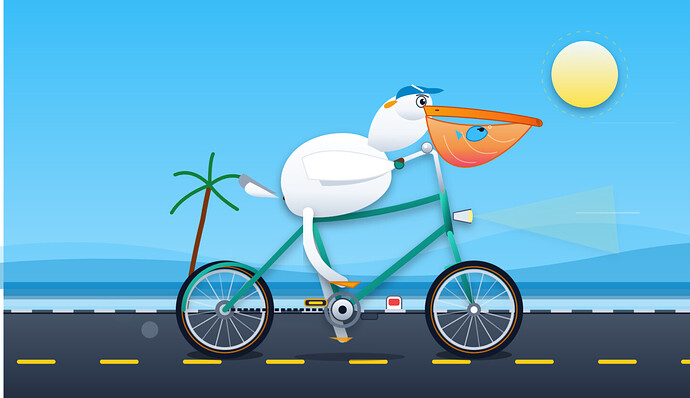
提示词‘’创建一个HTML,内容是SVG绘制一个鹈鹕骑自行车的2D动画‘’
这次腿的问题解决了
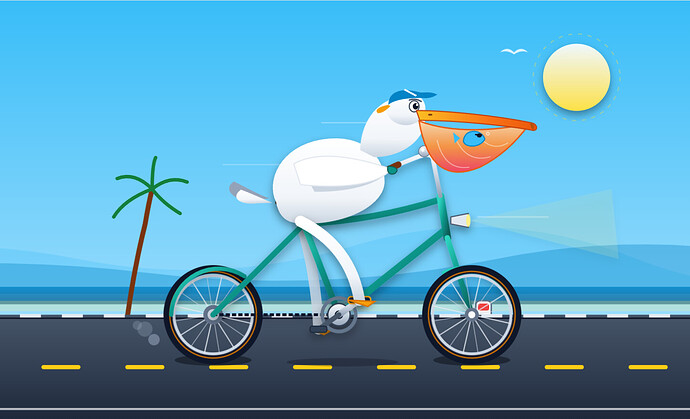
* 帖子来源Linux.do
附近帖子
- ↑谷歌现在正从退役服务器中取出DDR4内存模块,并将其重新用于新的AI服务器
- ↑折腾了两天百度网盘限速,我大概搞明白 120 KiB/s 是怎么来的了
- ↑【开源推广】ReadBrief,划词ai总结软件--随时随地,一键总结
- ↑分享一个最近很火的游戏《植物大战僵尸恐怖版》
- ↑[富可敌国]ACS Gateway gemini-3.8-flash上线 新用户注册福利继续送体验额度 快来体验
- 📍 Gemini 3.8flash(High)鹈鹕测试
- ↓佬们web3是真完了吗?
- ↓【已解决】: invalid_request
- ↓广东入秋啦。
- ↓10月底之前撤出所有个人A股资金
- ↓[开源自荐] pi- antigravity 让你在pi中直接使用Antigravity订阅 已经实现Gemini3.8 flash