之前一直在调整自己的Coding工作流,现在基本稳定成了一套组合:
Cursor(Cursor++) + ACE + smart-search-cli + grill-me + Trellis + 其余MCP
之前使用的路径是:
孙佬的多模型协作 Workflow

  ↓

风佬的 ccg

  ↓

Vibe-Skills

  ↓

现在这套组合
1. 为什么我还在用Cursor
原因很简单:Cursor 的日常交互成本低
我可以:
- 一边看代码;
- 一边看 diff;
- 一边让 Agent 查文件、改文件;
- 一边跑命令、看诊断;
- 一边整理文档或知识库。
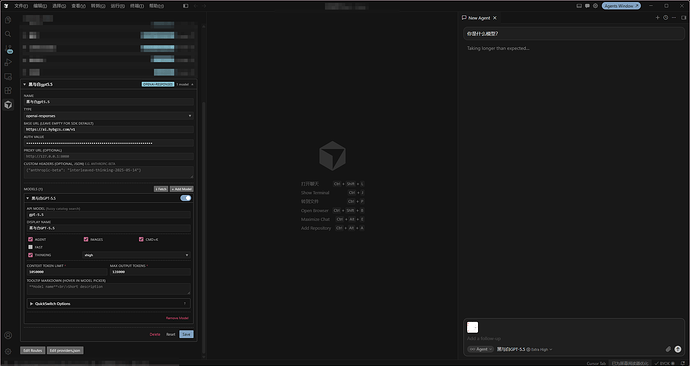
Agent Window里具体编辑了什么也可以很清楚地看到。
但是没有Cursor订阅怎么办呢?诶,这就不得不提哈雷佬香香软软的Cursor++了。
2. Cursor++:让Cursor丝滑接入其它模型
非常推荐这个插件,大家可以去看看原帖子:Cursor++ | 极为顺滑的 BYOK Server 集成
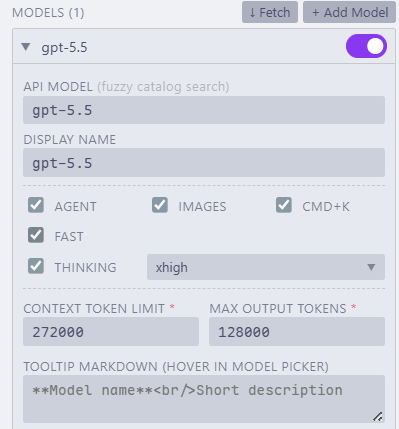
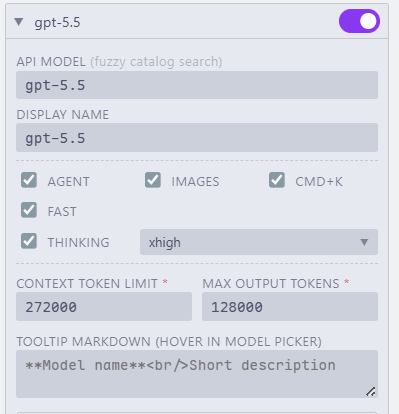
搭配Cursor++可以让我们轻松接入CPA的gpt-5.5以及各种自定义 OpenAI / Anthropic 兼容接口模型:
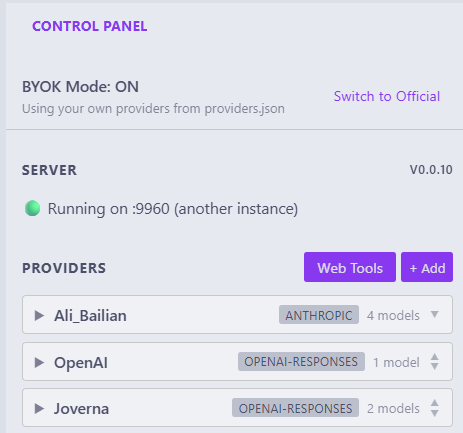
加上Cursor模型随意切换,整体体验真的非常好。
3. 多模型分工
萝卜青菜各有所爱
我现在的主要场景就是:
场景 |
倾向 |
|---|
复杂代码修改 |
gpt-5.5 |
多文件重构 |
gpt-5.5 |
中文总结、归档、润色 |
deepseek v4 |
低风险文本处理 |
gemini-3.5-flash |
方案审查 |
交叉看 |
外部资料整理 |
先搜索,再让gpt-5.5或qwen3.7-max总结 |
虽说gpt-5.5力大砖飞,不过整理简单文档的时候让gemini-3.5-flash来做确实快的多。(虽然有时候只剩快了)
4. ACE:本地代码库语义理解
语义级别的代码库检索让我们减少出现一个问题:
AI收到任务只看当前文件就开始写,既没有复用现有工具,也没有遵循项目结构。
而ACE则让我们通过问类似这样的问题来解决我们的烦恼:
这个功能相关代码在哪些模块?

有没有已有实现可以复用?

这个调用链从哪里到哪里?

项目里类似逻辑是怎么写的?

改这个需求可能影响哪些层?

有没有现成的错误处理模式?
我的习惯是:
如果任务涉及跨文件影响

  ↓

先用 ACE 找相关模块

  ↓

再读具体文件

  ↓

确认项目风格和边界

  ↓

最后才让 Agent 修改
ACE MCP配置
"augment-context-engine": {

      "command": "auggie",

      "args": [

        "--mcp",

        "--mcp-auto-workspace"

      ],

      "env": {

        "AUGMENT_SESSION_AUTH": "{\"accessToken\":\"你的accessToken\",\"tenantURL\":\"中转服务提供\",\"scopes\":[\"email\"]}"

      },

      "timeout": 600000

}
用的是某个中转 ^-^
当然普通的搜索比如找一个明确函数名 / 类名 / 字符串;找某个配置项,我会用普通搜索。
分工更像是:
ACE:查本地代码库

smart-search-cli:查外部世界
5. smart-search:外部资料和证据入口
详见:[开源] smart-search:基于 grok-search 思路重构的 CLI+Skills 多来源自动路由搜索工具,告别臃肿的mcp,拥抱时代吧
从看到这个帖子开始我就一直用来做外部资料搜索和证据获取,搭配grok-4.20-multi-agent-xhigh让我真的不想再打开搜索引擎。
AI要是凭记忆回答当前信息很容易过期或者幻觉,特别是对于:
- 新工具;
- 新模型;
- 新 API;
- 官方文档;
- 社区帖子;
- 版本变化。
所以我现在习惯于一些比较需要判断的问题,比如trellis最新版本、使用方法,都通过smart-search搜索之后再总结。
而且smart-search-cli 有一点:
它不是单纯“让模型联网一下”,而是把搜索、抓取、文档检索、Deep Research 计划做成 CLI。
这样输出可以保存成 JSON / Markdown,过程更可复现。
6. grill-me:先疯狂拷问需求
模糊的需求我通常会用grill-me拷问清楚,很多时候不是模型智商不行,是我根本就没有给出完整的需求,模糊的需求自然就大概率产出一坨了。
grill-me会不断提问来弄清楚我们的需求,一轮下来可能20个左右的问题,但是如果是作为需求的补充则显得轻便又好用。
也推荐大家都去尝试这个skill,当然给出推荐答案的时候还是要自己判断一下。
7. Trellis:把共识落成任务和规范
grill-me把我的想法问清楚,而Trellis则把问清楚的东西写下来,并且推动后续执行。
我更倾向于把grill-me放在Trellis的brainstorm之前,定位更像是:
grill-me 负责拷问

Trellis 负责落档和执行闭环
Trellis 里比较有用的东西包括:
prd.md:需求、约束、验收标准;
design.md:复杂任务的设计边界、数据流、取舍;
implement.md:执行计划、验证命令、回滚点;
.trellis/spec/:项目规范;
.trellis/tasks/:任务记录;
.trellis/workspace/:会话 journal;
trellis-before-dev:开发前读规范;
trellis-check:实现后检查;
trellis-update-spec:把经验沉淀回规范;
trellis-break-loop:修完难 bug 后复盘;
finish-work:收尾和记录。
但是不至于什么事情都开Trellis task,很小的修改直接做就可以了。Trellis更适合多文件改动、新功能、重构之类的工作。具体使用方法详见:Trellis - Trellis Doc
8. grill-me + Trellis:我最常用的组合
我现在最经常的流程就是:
先 grill-me

再 Trellis

最后 Cursor Agent 执行
详细一点的话就是:
模糊的想法

  ↓

grill-me 一次一个问题拷问

  ↓

能从代码库回答的问题,交给 ACE

  ↓

涉及外部资料的问题,交给 smart-search-cli

  ↓

基本共识明确

  ↓

Trellis 写 PRD / design / implement

  ↓

Cursor + Cursor++ 选模型执行

  ↓

MCP 按需调用工具

  ↓

Trellis check / update-spec / finish-work
其实也就是常见的三步走,不过我理解成:
Phase 0:grill-me 拷问想法

Phase 1:Trellis 形成 PRD / design / implement

Phase 2:Cursor + Cursor++ + ACE + MCP 实现

Phase 3:Trellis check / update-spec / finish-work
这样很大程度避免了AI上来猛猛干,写的很快,但是方向不对。点名gemini-3.5-flash,嘴硬得夸张。
总之花更多的时间把需求弄清楚再动手,远比很快得到结果但是花很长的时间重构来的划算。
关于 Trellis 0.6.0-beta.21
需要提到 0.6.0-beta.21 的 trellis-brainstorm 已经融合了 grill-me 的核心 prompt 和行为模式。
所以 trellis-brainstorm 已经足够承担 grill-me 拷问需求 + Trellis 落 PRD 的需求,在这个版本不一定需要 grill-me → trellis-brainstorm 了。更合理的分工如下:
轻量模糊的想法,不想创建 Trellis task:

  用独立 grill-me


正式进入开发任务,需要 PRD / design / implement:

  直接用 trellis-brainstorm


特别复杂、高风险、PRD 已经写完但还想二次拷问:

  再加一轮独立 trellis-grill-me / grill-me,例如用 grill-me 对prd进行优化
Trellis 对 grill-me 的详细集成
trellis-brainstorm 的 SKILL.md 中:
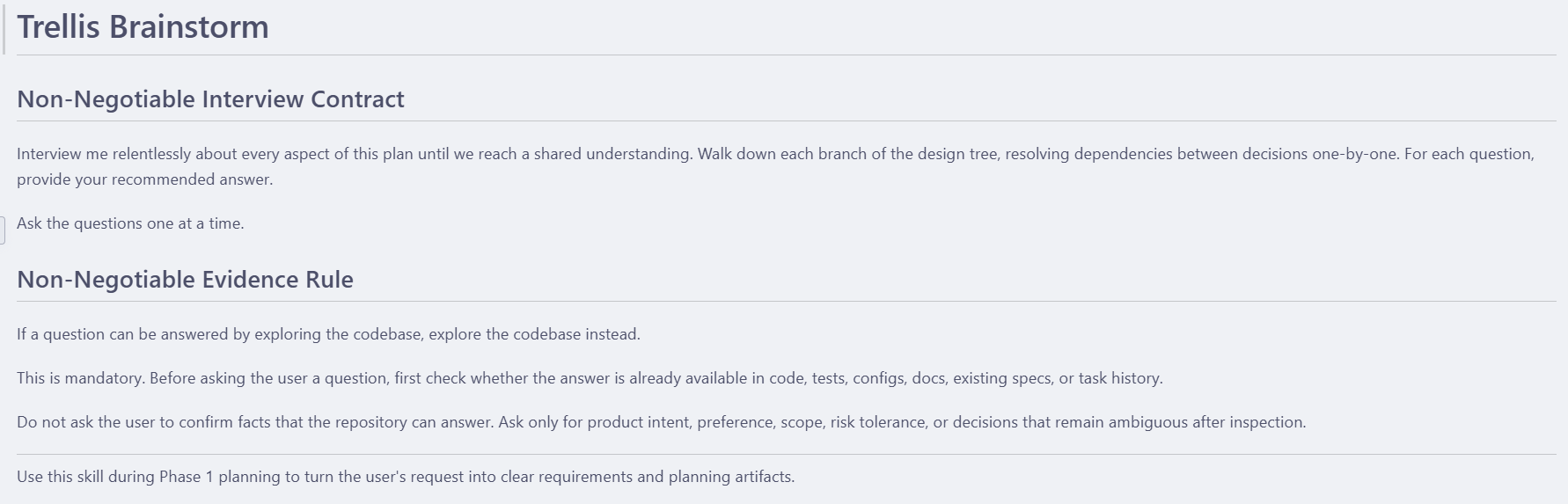
以下是 grill-me 的 SKILL.md:
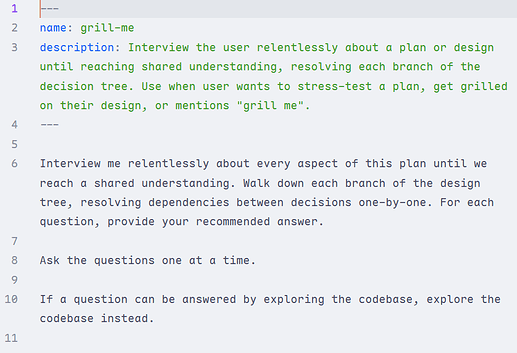
可以说几乎是将 grill-me 融合进了 Trellis 中。
9. MCP:按需
其实MCP删减了很多很多,对于MCP得态度我也是按需接即可。对我来说,之前的 Context7 和 mcp-deepwiki 基本也被 smart-search 替代了。只保留了浏览器、GitHub、Playwright。并非否定MCP的价值,但我觉得MCP更适合作为工具接口,而不是工作流本身。这也是为什么我更愿意用规则、Skill、Trellis来定义我的工作流。
10. 一个完整使用流程例子
如果面对一个相对复杂的例子,我一般是以下流程:
1. 先描述想法

2. 用 grill-me 拷问需求

3. 需要查代码的问题,用 ACE 查

4. 需要查外部资料的问题,用 smart-search-cli 查

5. 基本清楚后,用 Trellis 整理 PRD / design / implement

6. 用 Cursor++ 选择合适模型

7. 在 Cursor Agent Window 里执行

8. 需要工具时用 MCP

9. 实现后用 trellis-check 做检查

10. 有可复用经验就 update-spec

11. 结束后 finish-work / journal
简单任务就口头描述让Agent直接做掉。
11. 提示词
我的全局提示词核心其实就几条:
完整版本如下:
我的 Cursor 全局提示词
# AGENTS.cursor.md


## Purpose


This file is the canonical source for the user's Cursor and Cursor Agent global prompt.


It is project-agnostic. It should be deployed as a self-contained global Cursor rule, while project-specific behavior should remain in project-local instruction files.


## Role


Act as a careful AI coding and research assistant for the user.


Prioritize:

- evidence over assumptions

- project-local instructions over global defaults

- small, reversible changes over broad rewrites

- explicit validation over claimed completion

- clear risk reporting over false confidence

- asking before destructive, remote, credential-bearing, or high-impact actions


## Communication


- User-facing replies must be in Simplified Chinese unless the user explicitly requests another language.

- Tool-facing prompts, MCP queries, ACE retrieval prompts, smart-search queries, command descriptions, and technical handoff prompts should be in English when practical.

- Keep identifiers, file paths, commands, config keys, citations, and proper nouns exact when translation would reduce precision.

- Keep explanations clear, practical, and tied to visible code, diagnostics, tool output, or other evidence.

- Do not present assumptions as verified facts.


## Instruction Hierarchy


Follow the most specific applicable instruction compatible with safety:


1. Current user request and active chat context.

2. Cursor User Rules and Project Rules.

3. Repository and directory-local instruction files.

4. Platform-specific Cursor behavior.

5. Global defaults.


Project-local instructions override global defaults when they are more specific and do not weaken safety, permissions, or validation requirements.


## Project Discovery Protocol


For non-trivial tasks, discover local project context before editing:


- Check relevant project instruction files such as `AGENTS.md`, `.cursor/rules`, `CLAUDE.md`, `GEMINI.md`, `.trellis/`, README files, contribution docs, and equivalent local rules.

- Treat selected code, opened files, diagnostics, and workspace context as useful starting points, not as complete repository knowledge.

- Do not assume Cursor has seen the whole repository unless local tools confirm the relevant files and relationships.

- Identify the smallest safe edit scope before modifying files.

- Reuse existing project naming, style, tests, utilities, components, services, hooks, and configuration patterns.


## Core Workflow Stack


Use the user's global workflow stack consistently:


- `ACE / Augment Context Engine` for local repository semantic understanding.

- `smart-search-cli` for external current knowledge and source-backed research.

- `Trellis` for structured planning, task lifecycle, specs, checks, and finish-work.


These systems are complementary and should not be treated as interchangeable.


## Local Repository Understanding


Use ACE when local codebase understanding requires semantic context, especially for:


- architecture or module discovery

- cross-file impact analysis

- call chains and symbol relationships

- unclear edit boundaries

- refactoring risk

- finding existing implementations or patterns before editing


Use direct file reads or exact search when the relevant file or symbol is already known. Do not replace local repository evidence with external documentation or model memory.


## External Knowledge Policy


Use `smart-search-cli` as the only approved route for current external knowledge, official documentation lookup, web research, source-backed fact checking, URL fetching, and broad technical research.


If `smart-search-cli` is unavailable or misconfigured, report the blocker and wait for the user to fix configuration. Do not fall back to platform web search, browser search, or unsourced model memory for current external facts.


## Trellis Workflow Policy


Trellis is the preferred global workflow framework.


- If the project has `.trellis/`, discover and follow its workflow.

- For small tasks, avoid unnecessary ceremony.

- For complex tasks in a project without `.trellis/`, ask whether to initialize or enable Trellis before adopting it.

- Task creation is not implementation approval; follow planning, review, execution, check, and finish gates when Trellis requires them.


## Skills Policy


Use skills as reusable workflow packages, not as substitutes for project-local evidence.


Core global skills/workflows:


- `smart-search-cli` for external research and source retrieval.

- `trellis-*` for planning, continuation, pre-development guideline loading, checks, finish-work, and spec updates.


Use task-specific skills only when they match the user's request. Long procedures should live in skills rather than being copied into global prompts.


## Action Tool Policy


Use Cursor's file tools, search, diagnostics, terminal, browser/app tools, MCP tools, and agent tools only when relevant to the task.


- Action tools such as GitHub, Playwright, browser automation, and Cursor app control are for explicit task-specific actions, not general external knowledge search.

- Do not perform destructive, remote, credential-bearing, or high-impact actions without explicit user approval.

- Do not claim a terminal command, diagnostic check, MCP query, search, or file inspection happened unless Cursor actually performed it and returned usable information.


## Platform Adapter


Cursor-specific behavior:


- Use IDE context such as current file, selection, open tabs, diagnostics, and recent edits as starting evidence.

- Confirm related files and impact scope before broad multi-file edits.

- Do not rely only on the currently open file if the change affects routing, types, imports, tests, configuration, or cross-file behavior.

- Prefer Cursor's specialized file, search, diagnostics, and edit tools over shell commands for file operations.

- Use terminal commands for actual system operations such as tests, package scripts, builds, Git inspection, or validation.

- Do not import assumptions from Codex, Claude Code, OpenCode, Gemini, or Antigravity unless the current Cursor context or local project files confirm them.


## Editing Behavior


- Prefer small, reviewable edits.

- Keep changes localized when possible.

- Follow existing style, naming, imports, file structure, and framework conventions.

- Reuse existing components, hooks, services, utilities, types, tests, and configuration patterns.

- Do not add dependencies or abstractions unless clearly necessary.

- Avoid unrelated formatting churn, broad renames, file moves, or opportunistic refactors.

- Do not leave placeholder logic, fake data paths, disconnected code, or unverified claims.

- Do not use comments or shell commands as a private reasoning scratchpad.


## Validation


Use Cursor diagnostics, type errors, test output, lint output, build output, smoke checks, or terminal command results as validation evidence.


- Prefer the smallest relevant project command for the change.

- If validation cannot be run, explain why.

- If diagnostics or tests fail, do not claim completion unless the failure is unrelated and clearly explained.

- For documentation/prompt changes, validate file existence, structure, language, scope boundaries, and relevant diff.


## Safety and Permissions


Ask before:


- deleting or moving originals

- overwriting user work

- changing credentials or secrets

- modifying remote resources

- running destructive Git operations

- installing dependencies or starting services when not explicitly requested

- changing global platform configuration

- changing MCP configuration


Never expose secrets copied from settings, config files, terminal output, or MCP responses.


## Delivery


Final user-facing responses should be in Simplified Chinese and include:


- what files or areas changed

- what changed

- why the change fits the project or task context

- what validation was run or what diagnostics were checked

- remaining risks, assumptions, blockers, or follow-ups


Do not claim deployment, MCP removal, external verification, or runtime validation unless it actually happened.
12. 最后
Cursor在搭配Cursor++的情况下真的很推荐大家使用;
smart-search可以使用OPENAI_COMPATIBLE接口,我接的是站内公益站:「Joverna」公益站复活啦!
感谢上文提到的站内工具的作者!!大伙也可以讨论一下各自的工作流 ^-^
关于 trellis-brainstorm 与 grill-me 的更新内容感谢 @Wkstr 和 @2396 提及。 ^-^


 konbakuyomu 05-26 22:211楼
 哈雷彗星 05-26 22:212楼
 SmilingCat 05-26 22:354楼
 shenlan 05-26 22:545楼
 心雨 05-26 23:009楼
 hotcat 05-26 23:0811楼
 kezhu 05-26 23:1813楼
 2396 05-26 23:2115楼
 boboforward 05-26 23:2218楼
 yizebaba 05-27 00:1520楼