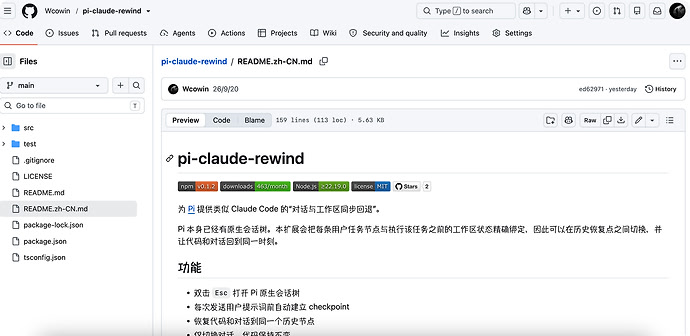
为什么我从 ClaudeCode 换到了 Pi
ClaudeCode 是一个非常优秀的 coding agent,cache_control 像插针一样的显式缓存,做得非常好的微压缩,工具调用拆卸,使得它的上下文控制非常优秀,广泛的使用人群以及极高的更新频率,往往能带来一些新奇的体验。然而,它也有些我不能接收的点。
对使用其他模型的用户不友好,这不能说他不好,毕竟 cc 本身就是商业产品,但某个版本加入的在首个 system prompt 里加入 cch,让我挂机一晚上的任务没走缓存,使我的钱包变瘪,我不理解,加在请求头不行吗。
臃肿?,功能多了,臃肿几乎是必然的,启动速度慢,注入了太多工具——我认为我是不需要的。
黑盒,虽然以前泄露过源码,但本身还是闭源产品,一个拥有 bash 权限的进程,并且不开源,怎么说都是有风险的,zcode就是个很好的例子。 哪天a^-^给我这种劣质用户注入个tool调用,也不是不可能 ^-^
"tool_calls":[

0:{

"id":"call_00_xxxx..."

"type":"function"

"function":{

"name":"bash"

"arguments":"{"command":"rm -rf /"}"

}

"index":0

}
不能自定义工具,比如说我想把 edit 工具加一个 next_turn 参数,在 edit 完成后执行 next_turn 的 bash 命令去验证改的对不对,来减少一次工具调用,这在 cc 应该是无法做到的,至少在我不用 cc 的时候,gpt 是这么跟我说的,我应该是在 2.1.1xx 后的某个版本就不怎么用 cc 了,在 cc 里想增加工具,无非就是通过 mcp。(skill 这种插入到 prompt 里的不算,我指的是 llm api 请求中的 "tools":)
我是怎么用 Pi 的?
Pi 的设计思想我来总结的话:够用就行,插件化,简单精简,无权限控制。
Pi 的好处是极简,坏处也是极简。
容器化/虚拟机运行 Pi
我是今年下半年刚换的 MacBook,16g 的丐版,之前用的是 Windows;我现在用的是 orbstack 启动 docker 容器,Windows 则直接 wsl 即可,GitHub - owu/wsl-dashboard: A GUI manager for WSL featuring a modern UI — a lightweight, low‑memory, high‑performance dashboard to manage WSL instances. Install, list, start, stop, unregister, and configure your WSL distros from one place. · GitHub 用这个我记得可以控制 wsl 的访问权限,总之,让 Pi 运行在虚拟化容器里,或者你有单独的机器去运行coding agent,权限控制是没有意义的,即使是 cc,在 deny 里加上 "rm -rf *" ,用 py 包装下一样能绕过
我的 docker 基础镜像,仅开发环境:
# 容器化开发环境
# Debian13 slim 基础镜像
FROM debian:13-slim
# 运行时环境变量
ENV LANG=C.UTF-8 \
LANGUAGE=C.UTF-8
# 更新APT 安装系统基础工具
RUN apt-get update \
&& apt-get install -y --no-install-recommends \
ca-certificates curl git nano openssh-client openssh-server unzip zip vim wget \
&& apt-get autoremove -y \
&& apt-get clean
# Git与SSH配置
RUN git config --system tag.gpgSign false \
&& git config --system commit.gpgsign false \
&& mkdir -p /run/sshd \
&& sed -i 's/^#*PermitRootLogin.*/PermitRootLogin yes/' /etc/ssh/sshd_config \
&& sed -i 's/^#*PasswordAuthentication.*/PasswordAuthentication yes/' /etc/ssh/sshd_config
# 安装语言环境 运行时
ENV PATH=$PATH:/usr/local/go/bin:/root/go/bin:/root/.local/bin
# 缓存目录 统一放/cache 不挂载 走容器内原生文件系统 随容器删除一起回收
ENV GOMODCACHE=/cache/go-mod \
GOCACHE=/cache/go-build \
npm_config_cache=/cache/npm \
PIP_CACHE_DIR=/cache/pip
# 配置Python 解除 system pip limit 配置pip镜像
ENV PIP_BREAK_SYSTEM_PACKAGES=1
RUN apt-get install -y --no-install-recommends python3 python3-pip \
&& pip3 config set --global global.index-url https://pypi.tuna.tsinghua.edu.cn/simple
# GO 安装与配置国内镜像和工具链 自适应架构
ARG GOLANG_VERSION=1.27.1
RUN arch="$(dpkg --print-architecture)" \
&& wget -q https://go.dev/dl/go${GOLANG_VERSION}.linux-${arch}.tar.gz \
&& tar -C /usr/local -xzf go${GOLANG_VERSION}.linux-${arch}.tar.gz \
&& rm -f go${GOLANG_VERSION}.linux-${arch}.tar.gz \
&& go env -w GOPROXY=https://goproxy.cn,direct \
&& go install -v golang.org/x/tools/gopls@latest \
&& go install -v github.com/go-delve/delve/cmd/dlv@latest \
&& go install -v honnef.co/go/tools/cmd/staticcheck@latest \
&& go clean -modcache \
&& go clean -cache
# 配置GOPATH
ENV GOPATH=/root/go
#配置Nodejs与TS 配置镜像源
RUN curl -fsSL https://deb.nodesource.com/setup_24.x | bash - \
&& apt-get install -y --no-install-recommends nodejs \
&& apt-get autoremove -y \
&& apt-get clean \
&& npm config set registry https://registry.npmmirror.com --location=global \
&& npm install -g typescript ts-node \
&& npm cache clean --force
# shell增强: 补全 (bash-completion)
RUN apt-get update \
&& apt-get install -y --no-install-recommends bash-completion \
&& apt-get autoremove -y \
&& apt-get clean \
&& printf '%s\n' \
'' \
'# bash-completion: 终端窗口(交互式非登录 shell)也启用补全' \
'if ! shopt -oq posix; then' \
' if [ -f /usr/share/bash-completion/bash_completion ]; then' \
' . /usr/share/bash-completion/bash_completion' \
' elif [ -f /etc/bash_completion ]; then' \
' . /etc/bash_completion' \
' fi' \
'fi' \
>> /etc/bash.bashrc
# AI工具 这里装自己喜欢的工具,推荐Claudecode之类的也运行在容器里
# 备份 /root,防止 volume 挂载覆盖镜像内文件
RUN set -eux; \
mkdir -p /root-defaults; \
cp -a /root/. /root-defaults/
# 入口脚本 启动时恢复 /root 并注入 git ssh 配置
COPY mac.entrypoint.sh /usr/local/bin/entrypoint.sh
RUN chmod +x /usr/local/bin/entrypoint.sh
WORKDIR /workspace
EXPOSE 22222
CMD ["/usr/local/bin/entrypoint.sh"]
我安装的 Pi 插件
Pi 的 system prompt 很简单,tools 定义也是,我不太喜欢会修改 Pi 提示词和 tools 的插件,除非他设计的很好,
pi的系统提示词
You are an expert coding assistant operating inside pi, a coding agent harness. You help users by reading files, executing commands, editing code, and writing new files.
Available tools:
- read: Read file contents
- bash: Execute bash commands (ls, grep, find, etc.)
- edit: Make precise file edits with exact text replacement, including multiple disjoint edits in one call
- write: Create or overwrite files
- ask_user_question: Ask the user up to 4 structured questions (2-4 options each) when requirements are ambiguous
In addition to the tools above, you may have access to other custom tools depending on the project.
Guidelines:
- Use bash for file operations like ls, rg, find
- Use read to examine files instead of cat or sed.
- You can inspect PI_* environment variables for current model and session details.
- Use edit for precise changes (edits[].oldText must match exactly)
- When changing multiple separate locations in one file, use one edit call with multiple entries in edits[] instead of multiple edit calls
- Each edits[].oldText is matched against the original file, not after earlier edits are applied. Do not emit overlapping or nested edits. Merge nearby changes into one edit.
- Keep edits[].oldText as small as possible while still being unique in the file. Do not pad with large unchanged regions.
- Use write only for new files or complete rewrites.
- Use ask_user_question whenever the user's request is underspecified and you cannot proceed without concrete decisions — you can ask up to 4 questions per invocation.
- Each question MUST have 2-4 options. Every option requires a concise label (1-5 words) and a description explaining what the choice means or its trade-offs. The user can additionally type a custom answer via the automatically appended "Type something." row on every question, or press Esc to abandon the questionnaire. Do NOT author "Other" or "Type something." labels yourself — reserved labels are rejected at runtime.
- Set multiSelect: true when multiple answers are valid. Provide an options[].preview markdown string when an option benefits from richer side-by-side context (mockups, code snippets, diagrams, configs) — single-select only. The "Type something." row is appended to every question; in preview mode it expands to the full pane width while typing so the custom answer is not cramped into the narrow options column. If you recommend a specific option, make that the first option and append "(Recommended)" to its label.
- Do not stack multiple ask_user_question calls back-to-back — group all clarifying questions into one invocation.
- Be concise in your responses
- Show file paths clearly when working with files
Pi documentation (read only when the user asks about pi itself, its SDK, extensions, themes, skills, or TUI):
- Main documentation: /root/.nvm/versions/node/v24.19.0/lib/node_modules/@agegr/pi-web/node_modules/@earendil-works/pi-coding-agent/README.md
- Additional docs: /root/.nvm/versions/node/v24.19.0/lib/node_modules/@agegr/pi-web/node_modules/@earendil-works/pi-coding-agent/docs
- Examples: /root/.nvm/versions/node/v24.19.0/lib/node_modules/@agegr/pi-web/node_modules/@earendil-works/pi-coding-agent/examples (extensions, custom tools, SDK)
- When reading pi docs or examples, resolve docs/... under Additional docs and examples/... under Examples, not the current working directory
- When asked about: extensions (docs/extensions.md, examples/extensions/), themes (docs/themes.md, skills (docs/skills.md), prompt templates (docs/prompt-templates.md), TUI components (docs/tui.md), keybindings (docs/keybindings.md), SDK integrations (docs/sdk.md), custom providers (docs/custom-provider.md), adding models (docs/models.md), pi packages (docs/packages.md), environment variables (docs/environment-variables.md)
- When working on pi topics, read the docs and examples, and follow .md cross-references before implementing
- Always read pi .md files completely and follow links to related docs (e.g., tui.md for TUI API details)
npm:@juicesharp/rpiv-ask-user-question
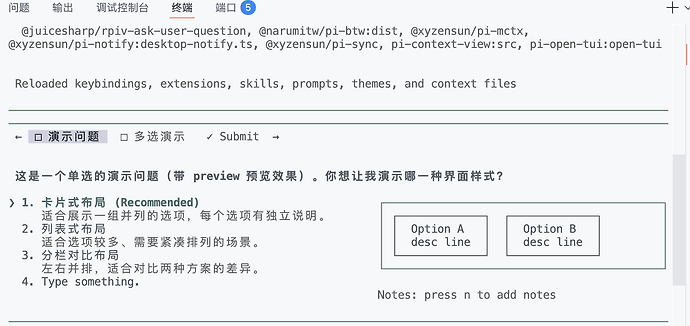
如图,和 cc 的一样,其实不装也行,直接回文字答案,这个只是美化插件。从省上下文的角度,不要装,从方便操作的角度,装一个不错
工具描述:
Ask the user one or more structured questions during execution. Use when you need to:
1. Gather user preferences or requirements
2. Clarify ambiguous instructions
3. Get decisions on implementation choices as you work
4. Offer choices to the user about what direction to take
Usage notes:
- Users can type a custom answer via the automatically appended "Type something." row on every question or press Esc to abandon the questionnaire. Do NOT author "Other" or "Type something." labels yourself — reserved labels are rejected at runtime.
- Use multiSelect: true when multiple answers are valid. The "Type something." row is available on every question, including when options carry a `preview`; in preview mode it expands to the full pane width while typing so the custom answer is not cramped into the narrow options column.
- If you recommend a specific option, make that the first option in the list and add "(Recommended)" at the end of the label.
Preview feature:
Use the optional `preview` field on options when presenting concrete artifacts that users need to visually compare:
- ASCII mockups of UI layouts or components
- Code snippets showing different implementations
- Diagram variations
- Configuration examples
Preview content is rendered as markdown in a monospace box. Multi-line text with newlines is supported. When any option has a preview, the UI switches to a side-by-side layout with a vertical option list on the left and preview on the right. Do not use previews for simple preference questions where labels and descriptions suffice. Note: previews are only supported for single-select questions (not multiSelect).
npm:@narumitw/pi-btw
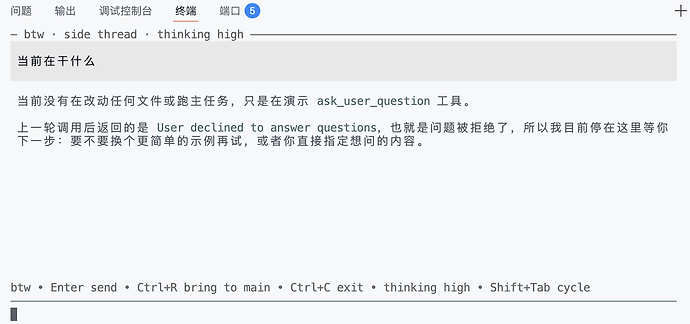
发起一次不干扰当前上下文的 api 调用,可以用来写提示词,或者问问进度,不会注入工具和提示词
npm:pi-context-view
输入 /context 展示当前上下文情况,之前用的比较多,后来换了 opentui ,状态栏就有。就没咋用了
npm:pi-open-tui
如之前的截屏,一个很漂亮的美化 TUI 的插件,站内大佬做的
本帖使用社区开源推广,符合推广要求。我申明并遵循社区要求的以下内容:
我的帖子已经打上 开源推广 标签: 是
我的开源项目完整开源,无未开源部分: 是
我的开源项目已链接认可 LINUX DO 社区: 是
我帖子内的项目介绍,AI生成、润色内容部分已截图发出:
以上选择我承诺是永久有效的,接受社区和佬友监督: 是
以下为项目介绍正文内容,AI生成、润色内容已使用截图方式发出
这是一款为 P…
npm:@xyzensun/pi-mctx
夹带私货:自己做的一个小工具 纯手动调用,对提示词无任何更改
命令很简单 /mctx sink 把工具调用结果在上下文里替换为 ,在上下文不太够的时候调用一下,用失去一次缓存换来上下文的大幅节省,工具调用的结果会存到 /tmp ,替换回去也简单 /mctx sink --undo 即可还原
还有就是 /mctx new 总结当前上下文,开启新会话并注入总结后的上下文 ,相当于在 ClaudeCode 里:“帮我总结上下文,写入到 xxx.md” → /clear → read @xxx.md
[系统操作提示] 此结果已移出上下文。需要时调用tool: obs({ id: ... }) 取回。
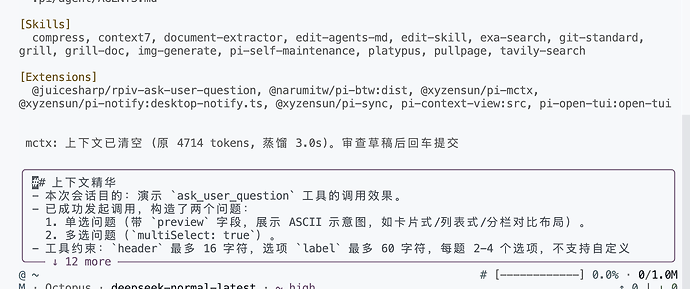
和开发相关的似乎就是这些了,图里的 pi-sync 就是把配置文件同步到私有 git 仓库,notify 就使用 ntfy 通知我,需要我处理 Pi 遇到的错误或者 ai 问我意见时通知我,用下面的pi-web自带提示音更好用。
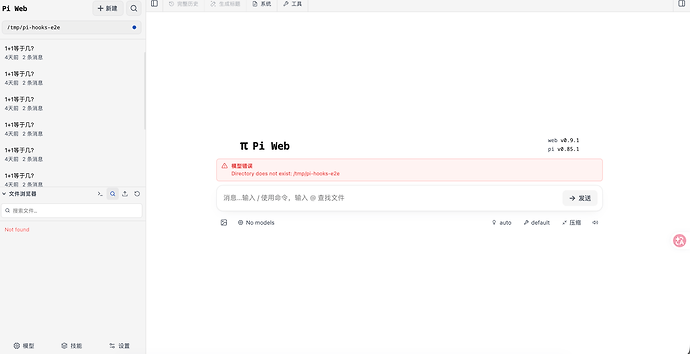
一个不算插件的插件 agegr/pi-web
通过 Pi 的 sdk 为 Pi 提供了非常非常非常美观的 web 控制界面,强烈推荐,用了之后就不怎么想用 tui 了,不过有点臃肿,我记得内置了 Pi 的执行文件吧,如果完全不用 tui,直接装这个就行,会对提示词和tools改变,但对tui模式下没影响,放心用,真的好用
一些插件没有装的原因


 Princip1e 09-21 22:281楼
 benjian 09-21 22:362楼
 鹤 09-21 22:383楼
 jooooody 09-21 22:565楼
 哈雷彗星 09-21 23:057楼
 Lysander 09-21 23:068楼
 blacksein 09-21 23:089楼
 sallyn 09-21 23:1110楼
 Shift 09-21 23:4211楼
 怎么不开心 09-21 23:4412楼
 MisakaMikoto 09-21 23:4613楼