CHANGELOG.md
main
# Changelog


All notable changes to this project are documented here. Format follows [Keep a Changelog](https://keepachangelog.com/en/1.1.0/); semver via [release-please](https://github.com/googleapis/release-please) from [Conventional Commits](https://www.conventionalcommits.org/).


> ⚙️ Maintained by [release-please](https://github.com/googleapis/release-please): conventional-commit subjects on `main` are collected into the open "Release PR"; merging that PR writes the new section here and tags `vX.Y.Z` on the same commit. Hand-edits to released sections will be preserved across future runs.


---


## [v0.1.4]


### Added


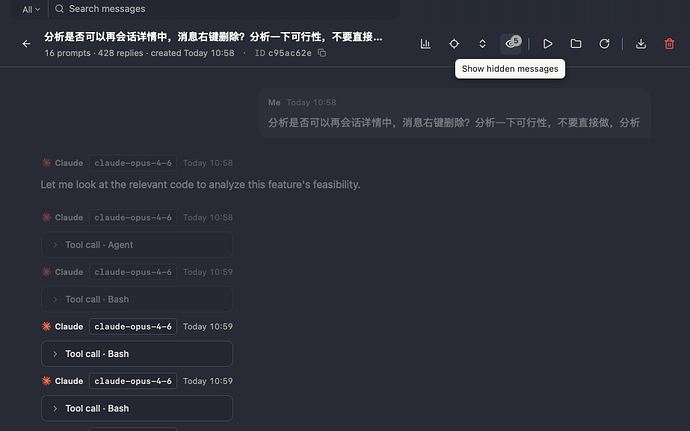
- **Jump to prompt** — chat header gains a locate button (crosshair icon) that opens a dropdown listing all user prompts in the session. Includes a search box for quick filtering. Clicking an entry scrolls to and flashes the target message.

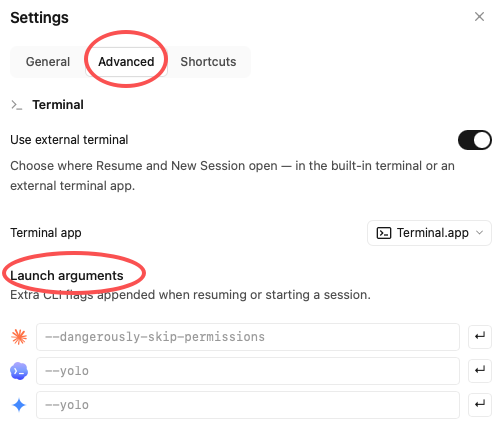
- **External terminal app picker** — Settings → Advanced gains a "Terminal app" dropdown (only visible when "Use external terminal" is enabled) letting users choose which terminal to open for Resume / New Session. Supports **Terminal.app** (default), **cmux**, **iTerm2**, **Ghostty**, and **Warp**. Only installed terminals are shown; the app auto-detects availability on macOS at startup.

- **cmux deep integration** — smart workspace reuse: queries `cmux workspace list --json` to find an existing workspace with the same `cwd`; if a matching session is already running (checked via `surface.list` RPC), focuses the exact surface + triggers a blue flash indicator instead of opening a duplicate. New splits auto-pick direction (right vs down) by comparing the focused pane's width/height ratio. New workspaces are named after the project directory.

- **iTerm2 support** — uses AppleScript `write text` to open a new tab (or reuse the launch window when iTerm2 was just started).

- **Ghostty support** — launches via `open -a Ghostty.app` with `--working-directory` and `-e` flags.

- **Warp support** — activates Warp, opens a new tab, escapes from Agent mode, pastes the command via clipboard (⌘V) to avoid keystroke garbling, and sets the tab title via OSC 0 escape sequence.

- **Terminal app brand icons** — each option in the dropdown shows its brand icon: Terminal.app (terminal prompt), cmux (official PNG, theme-adaptive), iTerm2 (green `$_` on dark bg), Ghostty (official ghost mark from ghostty.org), Warp (cyan-purple gradient).

- **Launch arguments per agent** — Settings → Advanced lets users configure extra CLI flags (e.g. `--dangerously-skip-permissions`, `--yolo`) per agent, appended when resuming or starting sessions. One-click fill button for common defaults.
此文件已被截断。 显示原始文件


 Sokeu 05-28 10:503楼
 sijizz 05-28 11:505楼
 Neslep 05-29 20:079楼
 shghack 06-05 16:5113楼
 huanghan 06-05 18:2815楼
 vextuber 06-05 18:3416楼