前言:
反重力中支持的几个模型对powershell的命令不熟悉,这导致某些在bash下很简单的命令,需要叠杀人书才能正常在powershell下运行,特别是当用的模型比较轴的时候,所以我一直有个想法,为什么不能让反重力的Agent直接用WSL2的终端呢?
寻找到几种方案:
^-^ A: 直接在WSL2 里安装Antigravity,主用debian,兼容性不行,运行Antigravity后,会建议让你直接用windows版本。 界面在高分屏的缩放也是一个问题,听从官方建议,遂卸载。
^-^ B: 使用bash风格的终端,WSL2面世后,这种做法没必要了
^-^ C: VM/Hyper-v,直接不考虑,还需要切环境,重,繁琐
^-^ D: 修改Antigravity 默认终端为WSL2,失败
^-^ E: Remote WSL,就它了!
先说下前置条件:
- ◆ 必选
Antigravity 更新到最新版本
- ◇ 可选 - 推荐 WSL2 网络
Mirrored模式
- ◆ 必选 WSL2 里安装的
发行版和Windows互通
- ◆ 必选 WSL2 里安装的发行版已安装
wget工具
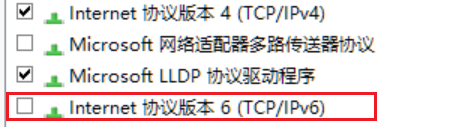
- ◇ 可选 - 推荐 Windows 网络环境为
tun模式
前置条件实施:
Antigravity 相关:
升级到最新版本,Antigravity下载地址
WSL2 相关:
1.把wsl 升级到最新版本(powershell)
wsl --update
升级完成后
wsl --shutdown
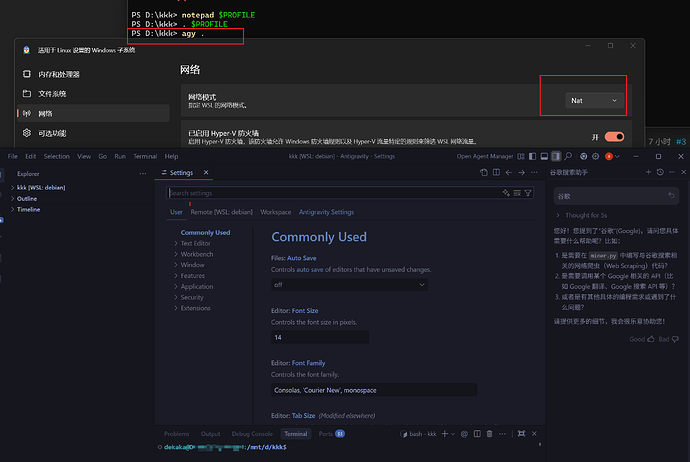
2.settings 里面设置网络为Mirrored模式,并确认
文件管理器输入%USERPROFILE% 到根目录看看.wslconfig是否有
[wsl2]

networkingMode=Mirrored

3.wsl2 的debian的 /etc/wsl.conf 配置文件中至少有如下配置
[boot]

systemd=true


[automount]

enabled=true


[interop]

enabled=true

appendWindowsPath=true
其他相关:
关于反重力浏览器打不开的问题 - 开发调优 / 开发调优, Lv1 - LINUX DO
4.需要在WSL2 里的发行版安装wget
sudo apt update && sudo apt install wget ca-certificates -y
5.完成上述改动后在powershell 运行wsl --shutdown 让改动生效
windows网络环境:
mihomo内核 tun模式 自定义规则
如果是非tun模式下遇到问题,详见 antigravity国内远程之不可设置 - 搞七捻三 - LINUX DO
好了,前置任务做完了,开始正式安装 wsl remote
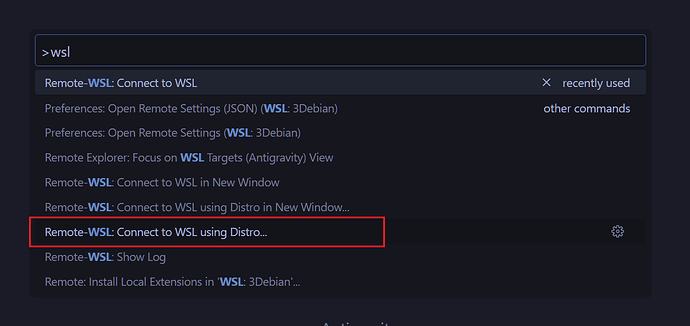
1.在反重力里面 按ctrl + shift + P ,选择Connect to WSL using Distro…
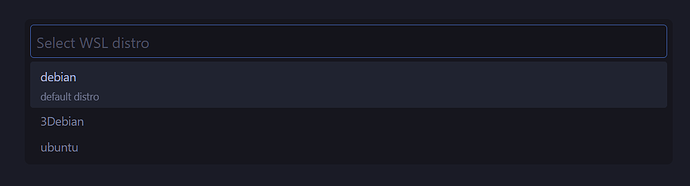
2.选择需要Remote的发行版,我这是用的debian,点击保持网络通畅,等待自动安装完成
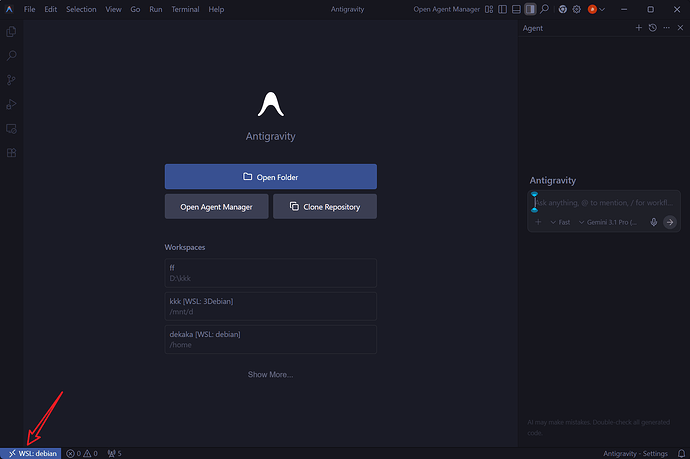
3.当左下角状态栏出现WSL:发行版时,恭喜,你成功了^-^
关于一些Remote WSL的环境下的一些使用说明:
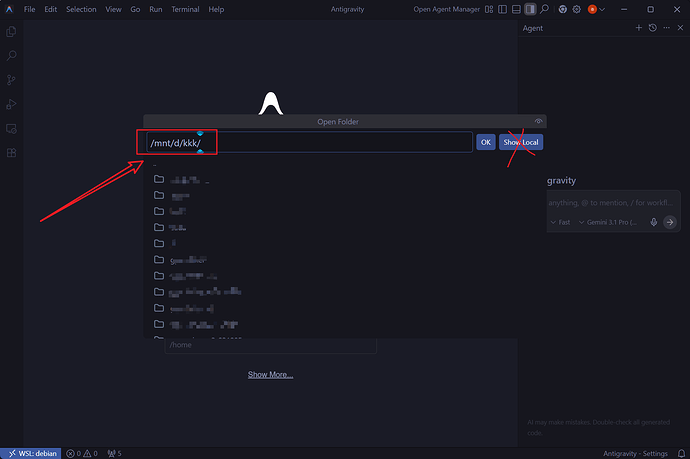
1.如果要使用windows文件夹下的项目,请使用WSL内的挂载路径打开目标文件夹,默认挂载在/mnt/windows盘符例如D盘那就是/mnt/d/,C盘就是/mnt/c/,不要使用Show Local
2.在WSL2中也能用 agy . 从debian(或你的发行版)的当前目录打开反重力IDE
在你发行版中直接输入以下命令,记得最后source ~/.bashrc
cat << 'EOF' >> ~/.bashrc


# Antigravity 启动函数:修复路径解析与远程连接

agy() {

    # 强制将相对路径(如 . 或 ./)转换为绝对路径,解决 Windows 识别障碍

    local TARGET_PATH=$(realpath "${1:-.}")

    antigravity --remote wsl+$WSL_DISTRO_NAME "$TARGET_PATH"

}

EOF
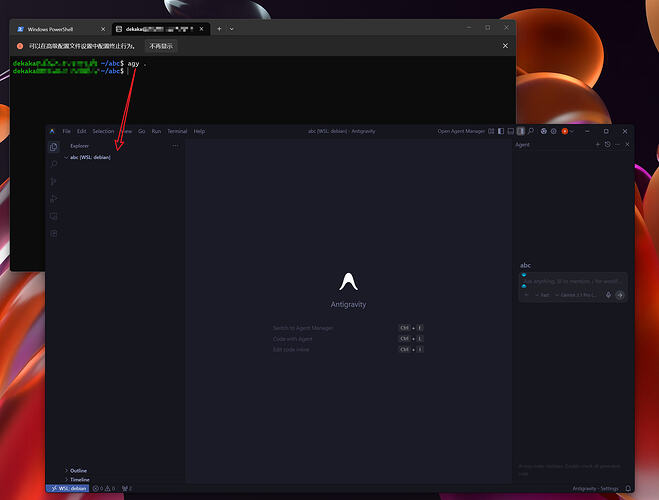
3.在powershell中使用 agy . 也可以直接 Remote 指定发行版并把当前目录作为反重力IDE的工作目录
打开powershell 运行以下命令
if (!(Test-Path $PROFILE)) { New-Item -Type File -Path $PROFILE -Force } notepad $PROFILE
在弹出的记事本中输入以下内容,
[string]$Distro = "debian" 这行中的debian需要改成你实际使用的的发行版,例如wsl+ubuntu
function agy {

    param(

        [Parameter(Position=0)]

        [string]$Path = ".",


        [Parameter(Position=1)]

        [string]$Distro = "debian" # 默认分发版

    )


    # 1. 将相对路径解析为绝对路径 (例如 . 转为 C:\Users\...)

    $WinPath = (Resolve-Path $Path).Path


    # 2. 路径转换逻辑:将 D:\project 转换为 /mnt/d/project

    # 提取盘符并转为小写

    $Drive = $WinPath.Substring(0,1).ToLower()

    # 提取剩余路径并把反斜杠 \ 替换为斜杠 /

    $Rest = $WinPath.Substring(2).Replace('\', '/')

    $WslPath = "/mnt/$Drive$Rest"


    # 3. 提示并启动

    Write-Host "Connecting to WSL ($Distro)..." -ForegroundColor Green

    Write-Host "Path: $WslPath" -ForegroundColor Cyan


    & antigravity --remote "wsl+$Distro" "$WslPath"

}
保存后在powershell窗口输入. $PROFILE重新加载终端
4.一些未归类参考资料
https://itecsonline.com/post/antigravity-setup-guide
https://www.reddit.com/r/google_antigravity/comments/1qmvzli/antigravity_is_trying_to_use_the_windows_shell_to/?tl=zh-hans
5.一些过时参考资料(避坑,勿用)
Antigravity CLI (agy) on WSL: broken launcher & missing scripts (manual repair report - Google Antigravity - Google AI Developers Forum
https://medium.com/google-cloud/working-with-google-antigravity-in-wsl-944c96c949f3
后记:
暂时没有后记,写着写着想做的都做完了,本来想留下补坑来着。


 大帅哥 02-24 08:341楼
 DragonJay 02-24 08:382楼
 AlexD 02-24 09:153楼
 你看看你那个熊样子 02-24 15:425楼
 LinuxDo 02-24 18:526楼
 Kassiny 02-24 19:017楼
 Yuen Sze Hong 02-25 02:379楼
 X# 02-27 11:1410楼
 wojiaonioo 03-08 13:3714楼
 RJ 03-09 22:1116楼
 China-Uncle 10-20 10:2618楼
 hukarida 10-20 11:3519楼