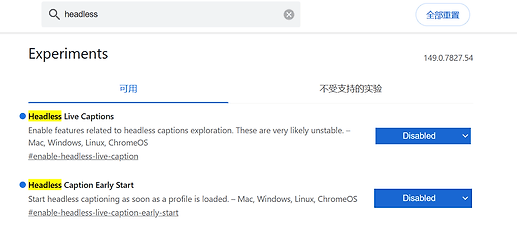
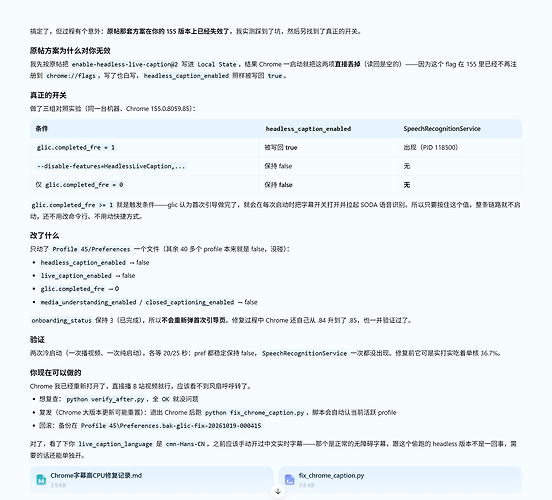
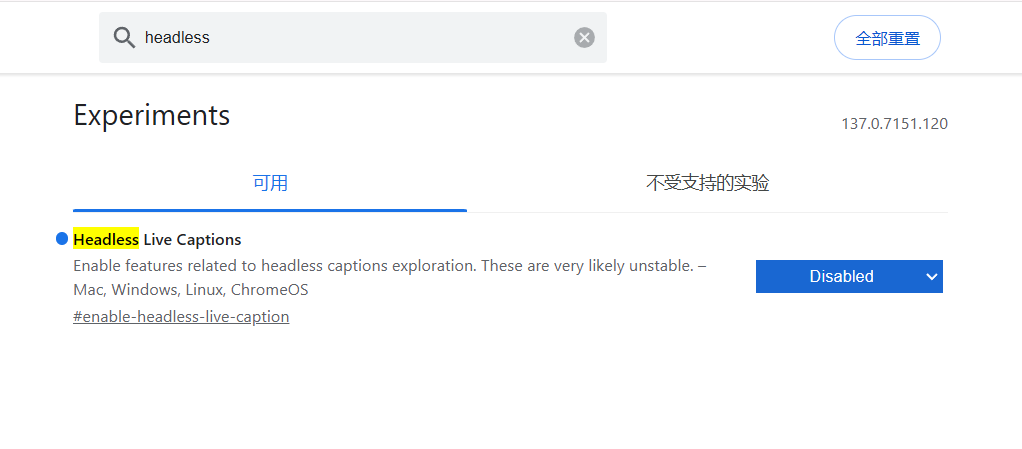
背景
浏览器播放网页(B 站等)视频时,CPU 单核长期满转,核心温度上升至 ~70°C,风扇开始呼呼转,觉得很不合理
排查过程
歧路
正途
- 离线检查
Default\Preferences,发现唯一的字幕激活项是 "headless_caption_enabled": true。
- 在 Chrome 完全关闭的状态下将其手工置为
false,重新打开 Chrome 播放视频,该配置在数秒内被 Chrome 运行时再次写回 true。
- 尝试改名移除
User Data\SODA 启动后又重新生效,根本关不掉。
对chrome.dll 进行分析,还原为啥headless_caption_enabled被重新打开:
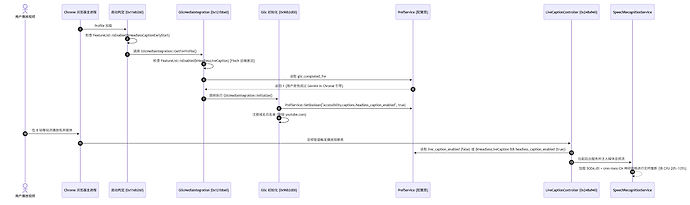
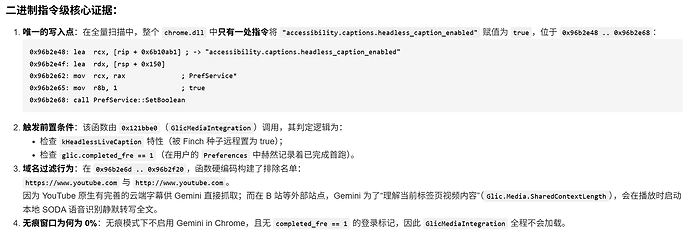
还把youtube过滤掉了,把自己摘的干干净净,Google 你好狠啊。
修复方案
chrome://flags 找不到相关设置,配置方法可以参考下面的脚本。
import glob

import json

import os

import shutil

import subprocess


def is_chrome_running() -> bool:

    res = subprocess.run(

        ["tasklist", "/FI", "IMAGENAME eq chrome.exe", "/NH"],

        capture_output=True,

        text=True,

        check=False,

    )

    return "chrome.exe" in res.stdout.lower()


def main() -> None:

    if is_chrome_running():

        print("[!] 检测到 chrome.exe 正在运行。请先完全退出 Chrome 后再执行本脚本,以免配置被运行中的进程覆盖。")

        return


    base = os.path.join(os.environ["LOCALAPPDATA"], r"Google\Chrome\User Data")


    # 1. Local State: 显式禁用 enable-headless-live-caption 与 enable-headless-live-caption-early-start

    ls_path = os.path.join(base, "Local State")

    if os.path.exists(ls_path):

        shutil.copy2(ls_path, ls_path + ".bak-glic-fix")

        with open(ls_path, "r", encoding="utf-8") as f:

            ls_data = json.load(f)

        browser = ls_data.setdefault("browser", {})

        labs = browser.setdefault("enabled_labs_experiments", [])

        # 移除已有的同名项并写入 @2 (Disabled)

        labs = [

            x for x in labs

            if not x.startswith("enable-headless-live-caption@")

            and x != "enable-headless-live-caption"

            and not x.startswith("enable-headless-live-caption-early-start@")

            and x != "enable-headless-live-caption-early-start"

        ]

        labs.append("enable-headless-live-caption@2")

        labs.append("enable-headless-live-caption-early-start@2")

        browser["enabled_labs_experiments"] = labs

        with open(ls_path, "w", encoding="utf-8") as f:

            json.dump(ls_data, f, ensure_ascii=False, separators=(",", ":"))

        print("[+] Local State 已更新: 显式写入 enable-headless-live-caption@2 与 enable-headless-live-caption-early-start@2")


    # 2. Default / Profile Preferences: 关闭 glic.completed_fre、glic.media_understanding_enabled 与 headless_caption_enabled

    pref_paths = glob.glob(os.path.join(base, "Default", "Preferences")) + glob.glob(

        os.path.join(base, "Profile *", "Preferences")

    )

    for pref_path in pref_paths:

        shutil.copy2(pref_path, pref_path + ".bak-glic-fix")

        with open(pref_path, "r", encoding="utf-8") as f:

            pref_data = json.load(f)


        captions = pref_data.setdefault("accessibility", {}).setdefault("captions", {})

        captions["headless_caption_enabled"] = False

        captions["live_caption_enabled"] = False


        glic = pref_data.setdefault("glic", {})

        glic["completed_fre"] = 0

        glic["media_understanding_enabled"] = False

        glic["closed_captioning_enabled"] = False


        with open(pref_path, "w", encoding="utf-8") as f:

            json.dump(pref_data, f, ensure_ascii=False, separators=(",", ":"))

        rel = os.path.relpath(pref_path, base)

        print(f"[+] {rel} 已更新: headless_caption_enabled=false, glic.completed_fre=0, glic.media_understanding_enabled=false")


if __name__ == "__main__":

    main()
关闭后播放视频 cpu核心温度 40度,风扇也不呼呼转了。
单独的设置 可以参考这位佬的回帖: chrome播放B站视频cpu温度异常排查过程(实际和B站无关,真凶为Chrome 155 内置的 Glic(Gemini in Chrome)媒体理解模块) - #14,来自 stevefa


 蒲君瑶 10-18 22:451楼
 DFobainx 10-18 23:443楼
 jqtmviyu 10-18 23:474楼
 pxw2002 10-18 23:595楼
 小面包 10-19 00:086楼
 phone 10-19 00:117楼
 Hifumi Mizuhara 10-19 08:2110楼
 wavexu 10-19 08:3011楼
 stevefa 10-19 12:5913楼
 mangL 10-19 13:3214楼
 fiytodie 10-19 13:5015楼
 奔跑的胖墩墩 10-19 13:5616楼
 庆哥 10-21 01:3518楼