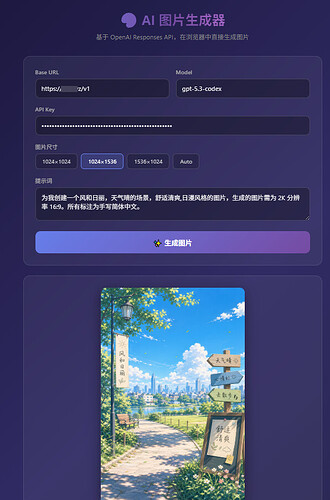
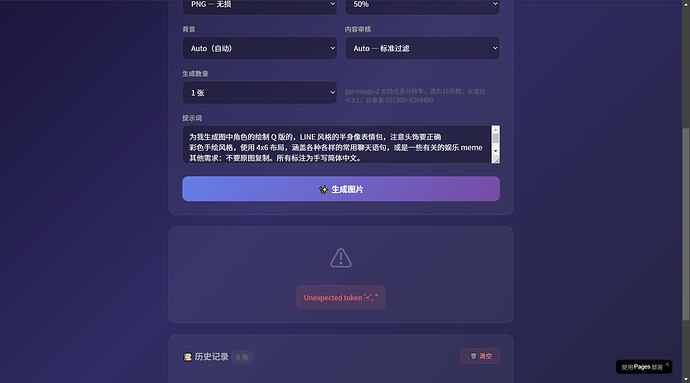
能直接用的地址,只用填上你的key即可。
最新版已支持传入参考图生图,不传就是文生图。
支持了队列。
AI 图片生成器
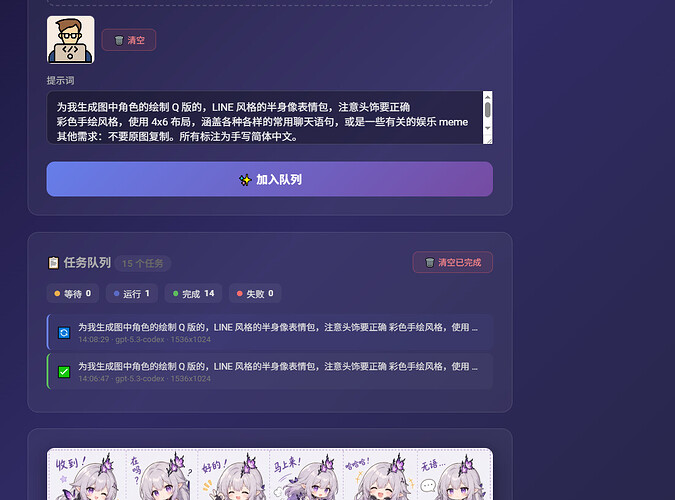
(以上的功能的最新源码)
下面是教程以及源码
在你的claude code 中安装如下的mcp
“mcpServers”: {
“edgeone-pages-mcp-server”: {
“url”: “https://mcp-on-edge.edgeone.app/mcp-server”
}
}
ps:使用cc desktop的需要重启desktop,才能使用部署好的edgeone mcp。
接下来就是你按照如下代码生成h5网页并使用mcp发布到edgeone,服务端会给你返回一个地址。
<!DOCTYPE html>
<html lang="zh-CN">
<head>
<meta charset="UTF-8">
<meta name="viewport" content="width=device-width, initial-scale=1.0">
<title>AI 图片生成器</title>
<style>
* { margin: 0; padding: 0; box-sizing: border-box; }
body {
font-family: -apple-system, BlinkMacSystemFont, 'Segoe UI', Roboto, sans-serif;
background: linear-gradient(135deg, #0f0c29, #302b63, #24243e);
min-height: 100vh;
color: #e0e0e0;
}
.container {
max-width: 760px;
margin: 0 auto;
padding: 40px 20px;
}
h1 {
text-align: center;
font-size: 2em;
margin-bottom: 8px;
background: linear-gradient(90deg, #667eea, #764ba2, #f093fb);
-webkit-background-clip: text;
-webkit-text-fill-color: transparent;
background-clip: text;
}
.subtitle {
text-align: center;
color: #888;
margin-bottom: 36px;
font-size: 0.95em;
}
.card {
background: rgba(255,255,255,0.05);
border: 1px solid rgba(255,255,255,0.1);
border-radius: 16px;
padding: 28px;
margin-bottom: 24px;
backdrop-filter: blur(10px);
}
label {
display: block;
font-size: 0.85em;
color: #aaa;
margin-bottom: 6px;
font-weight: 500;
}
input, textarea, select {
width: 100%;
padding: 12px 14px;
border: 1px solid rgba(255,255,255,0.15);
border-radius: 10px;
background: rgba(0,0,0,0.3);
color: #f0f0f0;
font-size: 0.95em;
margin-bottom: 18px;
transition: border-color 0.2s;
font-family: inherit;
}
input:focus, textarea:focus, select:focus {
outline: none;
border-color: #667eea;
}
textarea {
resize: vertical;
min-height: 80px;
}
.row {
display: grid;
grid-template-columns: 1fr 1fr;
gap: 16px;
}
.btn-generate {
width: 100%;
padding: 14px;
border: none;
border-radius: 12px;
font-size: 1.05em;
font-weight: 600;
cursor: pointer;
background: linear-gradient(135deg, #667eea, #764ba2);
color: white;
transition: transform 0.15s, box-shadow 0.2s, opacity 0.2s;
margin-top: 4px;
}
.btn-generate:hover { transform: translateY(-1px); box-shadow: 0 6px 24px rgba(102,126,234,0.4); }
.btn-generate:active { transform: translateY(0); }
.btn-generate:disabled { opacity: 0.6; cursor: not-allowed; transform: none; box-shadow: none; }
.result-area {
text-align: center;
min-height: 120px;
display: flex;
flex-direction: column;
align-items: center;
justify-content: center;
}
.result-area img {
max-width: 100%;
max-height: 520px;
border-radius: 12px;
box-shadow: 0 8px 32px rgba(0,0,0,0.4);
cursor: pointer;
transition: transform 0.2s;
}
.result-area img:hover { transform: scale(1.01); }
.result-actions {
display: flex;
gap: 10px;
margin-top: 16px;
flex-wrap: wrap;
justify-content: center;
}
.btn-action {
padding: 10px 28px;
border: 1px solid rgba(255,255,255,0.2);
border-radius: 10px;
background: rgba(255,255,255,0.08);
color: #e0e0e0;
cursor: pointer;
font-size: 0.9em;
transition: background 0.2s;
}
.btn-action:hover { background: rgba(255,255,255,0.15); }
.spinner {
width: 48px; height: 48px;
border: 4px solid rgba(255,255,255,0.1);
border-top-color: #667eea;
border-radius: 50%;
animation: spin 0.8s linear infinite;
}
@keyframes spin { to { transform: rotate(360deg); } }
.loading-text {
margin-top: 16px;
color: #aaa;
font-size: 0.9em;
}
.placeholder-icon {
font-size: 3em;
margin-bottom: 12px;
opacity: 0.3;
}
.placeholder-text {
color: #555;
font-size: 0.9em;
}
.error-msg {
color: #ff6b6b;
background: rgba(255,107,107,0.1);
border: 1px solid rgba(255,107,107,0.2);
border-radius: 10px;
padding: 14px;
margin-top: 12px;
font-size: 0.9em;
text-align: left;
word-break: break-all;
}
.history-header {
display: flex;
justify-content: space-between;
align-items: center;
margin-bottom: 16px;
}
.history-header h2 {
font-size: 1.1em;
color: #aaa;
}
.history-count {
font-size: 0.8em;
color: #666;
background: rgba(255,255,255,0.05);
padding: 4px 12px;
border-radius: 20px;
}
.btn-clear {
padding: 6px 16px;
border: 1px solid rgba(255,100,100,0.3);
border-radius: 8px;
background: rgba(255,100,100,0.08);
color: #ff8888;
cursor: pointer;
font-size: 0.8em;
transition: all 0.2s;
}
.btn-clear:hover { background: rgba(255,100,100,0.15); border-color: rgba(255,100,100,0.5); }
.history-grid {
display: grid;
grid-template-columns: repeat(auto-fill, minmax(150px, 1fr));
gap: 12px;
}
.history-item {
position: relative;
border-radius: 12px;
overflow: hidden;
cursor: pointer;
border: 2px solid transparent;
transition: all 0.2s;
aspect-ratio: 1;
background: rgba(0,0,0,0.3);
}
.history-item:hover {
border-color: #667eea;
transform: translateY(-2px);
box-shadow: 0 6px 20px rgba(0,0,0,0.4);
}
.history-item.active {
border-color: #f093fb;
box-shadow: 0 0 0 2px rgba(240,147,251,0.3);
}
.history-item img {
width: 100%;
height: 100%;
object-fit: cover;
}
.history-item .item-meta {
position: absolute;
bottom: 0;
left: 0;
right: 0;
padding: 6px 8px;
background: linear-gradient(transparent, rgba(0,0,0,0.8));
font-size: 0.7em;
color: #ccc;
display: flex;
justify-content: space-between;
align-items: center;
}
.history-item .item-index {
position: absolute;
top: 6px;
left: 6px;
background: rgba(0,0,0,0.6);
color: #aaa;
font-size: 0.7em;
padding: 2px 8px;
border-radius: 10px;
}
.history-item .btn-del {
background: none;
border: none;
color: #ff6b6b;
cursor: pointer;
font-size: 1em;
padding: 0 4px;
opacity: 0;
transition: opacity 0.2s;
}
.history-item:hover .btn-del { opacity: 1; }
.history-empty {
text-align: center;
padding: 40px 20px;
color: #555;
}
.lightbox {
display: none;
position: fixed;
inset: 0;
background: rgba(0,0,0,0.92);
z-index: 1000;
justify-content: center;
align-items: center;
cursor: zoom-out;
}
.lightbox.show { display: flex; }
.lightbox img {
max-width: 95vw;
max-height: 92vh;
border-radius: 8px;
box-shadow: 0 12px 48px rgba(0,0,0,0.6);
}
.lightbox-close {
position: fixed;
top: 20px;
right: 24px;
background: rgba(255,255,255,0.1);
border: 1px solid rgba(255,255,255,0.2);
color: white;
width: 40px;
height: 40px;
border-radius: 50%;
font-size: 1.2em;
cursor: pointer;
display: flex;
align-items: center;
justify-content: center;
transition: background 0.2s;
}
.lightbox-close:hover { background: rgba(255,255,255,0.2); }
.upload-zone {
border: 2px dashed rgba(255,255,255,0.15);
border-radius: 12px;
padding: 24px;
text-align: center;
cursor: pointer;
transition: all 0.2s;
margin-bottom: 14px;
}
.upload-zone:hover, .upload-zone.dragover {
border-color: #667eea;
background: rgba(102,126,234,0.05);
}
.upload-zone .upload-icon { font-size: 2em; margin-bottom: 6px; opacity: 0.4; }
.upload-zone .upload-hint { color: #888; font-size: 0.85em; }
.upload-preview {
display: flex;
gap: 10px;
flex-wrap: wrap;
margin-bottom: 14px;
align-items: center;
}
.preview-item {
position: relative;
width: 72px;
height: 72px;
border-radius: 8px;
overflow: hidden;
border: 1px solid rgba(255,255,255,0.15);
flex-shrink: 0;
}
.preview-item img { width: 100%; height: 100%; object-fit: cover; }
.preview-item .btn-rm {
position: absolute;
top: 2px;
right: 2px;
background: rgba(255,60,60,0.85);
color: white;
border: none;
border-radius: 50%;
width: 20px;
height: 20px;
font-size: 0.7em;
cursor: pointer;
display: flex;
align-items: center;
justify-content: center;
opacity: 0;
transition: opacity 0.2s;
}
.preview-item:hover .btn-rm { opacity: 1; }
.queue-stats {
display: flex;
gap: 10px;
margin-bottom: 16px;
flex-wrap: wrap;
}
.queue-stat {
display: flex;
align-items: center;
gap: 6px;
font-size: 0.82em;
padding: 5px 12px;
border-radius: 8px;
background: rgba(255,255,255,0.05);
}
.queue-stat .dot {
width: 8px;
height: 8px;
border-radius: 50%;
}
.queue-stat .dot.waiting { background: #f0ad4e; }
.queue-stat .dot.running { background: #667eea; animation: qpulse 1s infinite; }
.queue-stat .dot.completed { background: #5cb85c; }
.queue-stat .dot.failed { background: #ff6b6b; }
@keyframes qpulse { 0%,100%{opacity:1} 50%{opacity:0.35} }
.queue-list {
max-height: 280px;
overflow-y: auto;
}
.queue-item {
display: flex;
align-items: center;
gap: 10px;
padding: 9px 12px;
border-radius: 8px;
margin-bottom: 5px;
background: rgba(255,255,255,0.03);
border-left: 3px solid transparent;
transition: background 0.2s;
}
.queue-item:hover { background: rgba(255,255,255,0.06); }
.queue-item--waiting { border-left-color: #f0ad4e; }
.queue-item--running { border-left-color: #667eea; background: rgba(102,126,234,0.06); }
.queue-item--completed { border-left-color: #5cb85c; }
.queue-item--failed { border-left-color: #ff6b6b; }
.queue-item-icon { font-size: 1em; flex-shrink: 0; }
.queue-item-body { flex: 1; min-width: 0; }
.queue-item-prompt { font-size: 0.83em; color: #ddd; white-space: nowrap; overflow: hidden; text-overflow: ellipsis; }
.queue-item-meta { font-size: 0.72em; color: #777; margin-top: 2px; }
.queue-item-error { font-size: 0.72em; color: #ff6b6b; margin-top: 2px; white-space: nowrap; overflow: hidden; text-overflow: ellipsis; }
.queue-item-actions { flex-shrink: 0; display: flex; gap: 4px; }
footer {
text-align: center;
color: #444;
font-size: 0.8em;
margin-top: 40px;
}
footer a { color: #667eea; text-decoration: none; }
</style>
</head>
<body>
<div class="container">
<h1>🎨 AI 图片生成器</h1>
<p class="subtitle">基于 OpenAI Responses API,在浏览器中直接生成图片</p>
<div class="card">
<div class="row">
<div>
<label>Base URL</label>
<input type="text" id="baseUrl" placeholder="https://api.openai.com/v1" value="https://anyrouter.top/v1">
</div>
<div>
<label>Model</label>
<input type="text" id="model" placeholder="gpt-5.4" value="gpt-5.3-codex">
</div>
</div>
<label>API Key</label>
<input type="password" id="apiKey" placeholder="sk-...(密钥仅在浏览器本地使用,不会上传)">
<div class="row">
<div>
<label>图片尺寸(Responses API 仅支持以下尺寸)</label>
<select id="paramSize">
<option value="auto">Auto(自动)</option>
<option value="1024x1024">1024×1024 — Square</option>
<option value="1024x1536" selected>1024×1536 — HD Portrait</option>
<option value="1536x1024">1536×1024 — HD Landscape</option>
</select>
</div>
<div>
<label>画质质量</label>
<select id="paramQuality">
<option value="auto">Auto(自动)</option>
<option value="low">Low — 快速草稿、批量生成</option>
<option value="medium">Medium — 日常使用</option>
<option value="high">High — 精细文字/图表/最终交付</option>
</select>
</div>
</div>
<div class="row">
<div>
<label>输出格式</label>
<select id="paramFormat">
<option value="png">PNG — 无损</option>
<option value="jpeg">JPEG — 更快、有损</option>
<option value="webp">WebP — 体积小</option>
</select>
</div>
<div>
<label>压缩率(仅 JPEG/WebP)</label>
<select id="paramCompression">
<option value="0">无压缩</option>
<option value="25">25%</option>
<option value="50" selected>50%</option>
<option value="75">75%</option>
<option value="100">100%(最大压缩)</option>
</select>
</div>
</div>
<div class="row">
<div>
<label>背景</label>
<select id="paramBackground">
<option value="auto">Auto(自动)</option>
<option value="opaque">Opaque — 不透明背景</option>
</select>
</div>
<div>
<label>内容审核</label>
<select id="paramModeration">
<option value="auto">Auto — 标准过滤</option>
<option value="low">Low — 宽松</option>
</select>
</div>
</div>
<label>参考图片(可选 · 拖拽或点击上传 · 最多 5 张 · 传入 image_generation 工具的 input_image)</label>
<div class="upload-zone" id="uploadZone" onclick="document.getElementById('fileInput').click()">
<div class="upload-icon">📎</div>
<div class="upload-hint">点击或拖拽图片到此处上传参考图</div>
<input type="file" id="fileInput" accept="image/*" multiple style="display:none" onchange="handleFiles(this.files)" />
</div>
<div class="upload-preview" id="uploadPreview"></div>
<label>提示词</label>
<textarea id="prompt" placeholder="描述你想生成的图片...">为我生成图中角色的绘制 Q 版的,LINE 风格的半身像表情包,注意头饰要正确
彩色手绘风格,使用 4x6 布局,涵盖各种各样的常用聊天语句,或是一些有关的娱乐 meme
其他需求:不要原图复制。所有标注为手写简体中文。
生成的图片需为 2K 分辨率 16:9</textarea>
<button class="btn-generate" id="btnGenerate" onclick="addToQueue()">✨ 加入队列</button>
</div>
<div class="card" id="queueCard">
<div class="history-header">
<h2>📋 任务队列 <span class="history-count" id="queueCount">0 个任务</span></h2>
<button class="btn-clear" onclick="clearDoneTasks()">🗑️ 清空已完成</button>
</div>
<div class="queue-stats">
<div class="queue-stat"><span class="dot waiting"></span> 等待 <b id="qStatW">0</b></div>
<div class="queue-stat"><span class="dot running"></span> 运行 <b id="qStatR">0</b></div>
<div class="queue-stat"><span class="dot completed"></span> 完成 <b id="qStatC">0</b></div>
<div class="queue-stat"><span class="dot failed"></span> 失败 <b id="qStatF">0</b></div>
</div>
<div id="queueList" class="queue-list">
<div class="history-empty">暂无任务</div>
</div>
</div>
<div class="card">
<div class="result-area" id="resultArea">
<div class="placeholder-icon">🖼️</div>
<div class="placeholder-text">图片将显示在这里</div>
</div>
</div>
<div class="card" id="historyCard">
<div class="history-header">
<h2>📚 历史记录 <span class="history-count" id="historyCount">0 张</span></h2>
<button class="btn-clear" id="btnClear" onclick="clearHistory()">🗑️ 清空</button>
</div>
<div id="historyGrid" class="history-grid">
<div class="history-empty">还没有生成过图片</div>
</div>
</div>
<footer>
Powered by <a href="https://edgeone.ai" target="_blank">EdgeOne Pages</a> · API 调用由浏览器直连,密钥不会经过第三方 · 历史图片存储在浏览器 IndexedDB 中
</footer>
</div>
<div class="lightbox" id="lightbox" onclick="closeLightbox()">
<button class="lightbox-close" onclick="closeLightbox()">✕</button>
<img id="lightboxImg" src="" alt="Preview" />
</div>
<script>
let history = [];
let activeIndex = -1;
let referenceImages = []; // { dataUrl: string, name: string }
function handleFiles(files) {
const max = 5;
for (const f of files) {
if (referenceImages.length >= max) break;
if (!f.type.startsWith('image/')) continue;
const reader = new FileReader();
reader.onload = (e) => {
referenceImages.push({ dataUrl: e.target.result, name: f.name });
renderUploadPreview();
};
reader.readAsDataURL(f);
}
document.getElementById('fileInput').value = '';
}
function renderUploadPreview() {
const container = document.getElementById('uploadPreview');
if (referenceImages.length === 0) { container.innerHTML = ''; return; }
container.innerHTML = referenceImages.map((img, i) => `
<div class="preview-item">
<img src="${img.dataUrl}" alt="Ref ${i+1}" />
<button class="btn-rm" onclick="event.stopPropagation();removeRefImage(${i})">✕</button>
</div>
`).join('') + `<button class="btn-clear" onclick="clearRefImages()" style="margin:0">🗑️ 清空</button>`;
}
function removeRefImage(i) {
referenceImages.splice(i, 1);
renderUploadPreview();
}
function clearRefImages() {
referenceImages = [];
renderUploadPreview();
}
const uploadZone = document.getElementById('uploadZone');
uploadZone.addEventListener('dragover', (e) => { e.preventDefault(); uploadZone.classList.add('dragover'); });
uploadZone.addEventListener('dragleave', () => uploadZone.classList.remove('dragover'));
uploadZone.addEventListener('drop', (e) => {
e.preventDefault();
uploadZone.classList.remove('dragover');
handleFiles(e.dataTransfer.files);
});
const DB_NAME = 'AIImageGenerator';
const DB_VERSION = 1;
const STORE_NAME = 'images';
function openDB() {
return new Promise((resolve, reject) => {
const req = indexedDB.open(DB_NAME, DB_VERSION);
req.onupgradeneeded = (e) => {
const db = e.target.result;
if (!db.objectStoreNames.contains(STORE_NAME)) {
db.createObjectStore(STORE_NAME, { keyPath: 'id', autoIncrement: true });
}
};
req.onsuccess = () => resolve(req.result);
req.onerror = () => reject(req.error);
});
}
async function saveToDB(item) {
const db = await openDB();
return new Promise((resolve, reject) => {
const tx = db.transaction(STORE_NAME, 'readwrite');
const store = tx.objectStore(STORE_NAME);
const req = store.add(item);
req.onsuccess = () => resolve(req.result);
req.onerror = () => reject(req.error);
});
}
async function loadAllFromDB() {
const db = await openDB();
return new Promise((resolve, reject) => {
const tx = db.transaction(STORE_NAME, 'readonly');
const store = tx.objectStore(STORE_NAME);
const req = store.getAll();
req.onsuccess = () => resolve(req.result);
req.onerror = () => reject(req.error);
});
}
async function deleteFromDB(id) {
const db = await openDB();
return new Promise((resolve, reject) => {
const tx = db.transaction(STORE_NAME, 'readwrite');
const store = tx.objectStore(STORE_NAME);
const req = store.delete(id);
req.onsuccess = () => resolve();
req.onerror = () => reject(req.error);
});
}
async function clearDB() {
const db = await openDB();
return new Promise((resolve, reject) => {
const tx = db.transaction(STORE_NAME, 'readwrite');
const store = tx.objectStore(STORE_NAME);
const req = store.clear();
req.onsuccess = () => resolve();
req.onerror = () => reject(req.error);
});
}
async function init() {
try {
history = await loadAllFromDB();
renderHistory();
renderQueue();
if (history.length > 0) {
showImage(history.length - 1);
}
} catch (e) {
console.warn('IndexedDB load failed:', e);
}
}
init();
function renderHistory() {
const grid = document.getElementById('historyGrid');
const count = document.getElementById('historyCount');
count.textContent = history.length + ' 张';
if (history.length === 0) {
grid.innerHTML = '<div class="history-empty">还没有生成过图片</div>';
return;
}
const sorted = [...history].reverse();
grid.innerHTML = sorted.map((item, ri) => {
const realIndex = history.length - 1 - ri;
const time = new Date(item.timestamp).toLocaleString('zh-CN', { month:'short', day:'numeric', hour:'2-digit', minute:'2-digit' });
const shortPrompt = item.prompt.length > 20 ? item.prompt.slice(0, 20) + '…' : item.prompt;
return `
<div class="history-item ${realIndex === activeIndex ? 'active' : ''}" onclick="showImage(${realIndex})">
<span class="item-index">#${realIndex + 1}</span>
<img src="data:image/png;base64,${item.base64}" alt="${shortPrompt}" loading="lazy" />
<div class="item-meta">
<span>${time}</span>
<button class="btn-del" onclick="event.stopPropagation();deleteImage(${realIndex})" title="删除">✕</button>
</div>
</div>
`;
}).join('');
}
function showImage(index) {
if (index < 0 || index >= history.length) return;
activeIndex = index;
const item = history[index];
const area = document.getElementById('resultArea');
const shortPrompt = item.prompt.length > 60 ? item.prompt.slice(0, 60) + '…' : item.prompt;
area.innerHTML = `
<img src="data:image/png;base64,${item.base64}" alt="Generated Image" onclick="openLightbox(${index})" title="点击查看大图" />
<div style="margin-top:10px;color:#888;font-size:0.8em;max-width:500px;text-align:center">${shortPrompt}</div>
<div class="result-actions">
<button class="btn-action" onclick="downloadImage(${index})">💾 下载</button>
<button class="btn-action" onclick="copyPrompt(${index})">📋 复制提示词</button>
<button class="btn-action" onclick="openLightbox(${index})">🔍 大图</button>
</div>
`;
renderHistory();
}
function setGenerating(on) {
const btn = document.getElementById('btnGenerate');
const area = document.getElementById('resultArea');
btn.disabled = on;
if (on) {
area.innerHTML = '<div class="spinner"></div><div class="loading-text">正在生成图片,请稍候...</div>';
}
}
function showError(msg) {
const area = document.getElementById('resultArea');
area.innerHTML = `<div class="placeholder-icon">⚠️</div><div class="error-msg">${msg}</div>`;
}
let taskQueue = [];
let isProcessing = false;
function addToQueue() {
const apiKey = document.getElementById('apiKey').value.trim();
const baseUrl = document.getElementById('baseUrl').value.trim();
const model = document.getElementById('model').value.trim();
const prompt = document.getElementById('prompt').value.trim();
if (!apiKey) { showError('请输入 API Key'); return; }
if (!baseUrl) { showError('请输入 Base URL'); return; }
if (!prompt) { showError('请输入提示词'); return; }
taskQueue.push({
id: Date.now() + Math.random(),
prompt,
referenceImages: referenceImages.map(img => ({ ...img })),
apiKey, baseUrl, model,
params: {
size: document.getElementById('paramSize').value,
quality: document.getElementById('paramQuality').value,
format: document.getElementById('paramFormat').value,
compression: parseInt(document.getElementById('paramCompression').value),
background: document.getElementById('paramBackground').value,
moderation: document.getElementById('paramModeration').value,
},
status: 'waiting',
error: null,
createdAt: Date.now(),
});
renderQueue();
processQueue();
}
async function processQueue() {
if (isProcessing) return;
const task = taskQueue.find(t => t.status === 'waiting');
if (!task) return;
isProcessing = true;
task.status = 'running';
renderQueue();
try {
const { apiKey, baseUrl, model, params } = task;
const url = baseUrl.replace(/\/+$/, '') + '/responses';
const toolConfig = { type: 'image_generation' };
if (params.size !== 'auto') toolConfig.size = params.size;
if (params.quality !== 'auto') toolConfig.quality = params.quality;
if (params.format !== 'png') toolConfig.output_format = params.format;
if (params.compression > 0 && params.format !== 'png') toolConfig.output_compression = params.compression;
if (params.background !== 'auto') toolConfig.background = params.background;
if (params.moderation !== 'auto') toolConfig.moderation = params.moderation;
let input;
if (task.referenceImages.length > 0) {
input = [{
role: 'user',
content: [
...task.referenceImages.map(img => ({ type: 'input_image', image_url: img.dataUrl })),
{ type: 'input_text', text: task.prompt }
]
}];
} else {
input = task.prompt;
}
const resp = await fetch(url, {
method: 'POST',
headers: { 'Content-Type': 'application/json', 'Authorization': `Bearer ${apiKey}` },
body: JSON.stringify({ model: model || 'gpt-5.4', input, tools: [toolConfig] })
});
if (!resp.ok) {
const errText = await resp.text();
let errMsg = `HTTP ${resp.status}`;
try { errMsg += ': ' + JSON.parse(errText).error?.message || errText; } catch { errMsg += ': ' + errText.slice(0, 300); }
throw new Error(errMsg);
}
const data = await resp.json();
const imageOutputs = (data.output || []).filter(o => o.type === 'image_generation_call');
if (!imageOutputs.length) throw new Error('API 未返回图片');
for (let i = 0; i < imageOutputs.length; i++) {
const item = {
base64: imageOutputs[i].result,
prompt: task.prompt,
model: model || 'gpt-5.4',
size: params.size,
timestamp: Date.now() + i
};
try { const id = await saveToDB(item); item.id = id; } catch (e) { console.warn(e); }
history.push(item);
}
task.status = 'completed';
showImage(history.length - 1);
} catch (err) {
task.status = 'failed';
task.error = err.message;
showError(err.message);
}
isProcessing = false;
renderQueue();
renderHistory();
processQueue();
}
function renderQueue() {
const counts = { waiting: 0, running: 0, completed: 0, failed: 0 };
taskQueue.forEach(t => counts[t.status]++);
const historyCompleted = history.length;
document.getElementById('qStatW').textContent = counts.waiting;
document.getElementById('qStatR').textContent = counts.running;
document.getElementById('qStatC').textContent = counts.completed + historyCompleted;
document.getElementById('qStatF').textContent = counts.failed;
document.getElementById('queueCount').textContent = (taskQueue.length + historyCompleted) + ' 个任务';
const list = document.getElementById('queueList');
if (taskQueue.length === 0) {
list.innerHTML = '<div class="history-empty">暂无任务(历史生成 ' + historyCompleted + ' 张)</div>';
return;
}
const icons = { waiting: '⏳', running: '🔄', completed: '✅', failed: '❌' };
const reversed = [...taskQueue].reverse();
list.innerHTML = reversed.map((task, ri) => {
const realIdx = taskQueue.length - 1 - ri;
const short = task.prompt.length > 50 ? task.prompt.slice(0, 50) + '…' : task.prompt;
const time = new Date(task.createdAt).toLocaleTimeString('zh-CN', { hour:'2-digit', minute:'2-digit', second:'2-digit' });
return `
<div class="queue-item queue-item--${task.status}">
<span class="queue-item-icon">${icons[task.status]}</span>
<div class="queue-item-body">
<div class="queue-item-prompt">${short}</div>
<div class="queue-item-meta">${time} · ${task.model || 'gpt-5.4'} · ${task.params.size}</div>
${task.error ? '<div class="queue-item-error">' + task.error.slice(0, 80) + '</div>' : ''}
</div>
<div class="queue-item-actions">
${task.status === 'failed' ? '<button class="btn-action" style="padding:3px 10px;font-size:0.72em" onclick="retryTask(' + realIdx + ')">重试</button>' : ''}
${task.status === 'waiting' ? '<button class="btn-action" style="padding:3px 10px;font-size:0.72em" onclick="removeTask(' + realIdx + ')">取消</button>' : ''}
</div>
</div>
`;
}).join('');
}
function retryTask(index) {
const task = taskQueue[index];
if (task && task.status === 'failed') {
task.status = 'waiting';
task.error = null;
renderQueue();
processQueue();
}
}
function removeTask(index) {
taskQueue.splice(index, 1);
renderQueue();
}
function clearDoneTasks() {
taskQueue = taskQueue.filter(t => t.status === 'waiting' || t.status === 'running');
renderQueue();
}
function downloadImage(index) {
if (index < 0 || index >= history.length) return;
const item = history[index];
const a = document.createElement('a');
a.href = 'data:image/png;base64,' + item.base64;
a.download = 'ai-image-' + new Date(item.timestamp).toISOString().slice(0,10) + '-' + (index + 1) + '.png';
a.click();
}
function copyPrompt(index) {
if (index < 0 || index >= history.length) return;
navigator.clipboard.writeText(history[index].prompt).then(() => {
const btn = event.target;
const orig = btn.textContent;
btn.textContent = '✅ 已复制';
setTimeout(() => btn.textContent = orig, 1500);
});
}
async function deleteImage(index) {
if (index < 0 || index >= history.length) return;
const item = history[index];
try { await deleteFromDB(item.id); } catch (e) { console.warn(e); }
history.splice(index, 1);
if (activeIndex === index) {
activeIndex = history.length > 0 ? Math.min(index, history.length - 1) : -1;
if (activeIndex >= 0) showImage(activeIndex);
else document.getElementById('resultArea').innerHTML = '<div class="placeholder-icon">🖼️</div><div class="placeholder-text">图片将显示在这里</div>';
} else if (activeIndex > index) {
activeIndex--;
}
renderHistory();
}
async function clearHistory() {
if (!confirm('确定清空所有历史记录?此操作不可撤销。')) return;
try { await clearDB(); } catch (e) { console.warn(e); }
history = [];
activeIndex = -1;
document.getElementById('resultArea').innerHTML = '<div class="placeholder-icon">🖼️</div><div class="placeholder-text">图片将显示在这里</div>';
renderHistory();
}
function openLightbox(index) {
if (index < 0 || index >= history.length) return;
const img = document.getElementById('lightboxImg');
img.src = 'data:image/png;base64,' + history[index].base64;
document.getElementById('lightbox').classList.add('show');
document.body.style.overflow = 'hidden';
}
function closeLightbox() {
document.getElementById('lightbox').classList.remove('show');
document.body.style.overflow = '';
}
document.addEventListener('keydown', (e) => {
if (e.key === 'Escape') closeLightbox();
});
['apiKey', 'baseUrl', 'model', 'paramSize', 'paramQuality', 'paramFormat', 'paramCompression', 'paramBackground', 'paramModeration'].forEach(id => {
const el = document.getElementById(id);
const saved = localStorage.getItem('imggen_' + id);
if (saved) el.value = saved;
el.addEventListener('change', () => localStorage.setItem('imggen_' + id, el.value));
});
</script>
</body>
</html>

至于怎么发布就是告诉它需要用edgeone发布这个静态页即可,当然你也可以双击这个h5页面在本地使用。
特性列表:
# |
特性 |
分类 |
说明 |
|---|
1 |
^-^ 数据本地化 |
隐私 |
所有数据仅存储在浏览器本地(IndexedDB + localStorage),不经过任何第三方服务器。API Key、生成记录、图片数据全部留在用户设备上 |
2 |
^-^ P2P 直连 API |
安全 |
浏览器直接连接用户配置的 API 端点,无需中间代理。密钥和请求内容不经过页面服务器中转 |
3 |
^-^ 历史持久化 |
存储 |
基于 IndexedDB 存储所有生成记录,刷新页面、关闭浏览器后重新打开仍保留全部图片和提示词 |
4 |
^-^ 缩略图画廊 |
浏览 |
按时间倒序展示所有历史图片的缩略图网格,最新生成排在最前,一键回溯所有作品 |
5 |
^-^ 全屏大图预览 |
查看 |
点击任意图片即可全屏查看高清原图,支持 ESC 键快速关闭 |
6 |
^-^ 多尺寸支持 |
灵活 |
内置 1024×1024 / 1024×1536 / 1536×1024 / Auto 四种尺寸预设 |
7 |
^-^ 配置记忆 |
便捷 |
自动保存 Base URL、Model、API Key 到 localStorage,下次打开无需重新填写 |
8 |
^-^ 提示词复用 |
效率 |
一键复制历史图片的 prompt 提示词,快速填入输入框进行微调或重新生成 |
9 |
^-^ 独立下载 |
导出 |
每张图片支持单独下载为 PNG 文件,文件名自动包含日期和序号 |
10 |
^-^ 灵活管理 |
控制 |
支持单条删除和一键清空全部历史,删除前有二次确认防止误操作 |
11 |
^-^ 兼容 OpenAI 协议 |
通用 |
支持所有兼容 OpenAI Responses API 格式的服务商,填入 Base URL 即可切换 |
12 |
^-^ 响应式布局 |
体验 |
自适应桌面和移动端屏幕,画廊网格自动调整列数 |
灵感来自于:周五使用codex 直接发提示词也能出图,当然站内也有人分享原理了。
好比: 没有gpt-image-2,也可以用gpt-5.2进行生图 - 开发调优 / 开发调优, Lv1 - LINUX DO
any 上的消耗图

因为是非流 生图比较慢,耐心等待即可。


 Linus_Cat 04-27 02:562楼
 zerofall 04-27 15:114楼
 天则则 04-27 17:497楼
 repeater1 04-27 19:0610楼
 KS 04-27 19:4011楼
 罗季安 04-27 19:5512楼
 紫忻 04-27 20:4416楼
 joejoequte 04-27 20:5417楼
 Ra1nb0w 04-27 20:5618楼
 bingx 04-28 16:5921楼
 270110923 04-28 17:5422楼