起因是想起来有个空闲的 pixel 4,可以装esim,遂斥重金购入后装在这个手机里。
本来以为日子就要风生水起了,可谁知突然有一次发现手机在疯狂自动重启,最后进入了 Recovery 的界面。尝试再次重启无效(Try again 无效)。
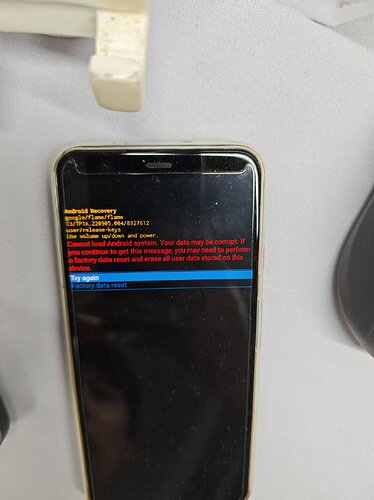
于是楼主狠心 Factory data reset ^-^,总算是短暂地给它复活了。
然而过了一天,又开始出现一样的毛病 ^-^,问了一下 G 老师,告诉我下载了一下 flame-tp1a.220905.004-factory-d3d046c8.zip 然后执行 ./flash-all.sh 重新刷了一下整套原厂系,但是发现会卡在 Recovery 界面,而 ./flash-all.sh 看起来是一直等待手机正常启动?反正最终还是卡在了 Recovery 这个地方 ^-^
shell输出
➜  flame-tp1a.220905.004 ./flash-all.sh

Warning: skip copying bootloader_b image avb footer (bootloader_b partition size: 0, bootloader_b image size: 9066264).

Sending 'bootloader_b' (8853 KB)                   OKAY [  0.340s]

Writing 'bootloader_b'                             (bootloader) Flashing Pack version c2f2-0.5-8351265

(bootloader) Flashing partition table for Lun = 0

(bootloader) Flashing partition table for Lun = 1

(bootloader) Flashing partition table for Lun = 2

(bootloader) Flashing partition table for Lun = 4

(bootloader) Flashing partition table for Lun = 5

(bootloader) Flashing partition xbl_b

(bootloader) Flashing partition xbl_config_b

(bootloader) Flashing partition aop_b

(bootloader) Flashing partition tz_b

(bootloader) Flashing partition hyp_b

(bootloader) Flashing partition abl_b

(bootloader) Flashing partition keymaster_b

(bootloader) Flashing partition devcfg_b

(bootloader) Flashing partition qupfw_b

(bootloader) Flashing partition uefisecapp_b

(bootloader) Flashing partition msadp_b

(bootloader) Flashing partition logfs

OKAY [  0.329s]

Finished. Total time: 1.169s

Rebooting into bootloader                          OKAY [  0.079s]

Finished. Total time: 0.079s

Warning: skip copying radio_b image avb footer (radio_b partition size: 0, radio_b image size: 84709516).

Sending 'radio_b' (82724 KB)                       OKAY [  2.150s]

Writing 'radio_b'                                  (bootloader) Flashing Pack version SSD:g8150-00123-220708-B-8810441

(bootloader) Flashing partition modem_b

OKAY [  0.673s]

Finished. Total time: 3.323s

Rebooting into bootloader                          OKAY [  0.079s]

Finished. Total time: 0.079s

--------------------------------------------

Bootloader Version...: c2f2-0.5-8351265

Baseband Version.....: g8150-00123-220708-B-8810441

Serial Number........: 99271FFAZ0023J

--------------------------------------------

extracting android-info.txt (0 MB) to RAM...

Checking 'product'                                 OKAY [  0.068s]

Checking 'version-bootloader'                      OKAY [  0.070s]

Checking 'version-baseband'                        OKAY [  0.069s]

Setting current slot to 'b'                        OKAY [  0.081s]

archive does not contain 'fastboot-info.txt'

extracting boot.img (64 MB) to disk... took 0.163s

archive does not contain 'init_boot.img'

extracting dtbo.img (8 MB) to disk... took 0.010s

archive does not contain 'dt.img'

archive does not contain 'pvmfw.img'

archive does not contain 'recovery.img'

extracting vbmeta.img (0 MB) to disk... took 0.000s

extracting vbmeta_system.img (0 MB) to disk... took 0.000s

archive does not contain 'vbmeta_vendor.img'

archive does not contain 'vendor_boot.img'

archive does not contain 'vendor_kernel_boot.img'

archive does not contain 'boot_other.img'

archive does not contain 'odm.img'

archive does not contain 'odm_dlkm.img'

extracting product.img (2440 MB) to disk... took 5.364s

extracting system.img (821 MB) to disk... took 1.738s

archive does not contain 'system_dlkm.img'

extracting system_ext.img (298 MB) to disk... took 0.614s

extracting system_other.img (23 MB) to disk... took 0.053s

extracting vendor.img (824 MB) to disk... took 1.857s

archive does not contain 'vendor_dlkm.img'

archive does not contain 'vendor_other.img'

extracting super_empty.img (0 MB) to RAM...

extracting super_empty.img (0 MB) to RAM...

extracting super_empty.img (0 MB) to RAM...

extracting super_empty.img (0 MB) to RAM...

extracting super_empty.img (0 MB) to RAM...

extracting super_empty.img (0 MB) to RAM...

extracting super_empty.img (0 MB) to RAM...

extracting super_empty.img (0 MB) to RAM...

extracting super_empty.img (0 MB) to RAM...

extracting super_empty.img (0 MB) to RAM...

extracting super_empty.img (0 MB) to RAM...

extracting boot.img (64 MB) to disk... took 0.153s

archive does not contain 'boot.sig'

extracting super_empty.img (0 MB) to RAM...

Sending 'boot_b' (65536 KB)                        OKAY [  1.670s]

Writing 'boot_b'                                   OKAY [  0.483s]

extracting super_empty.img (0 MB) to RAM...

extracting dtbo.img (8 MB) to disk... took 0.026s

archive does not contain 'dtbo.sig'

extracting super_empty.img (0 MB) to RAM...

Sending 'dtbo_b' (8192 KB)                         OKAY [  0.310s]

Writing 'dtbo_b'                                   OKAY [  0.126s]

extracting super_empty.img (0 MB) to RAM...

extracting vbmeta.img (0 MB) to disk... took 0.000s

archive does not contain 'vbmeta.sig'

extracting super_empty.img (0 MB) to RAM...

Sending 'vbmeta_b' (8 KB)                          OKAY [  0.140s]

Writing 'vbmeta_b'                                 OKAY [  0.078s]

extracting super_empty.img (0 MB) to RAM...

extracting vbmeta_system.img (0 MB) to disk... took 0.000s

archive does not contain 'vbmeta_system.sig'

extracting super_empty.img (0 MB) to RAM...

Sending 'vbmeta_system_b' (4 KB)                   OKAY [  0.140s]

Writing 'vbmeta_system_b'                          OKAY [  0.078s]

extracting super_empty.img (0 MB) to disk... took 0.000s

Rebooting into fastboot                            OKAY [  0.070s]

< waiting for any device >
目前不知道该怎么办,有没有佬能救一下 ^-^

 Hanhanawa 07-07 00:281楼