Windows Codex App: apply_patch fails because codex-windows-sandbox-setup.exe cannot launch from package path
已打开 09:46AM - 19 Jun 26 UTC
bug
windows-os
sandbox
tool-calls
app
### What version of the Codex App are you using (From “About Codex” dialog)?
26….616.3767.0
### What subscription do you have?
Redacted / not included
### What platform is your computer?
Microsoft Windows NT 10.0.19045.0 x64
### What issue are you seeing?
Summary
On Windows, every `apply_patch` call in the Codex desktop app fails, even for a normal temporary file inside the workspace. The failure is reproducible and is not related to patch content or the target file.
Observed Codex error
```text
apply_patch verification failed: Failed to read file to update <workspace>\.tmp-apply-patch-diagnostic.txt: fs sandbox helper failed with status exit code: 1: windows sandbox failed: orchestrator_helper_launch_canceled: ShellExecuteExW failed to launch setup helper: 1223
```
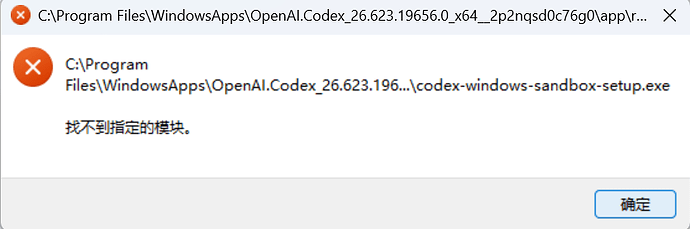
Observed Windows dialog
```text
C:\Program Files\WindowsApps\OpenAI.Codex_26.616.3767.0_x64__2p2nqsd0c76g0\app\resources\codex-windows-sandbox-setup.exe
The specified module could not be found.
```
What has already been verified
- The helper file exists at the package path.
- Restarting Codex does not fix the problem.
- Reinstalling Codex does not fix the problem.
- Normal shell read/write in the workspace still works.
- `apply_patch` fails for any target file, not just one specific repository file.
- Launching the helper directly from the package path is blocked by package ACLs, but copying the exact same binary to a normal workspace path allows it to start and print argument parsing errors.
- The copied helper has the same SHA256 hash as the packaged helper.
Important observation
Copying `codex-windows-sandbox-setup.exe` out of `C:\Program Files\WindowsApps` to a normal writable path allows it to run. For example, running the copied binary without arguments prints:
```text
Error: helper_request_args_failed: expected payload argument
```
This suggests the helper binary itself is not generally broken and does not have a universal missing-DLL problem. The issue appears to happen specifically when Codex launches the helper from the packaged WindowsApps / AppContainer context.
Chinese version
在 Windows 上,Codex 桌面版中的所有 `apply_patch` 调用都会失败,即使目标只是工作区里的一个普通临时文件。这个问题可以稳定复现,和补丁内容或目标文件本身无关。
已观察到的 Codex 错误:
```text
apply_patch verification failed: Failed to read file to update <workspace>\.tmp-apply-patch-diagnostic.txt: fs sandbox helper failed with status exit code: 1: windows sandbox failed: orchestrator_helper_launch_canceled: ShellExecuteExW failed to launch setup helper: 1223
```
Windows 弹窗:
```text
C:\Program Files\WindowsApps\OpenAI.Codex_26.616.3767.0_x64__2p2nqsd0c76g0\app\resources\codex-windows-sandbox-setup.exe
找不到指定的模块。
```
已确认:
- helper 文件本体存在。
- 重启 Codex 无法修复。
- 重装 Codex 无法修复。
- 普通 shell 对工作区文件的读写正常。
- `apply_patch` 对任意文件都失败,不是某个仓库文件的个例。
- 直接从包路径启动 helper 会被包权限限制,但把同一个二进制复制到普通工作区路径后可以正常启动,并输出参数解析错误。
- 复制后的 helper 与包内 helper 的 SHA256 完全一致。
关键信息:把 `codex-windows-sandbox-setup.exe` 从 `C:\Program Files\WindowsApps` 复制到普通可写路径后,它是可以运行的,例如无参数运行会输出:
```text
Error: helper_request_args_failed: expected payload argument
```
这说明 helper 二进制本体并没有普遍性损坏,也不像是一个通用的缺 DLL 问题。问题更像发生在 Codex 从 WindowsApps / AppContainer 上下文中启动该 helper 的这条集成链路上。
### What steps can reproduce the bug?
1. Open Codex desktop app on Windows.
2. In any workspace, invoke `apply_patch` on a normal file, including a temporary text file.
3. Observe that the tool fails immediately before patch application.
4. A Windows dialog may appear referencing `codex-windows-sandbox-setup.exe` and saying that the specified module could not be found.
Minimal reproduction target used during debugging:
```text
.tmp-apply-patch-diagnostic.txt
```
Anonymous reproduction notes:
- Personal account identifiers removed
- Local workspace path redacted in the main error excerpt
### What is the expected behavior?
`apply_patch` should be able to edit normal workspace files successfully. If the helper cannot be launched from the packaged environment, Codex should either recover gracefully or provide a more actionable error that identifies the exact failing dependency or launch condition.
### Additional information
Likely scope based on local investigation:
- The helper binary itself can run when copied outside the package path.
- The failure appears specific to the packaged WindowsApps / AppContainer launch path.
- This may point to helper launch integration, working directory or environment setup, or package-context resource resolution rather than a corrupted helper binary.
Potential developer debugging directions:
- Check the exact helper launch parameters and working directory used by the app
- Check whether the helper depends on relative resources when launched from the package
- Trace file and DLL lookups during helper startup from the packaged environment


 FeamCoco 07-09 09:592楼
 amufeng 07-09 10:013楼
 泼痞 07-09 10:044楼
 moxiaoying 07-09 10:095楼
 Fengshi 07-09 10:129楼
 马失前蹄 07-09 10:1210楼
 明月上东阁 07-09 10:1911楼