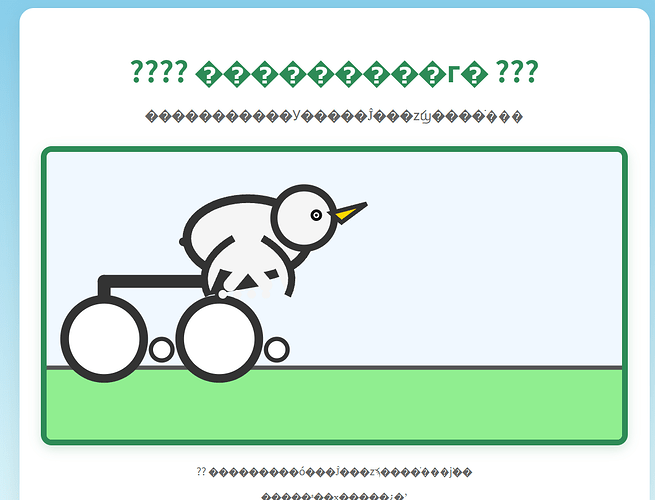
???? 鹈鹕骑自行车 ???
鹈鹕正在骑行,翅膀拍打,喙张合,车轮滚动
        <!-- 草地背景 -->

        <rect x="0" y="300" width="800" height="100" fill="#90EE90"/>

        <rect x="0" y="300" width="800" height="100" fill="url(#grass-pattern)"/>


        <!-- 地面 -->

        <line x1="0" y1="300" x2="800" y2="300" stroke="#555" stroke-width="6" stroke-linecap="round"/>


        <!-- 自行车 -->

        <g id="bike" transform="translate(80, 260)">


            <!-- 车架 -->

            <line x1="0" y1="0" x2="0" y2="-80" stroke="#333" stroke-width="18" stroke-linecap="round" />

            <line x1="0" y1="-80" x2="160" y2="-80" stroke="#333" stroke-width="18" stroke-linecap="round" />

            <line x1="160" y1="-80" x2="160" y2="-20" stroke="#333" stroke-width="12" stroke-linecap="round" />


            <!-- 后轮 -->

            <circle cx="0" cy="0" r="55" fill="#fff" stroke="#333" stroke-width="12"/>

            <!-- 后轮辐条 -->

            <g id="rear-spokes">

                <line x1="0" y1="0" x2="0" y2="0" stroke="#333" stroke-width="4" transform="rotate(0 0 0)"/>

                <line x1="0" y1="0" x2="0" y2="0" stroke="#333" stroke-width="4" transform="rotate(45 0 0)"/>

                <line x1="0" y1="0" x2="0" y2="0" stroke="#333" stroke-width="4" transform="rotate(90 0 0)"/>

                <line x1="0" y1="0" x2="0" y2="0" stroke="#333" stroke-width="4" transform="rotate(135 0 0)"/>

                <line x1="0" y1="0" x2="0" y2="0" stroke="#333" stroke-width="4" transform="rotate(180 0 0)"/>

                <line x1="0" y1="0" x2="0" y2="0" stroke="#333" stroke-width="4" transform="rotate(225 0 0)"/>

                <line x1="0" y1="0" x2="0" y2="0" stroke="#333" stroke-width="4" transform="rotate(270 0 0)"/>

                <line x1="0" y1="0" x2="0" y2="0" stroke="#333" stroke-width="4" transform="rotate(315 0 0)"/>

            </g>


            <!-- 后座垫 -->

            <rect x="140" y="-85" width="80" height="18" fill="#333" rx="4" transform="rotate(-10 180 -85)"/>


            <!-- 前轮 -->

            <circle cx="160" cy="0" r="55" fill="#fff" stroke="#333" stroke-width="12"/>

            <!-- 前轮辐条 -->

            <g id="front-spokes">

                <line x1="160" y1="0" x2="160" y2="0" stroke="#333" stroke-width="4" transform="rotate(0 160 0)"/>

                <line x1="160" y1="0" x2="160" y2="0" stroke="#333" stroke-width="4" transform="rotate(45 160 0)"/>

                <line x1="160" y1="0" x2="160" y2="0" stroke="#333" stroke-width="4" transform="rotate(90 160 0)"/>

                <line x1="160" y1="0" x2="160" y2="0" stroke="#333" stroke-width="4" transform="rotate(135 160 0)"/>

                <line x1="160" y1="0" x2="160" y2="0" stroke="#333" stroke-width="4" transform="rotate(180 160 0)"/>

                <line x1="160" y1="0" x2="160" y2="0" stroke="#333" stroke-width="4" transform="rotate(225 160 0)"/>

                <line x1="160" y1="0" x2="160" y2="0" stroke="#333" stroke-width="4" transform="rotate(270 160 0)"/>

                <line x1="160" y1="0" x2="160" y2="0" stroke="#333" stroke-width="4" transform="rotate(315 160 0)"/>

            </g>


            <!-- 车把 -->

            <line x1="160" y1="-80" x2="160" y2="-120" stroke="#333" stroke-width="14" stroke-linecap="round"/>

            <line x1="160" y1="-120" x2="110" y2="-135" stroke="#333" stroke-width="12" stroke-linecap="round"/>

            <line x1="160" y1="-120" x2="210" y2="-135" stroke="#333" stroke-width="12" stroke-linecap="round"/>


            <!-- 链条 -->

            <line x1="0" y1="0" x2="0" y2="0" stroke="#333" stroke-width="6" stroke-dasharray="8 6" id="chain"/>


            <!-- 踏板 -->

            <circle cx="80" cy="15" r="18" fill="#333"/>

            <circle cx="80" cy="15" r="12" fill="#fff"/>

            <circle cx="240" cy="15" r="18" fill="#333"/>

            <circle cx="240" cy="15" r="12" fill="#fff"/>

        </g>


        <!-- 鹈鹕 -->

        <g id="pelican" transform="translate(280, 120)">


            <!-- 身体 -->

            <ellipse cx="0" cy="0" rx="85" ry="55" fill="#F5F5F5" stroke="#333" stroke-width="12"/>


            <!-- 头部 -->

            <circle cx="78" cy="-28" r="42" fill="#F5F5F5" stroke="#333" stroke-width="10"/>


            <!-- 眼睛 -->

            <circle cx="95" cy="-32" r="8" fill="#111"/>

            <circle cx="95" cy="-32" r="4" fill="#fff"/>

            <circle cx="95" cy="-32" r="2" fill="#111"/>


            <!-- 喙 -->

            <polygon points="115,-35 165,-48 130,-22" fill="#FFD700" stroke="#333" stroke-width="6"/>

            <polygon points="130,-22 165,-48 130,-22" fill="#FFAA00"/>


            <!-- 翅膀(拍打用) -->

            <!-- 左翅膀 -->

            <path id="wing-left" d="M-20,0 C-55,20 -70,50 -55,80" fill="#F5F5F5" stroke="#333" stroke-width="10" transform="rotate(0 0 0)"/>

            <!-- 右翅膀 -->

            <path id="wing-right" d="M20,0 C55,20 70,50 55,80" fill="#F5F5F5" stroke="#333" stroke-width="10" transform="rotate(0 0 0)"/>


            <!-- 腿和脚 -->

            <line x1="0" y1="35" x2="-25" y2="65" stroke="#F5F5F5" stroke-width="18" stroke-linecap="round"/>

            <line x1="0" y1="35" x2="25" y2="65" stroke="#F5F5F5" stroke-width="18" stroke-linecap="round"/>


            <!-- 脚趾 -->

            <circle cx="-35" cy="78" r="6" fill="#F5F5F5"/>

            <circle cx="-15" cy="78" r="6" fill="#F5F5F5"/>

            <circle cx="5" cy="78" r="6" fill="#F5F5F5"/>

            <circle cx="25" cy="78" r="6" fill="#F5F5F5"/>

        </g>


    </svg>


    <div class="info">

        <p>?? 鹈鹕正在用翅膀拍打、喙张合、车轮滚动前进</p>

        <p>你可以刷新页面重新开始</p>

    </div>

</div>


<script>

    // 动画控制

    const bike = document.getElementById('bike');

    const pelican = document.getElementById('pelican');

    const chain = document.getElementById('chain');

    const wingLeft = document.getElementById('wing-left');

    const wingRight = document.getElementById('wing-right');

    const rearSpokes = document.getElementById('rear-spokes');

    const frontSpokes = document.getElementById('front-spokes');


    let position = 0;

    const speed = 1.8;


    // 初始位置

    bike.setAttribute('transform', 'translate(80, 260)');

    pelican.setAttribute('transform', 'translate(280, 120)');


    // 动画函数

    function animate() {

        position += speed;


        // 自行车前进

        const newX = 80 + position;

        bike.setAttribute('transform', 	ranslate(, 260));


        // 鹈鹕头部上下摇晃

        const bob = Math.sin(position * 0.08) * 8;

        pelican.setAttribute('transform', 	ranslate(, ));


        // 喙张合

        const beakScale = 1 + Math.sin(position * 0.12) * 0.12;

        const beak = pelican.querySelector('polygon:last-child');

        if (beak) {

            beak.setAttribute('transform', scale() translate(115, -35));

        }


        // 翅膀拍打

        const flap = Math.sin(position * 0.18) * 25;

        wingLeft.setAttribute('transform',
otate( 0 0));
wingRight.setAttribute(‘transform’,
otate( 0 0));
        // 车轮旋转

        const wheelRotate = position * 8;

        rearSpokes.querySelectorAll('line').forEach((spoke, i) => {

            spoke.setAttribute('transform',
otate( 0 0));
});
frontSpokes.querySelectorAll(‘line’).forEach((spoke, i) => {
spoke.setAttribute(‘transform’,
otate( 160 0));
});
        // 链条摆动

        chain.setAttribute('x2',  );

        chain.setAttribute('y2', ${Math.sin(position * 0.1) * 15});


        // 踏板旋转

        const pedalRotate = position * 6;

        const pedals = pelican.querySelectorAll('circle:nth-child(3)');

        pedals.forEach((pedal, i) => {

            pedal.setAttribute('transform',
otate( 80 15));
});
        requestAnimationFrame(animate);

    }


    // 开始动画

    animate();


    // 每5秒改变一下背景颜色,增加趣味性

    setInterval(() => {

        const svg = document.getElementById('animation');

        const colors = ['#F0F8FF', '#E0F7FA', '#B0E0E6', '#87CEEB'];

        svg.style.background = colors[Math.floor(Math.random() * colors.length)];

    }, 5000);

</script>
`


 sunking 08-13 00:351楼
 langren 08-13 00:423楼
 balangxian 08-13 00:444楼
 Hank 08-13 08:446楼