楼主就学过一点点前端,现在领导要求用AI前后一把梭,但是楼主用codex生成的效果不好,一眼看过去好丑,是我提示词不对,还是我的模型不对?k3是不是会好一点。
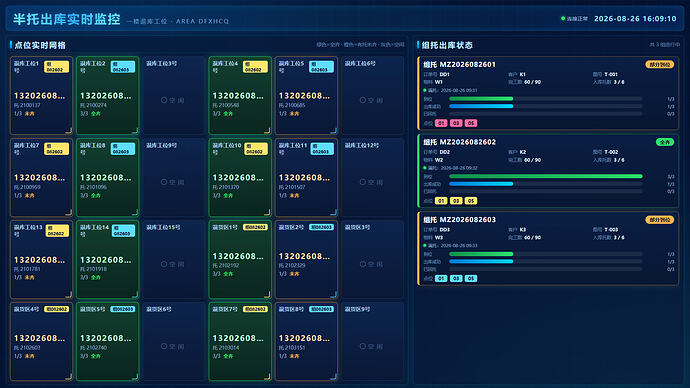
代码如下
<template>

  <div class="sf-root">

    <!-- 顶部标题栏 -->

    <header class="sf-header">

      <div class="sf-title-wrap">

        <h1 class="sf-title">半托出库实时监控</h1>

        <span class="sf-title-sub">一楼退库工位 · AREA DFXHCQ</span>

      </div>

      <div class="sf-header-right">

        <span class="sf-conn" :class="connCls"><i></i>{{ connText }}</span>

        <span class="sf-clock">{{ nowTime }}</span>

      </div>

    </header>


    <div class="sf-body">

      <!-- 左侧:18 点位实时网格 -->

      <section class="sf-grid-panel panel-box">

        <div class="panel-hd">

          <span class="panel-hd-line"></span>

          <span class="panel-hd-title">点位实时网格</span>

          <span class="panel-hd-tip">绿色=全齐 · 橙色=有托未齐 · 灰色=空闲</span>

        </div>


<div class="sf-grid" :style="gridStyle">

          <div v-for="p in pointGrid" :key="p.positionCode" class="sf-cell" :class="cellClass(p)" :style="cellStyle(p)">

            <div class="sf-cell-hd">

              <span class="sf-cell-name">{{ shortName(p.positionName) }}</span>

              <span v-if="p.mergeCode" class="sf-cell-tag">组{{ shortMerge(p.mergeCode) }}</span>

            </div>

            <div v-if="p.state === 'empty'" class="sf-cell-empty">

              <span class="sf-empty-ico"></span>空闲

            </div>

            <div v-else class="sf-cell-bd">

              <div class="sf-cell-barcode" :title="p.barcode">{{ p.barcode || '-' }}</div>

              <div class="sf-cell-pod">托 {{ p.podCode }}</div>

              <div v-if="p.mergeCode" class="sf-cell-foot">

                <span class="sf-cell-arrive">{{ p.groupArrivedCount }}/{{ p.groupTotal }}</span>

                <span v-if="p.groupArrived" class="sf-cell-full">全齐</span>

                <span v-else class="sf-cell-wait">未齐</span>

              </div>

            </div>

            <div class="sf-cell-corner"></div>

          </div>

        </div>

      </section>


      <!-- 右侧:组托出库状态 -->

      <section class="sf-groups-panel panel-box">

        <div class="panel-hd">

          <span class="panel-hd-line"></span>

          <span class="panel-hd-title">组托出库状态</span>

          <span class="panel-hd-tip">共 {{ groups.length }} 组进行中</span>

        </div>


        <div v-if="groups.length === 0" class="sf-no-group">

          <span class="sf-no-group-ico"></span>

          暂无进行中的组托

        </div>


        <div v-else class="sf-groups">

          <div v-for="g in groups" :key="g.mergeCode" class="sf-group" :class="stateCls(g.state)" :style="groupStyle(g.mergeCode)">

            <div class="sf-group-hd">

              <span class="sf-group-code">组托 {{ g.mergeCode }}</span>

              <span class="sf-group-state">{{ g.state }}</span>

            </div>


            <div class="sf-group-info">

              <div class="sf-info"><span>订单号</span><b>{{ g.ddh || '-' }}</b></div>

              <div class="sf-info"><span>客户</span><b>{{ g.khh || '-' }}</b></div>

              <div class="sf-info"><span>图号</span><b>{{ g.drawing || '-' }}</b></div>

              <div class="sf-info"><span>物料</span><b>{{ g.cpwl || '-' }}</b></div>

              <div class="sf-info"><span>完工数</span><b>{{ fmtNum(g.completeQty) }} / {{ fmtNum(g.qty) }}</b></div>

              <div class="sf-info"><span>入库托数</span><b>{{ fmtNum(g.inCount) }} / {{ fmtNum(g.expectedTrayNum) }}</b></div>

            </div>


            <div class="sf-group-times">

              <div v-if="g.fullTime" class="sf-time"><i class="t-dot t-full"></i>满托:{{ g.fullTime }}</div>

              <div v-if="g.outTime" class="sf-time"><i class="t-dot t-out"></i>出库:{{ g.outTime }}</div>

              <div v-if="g.manualTime" class="sf-time"><i class="t-dot t-manual"></i>手动出库:{{ g.manualTime }}</div>

            </div>


            <div class="sf-progress">

              <div class="sf-pbar">

                <span class="pbl">到位</span>

                <div class="pbt"><i class="pbi pbi-arrive" :style="{ width: pct(g.arrivedCount, g.inCount) }"></i></div>

                <em>{{ g.arrivedCount }}/{{ g.inCount }}</em>

              </div>

              <div class="sf-pbar">

                <span class="pbl">出库成功</span>

                <div class="pbt"><i class="pbi pbi-out" :style="{ width: pct(g.outSuccessCount, g.inCount) }"></i></div>

                <em>{{ g.outSuccessCount }}/{{ g.inCount }}</em>

              </div>

              <div class="sf-pbar">

                <span class="pbl">已回托</span>

                <div class="pbt"><i class="pbi pbi-return" :style="{ width: pct(g.returnCount, g.inCount) }"></i></div>

                <em>{{ g.returnCount }}/{{ g.inCount }}</em>

              </div>

            </div>


            <div class="sf-group-pos">

              <span class="pos-lbl">点位</span>

              <template v-if="g.positions && g.positions.length">

                <span v-for="pos in g.positions" :key="pos" class="pos-chip" :style="groupStyle(g.mergeCode)">{{ shortPos(pos) }}</span>

              </template>

              <span v-else class="pos-chip pos-none">未定</span>

            </div>

          </div>

        </div>

      </section>

    </div>

  </div>

</template>


<script lang="ts" setup>

import { ref, computed, onMounted, onUnmounted } from 'vue'

import invapi from '/@/api/invaxios'

import { ElNotification } from 'element-plus'


const form = ref({ screentype: 'screen_devwell', paramdata: {}, returndata: {} as any, returnstatus: 'success' } as any)

const pointGrid = ref<any[]>([])

const groups = ref<any[]>([])

const nowTime = ref('')

const updateTime = ref('')

const connStatus = ref<'ok' | 'err'>('ok')

const connText = ref('连接正常')

let timerClock: any = null

let timerRefresh: any = null


const GROUP_COLORS = ['#2CE16A', '#00D4FF', '#FFB648', '#B388FF', '#FF6B9D', '#FFE66D', '#5EDFFF', '#7CFFB2']


const hashStr = (s: string) => {

  let h = 0

  for (let i = 0; i < s.length; i++) {

    h = (h * 31 + s.charCodeAt(i)) >>> 0

  }

  return h

}


const groupColor = (mergeCode: string) => GROUP_COLORS[hashStr(mergeCode || '') % GROUP_COLORS.length]


const groupStyle = (mergeCode: string) => ({ '--g': groupColor(mergeCode) } as any)


const cellStyle = (p: any) => (p.mergeCode ? groupStyle(p.mergeCode) : null)


const gridCols = computed(() => {

  const n = pointGrid.value.length

  if (!n) return 6

  for (const c of [6, 5, 4, 3, 2, 1]) {

    if (n % c === 0) return c

  }

  return Math.ceil(Math.sqrt(n))

})


const gridRows = computed(() => Math.max(1, Math.ceil(pointGrid.value.length / gridCols.value)))


const gridStyle = computed(() => ({ '--cols': gridCols.value, '--rows': gridRows.value } as any))


const cellClass = (p: any) => {

  if (p.state === 'empty') return 'is-empty'

  if (p.groupArrived) return 'is-full'

  return 'is-part'

}


const stateCls = (s: string) => {

  const map: any = {

    '待出库': 'st-pending',

    '出库中': 'st-out',

    '在途': 'st-transit',

    '部分到位': 'st-part',

    '全齐': 'st-full',

    '收尾': 'st-finish'

  }

  return map[s] || 'st-pending'

}


const shortName = (name: string) => (name || '').replace(/^一楼/, '')


const shortMerge = (code: string) => (code || '').length > 6 ? (code || '').slice(-6) : code


const shortPos = (pos: string) => {

  const m = /(\d+)$/.exec(pos || '')

  return m ? m[1] : pos

}


const fmtNum = (n: any) => (n === null || n === undefined || n === '') ? '0' : n


const pct = (a: any, b: any) => {

  const aa = Number(a) || 0

  const bb = Number(b) || 0

  return bb <= 0 ? '0%' : Math.min(100, Math.round((aa / bb) * 100)) + '%'

}


const pad = (n: number) => (n < 10 ? '0' + n : '' + n)


const tickClock = () => {

  const d = new Date()

  nowTime.value = d.getFullYear() + '-' + pad(d.getMonth() + 1) + '-' + pad(d.getDate()) +

    ' ' + pad(d.getHours()) + ':' + pad(d.getMinutes()) + ':' + pad(d.getSeconds())

}


const refreshdata = () => {

  const paramarr = { screentype: form.value.screentype, psd: 'akjfapjfpadaoif', jsona: {} }

  invapi.invgescreen(paramarr, renderdata)

}


const renderdata = (res: any) => {

  form.value.returnstatus = res ? res['status'] : 'error'

  if (res && res['status'] === 'success') {

    connStatus.value = 'ok'

    connText.value = '连接正常'

    const result = res['result'] || {}

    pointGrid.value = result.pointGrid || []

    groups.value = result.groups || []

    updateTime.value = result.updateTime || ''

  } else {

    connStatus.value = 'err'

    connText.value = '连接异常'

    noticebox('请求报错', res ? res['result'] : '无响应', 'error', 8000)

  }

}


const noticebox = (title: string, content: any, type: any, duration: number) => {

  ElNotification({

    title: title,

    message: content || '',

    type: type,

    duration: duration

  })

}


const stopinterval = () => {

  clearInterval(timerClock)

  clearInterval(timerRefresh)

  timerClock = null

  timerRefresh = null

}


onMounted(() => {

  tickClock()

  timerClock = setInterval(tickClock, 1000)

  refreshdata()

  timerRefresh = setInterval(refreshdata, 10000)

})


onUnmounted(() => {

  stopinterval()

})

</script>


<style scoped>

.sf-root {

  position: relative;

  min-height: 100vh;

  padding: 0.2rem 0.2rem 0.1rem;

  box-sizing: border-box;

  background:

    radial-gradient(ellipse at 20% 0%, rgba(0, 170, 255, 0.12), transparent 45%),

    radial-gradient(ellipse at 90% 100%, rgba(0, 255, 170, 0.08), transparent 45%),

    linear-gradient(160deg, #071436 0%, #04102e 55%, #071a3f 100%);

  color: #dce8ff;

  font-family: 'Microsoft YaHei', 'PingFang SC', Arial, sans-serif;

  overflow: hidden;

}


.sf-root::before {

  content: '';

  position: absolute;

  inset: 0;

  pointer-events: none;

  background-image:

    linear-gradient(rgba(64, 158, 255, 0.05) 1px, transparent 1px),

    linear-gradient(90deg, rgba(64, 158, 255, 0.05) 1px, transparent 1px);

  background-size: 40px 40px;

}


/* 顶部 */

.sf-header {

  position: relative;

  display: flex;

  align-items: center;

  justify-content: space-between;

  height: 0.85rem;

  padding: 0 0.25rem;

  margin-bottom: 0.16rem;

  background: linear-gradient(90deg, rgba(0, 122, 255, 0.16), rgba(0, 200, 255, 0.06), rgba(0, 122, 255, 0.16));

  border: 1px solid rgba(0, 200, 255, 0.25);

  border-radius: 0.12rem;

  box-shadow: 0 0 0.25rem rgba(0, 170, 255, 0.15) inset;

}


.sf-title-wrap {

  display: flex;

  align-items: baseline;

  gap: 0.18rem;

}


.sf-title {

  margin: 0;

  font-size: 0.42rem;

  font-weight: 700;

  letter-spacing: 0.05rem;

  background: linear-gradient(90deg, #7ef0ff, #3da9ff 55%, #7ef0ff);

  -webkit-background-clip: text;

  background-clip: text;

  -webkit-text-fill-color: transparent;

  text-shadow: 0 0 0.2rem rgba(0, 200, 255, 0.35);

}


.sf-title-sub {

  font-size: 0.2rem;

  color: rgba(140, 200, 255, 0.75);

  letter-spacing: 0.04rem;

}


.sf-header-right {

  display: flex;

  align-items: center;

  gap: 0.22rem;

}


.sf-conn {

  display: inline-flex;

  align-items: center;

  gap: 0.08rem;

  font-size: 0.18rem;

  color: rgba(180, 220, 255, 0.85);

}


.sf-conn i {

  width: 0.12rem;

  height: 0.12rem;

  border-radius: 50%;

  background: #2ce16a;

  box-shadow: 0 0 0.12rem #2ce16a;

}


.sf-conn.err i {

  background: #ff4d4f;

  box-shadow: 0 0 0.12rem #ff4d4f;

}


.sf-clock {

  font-size: 0.24rem;

  font-weight: 600;

  color: #8fdcff;

  font-variant-numeric: tabular-nums;

  letter-spacing: 0.02rem;

}


/* 主体 */

.sf-body {

  position: relative;

  display: flex;

  gap: 0.16rem;

  height: calc(100vh - 1.35rem);

  min-height: 6rem;

}


.panel-box {

  position: relative;

  border: 1px solid rgba(0, 200, 255, 0.22);

  border-radius: 0.12rem;

  background: rgba(8, 26, 58, 0.55);

  box-shadow: 0 0 0.3rem rgba(0, 170, 255, 0.08);

  padding: 0.14rem 0.14rem 0.12rem;

  box-sizing: border-box;

  display: flex;

  flex-direction: column;

}


.panel-hd {

  display: flex;

  align-items: center;

  gap: 0.1rem;

  padding-bottom: 0.1rem;

  border-bottom: 1px solid rgba(0, 200, 255, 0.15);

  margin-bottom: 0.12rem;

}


.panel-hd-line {

  width: 0.06rem;

  height: 0.26rem;

  background: linear-gradient(180deg, #00e0ff, #0077ff);

  border-radius: 0.03rem;

  box-shadow: 0 0 0.12rem rgba(0, 200, 255, 0.8);

}


.panel-hd-title {

  font-size: 0.26rem;

  font-weight: 700;

  color: #bfe9ff;

  letter-spacing: 0.04rem;

}


.panel-hd-tip {

  margin-left: auto;

  font-size: 0.17rem;

  color: rgba(140, 190, 240, 0.65);

}


.sf-grid-panel {

  flex: 3;

}


.sf-groups-panel {

  flex: 2;

}


/* 点位网格 */

.sf-grid {

  flex: 1;

  display: grid;

  grid-template-columns: repeat(var(--cols, 6), 1fr);

  grid-template-rows: repeat(var(--rows, 3), 1fr);

  gap: 0.12rem;

}


.sf-cell {

  position: relative;

  border-radius: 0.1rem;

  border: 1px solid rgba(255, 255, 255, 0.1);

  background: linear-gradient(180deg, rgba(16, 40, 84, 0.75), rgba(10, 24, 54, 0.85));

  padding: 0.1rem 0.12rem;

  box-sizing: border-box;

  display: flex;

  flex-direction: column;

  overflow: hidden;

  transition: all 0.3s ease;

}


.sf-cell-hd {

  display: flex;

  align-items: center;

  justify-content: space-between;

  margin-bottom: 0.06rem;

}


.sf-cell-name {

  font-size: 0.19rem;

  font-weight: 600;

  color: rgba(190, 225, 255, 0.9);

}


.sf-cell-tag {

  font-size: 0.15rem;

  padding: 0.01rem 0.08rem;

  border-radius: 0.06rem;

  color: #04102e;

  background: var(--g, #00d4ff);

  font-weight: 700;

}


.sf-cell-empty {

  flex: 1;

  display: flex;

  align-items: center;

  justify-content: center;

  gap: 0.08rem;

  font-size: 0.2rem;

  color: rgba(140, 175, 215, 0.45);

  letter-spacing: 0.1rem;

}


.sf-empty-ico {

  width: 0.16rem;

  height: 0.16rem;

  border-radius: 50%;

  border: 2px solid rgba(140, 175, 215, 0.35);

}


.sf-cell-bd {

  flex: 1;

  display: flex;

  flex-direction: column;

  justify-content: center;

  gap: 0.06rem;

}


.sf-cell-barcode {

  font-size: 0.26rem;

  font-weight: 700;

  letter-spacing: 0.03rem;

  color: #ffffff;

  white-space: nowrap;

  overflow: hidden;

  text-overflow: ellipsis;

  font-variant-numeric: tabular-nums;

}


.sf-cell-pod {

  font-size: 0.17rem;

  color: rgba(170, 205, 245, 0.8);

}


.sf-cell-foot {

  display: flex;

  align-items: center;

  gap: 0.1rem;

  font-size: 0.17rem;

}


.sf-cell-arrive {

  color: rgba(190, 220, 255, 0.85);

  font-variant-numeric: tabular-nums;

}


.sf-cell-full {

  color: #2ce16a;

  font-weight: 700;

}


.sf-cell-wait {

  color: #ffb648;

  font-weight: 600;

}


.sf-cell.is-part {

  border-color: rgba(255, 182, 72, 0.65);

  box-shadow: 0 0 0.18rem rgba(255, 182, 72, 0.18);

}


.sf-cell.is-part .sf-cell-barcode {

  color: #ffd9a0;

}


.sf-cell.is-full {

  border-color: rgba(44, 225, 106, 0.85);

  box-shadow: 0 0 0.22rem rgba(44, 225, 106, 0.35);

  background: linear-gradient(180deg, rgba(20, 70, 46, 0.85), rgba(10, 38, 28, 0.9));

}


.sf-cell.is-full .sf-cell-barcode {

  color: #b8ffd4;

}


.sf-cell-corner {

  position: absolute;

  width: 0.18rem;

  height: 0.18rem;

  right: 0.04rem;

  bottom: 0.04rem;

  border-right: 2px solid var(--g, rgba(0, 200, 255, 0.5));

  border-bottom: 2px solid var(--g, rgba(0, 200, 255, 0.5));

  border-radius: 0 0 0.06rem;

  opacity: 0.9;

}


.sf-cell.is-empty .sf-cell-corner {

  display: none;

}


/* 组卡片 */

.sf-groups {

  flex: 1;

  overflow-y: auto;

  display: flex;

  flex-direction: column;

  gap: 0.14rem;

  padding-right: 0.04rem;

}


.sf-groups::-webkit-scrollbar {

  width: 0.08rem;

}


.sf-groups::-webkit-scrollbar-thumb {

  background: rgba(0, 200, 255, 0.25);

  border-radius: 0.04rem;

}


.sf-no-group {

  flex: 1;

  display: flex;

  flex-direction: column;

  align-items: center;

  justify-content: center;

  gap: 0.12rem;

  color: rgba(140, 190, 240, 0.45);

  font-size: 0.24rem;

  letter-spacing: 0.06rem;

}


.sf-no-group-ico {

  width: 0.5rem;

  height: 0.5rem;

  border-radius: 50%;

  border: 2px solid rgba(140, 190, 240, 0.3);

  border-top-color: rgba(0, 200, 255, 0.6);

  animation: sf-rotate 2s linear infinite;

}


@keyframes sf-rotate {

  to { transform: rotate(360deg); }

}


.sf-group {

  position: relative;

  border: 1px solid rgba(0, 200, 255, 0.25);

  border-left: 0.08rem solid var(--g, #00d4ff);

  border-radius: 0.1rem;

  background: linear-gradient(180deg, rgba(10, 32, 70, 0.85), rgba(7, 22, 50, 0.9));

  padding: 0.12rem 0.14rem 0.1rem;

  box-sizing: border-box;

}


.sf-group.st-full {

  border-color: rgba(44, 225, 106, 0.45);

  border-left-color: #2ce16a;

  box-shadow: 0 0 0.2rem rgba(44, 225, 106, 0.2);

}


.sf-group.st-transit,

.sf-group.st-part {

  border-color: rgba(255, 182, 72, 0.45);

  border-left-color: #ffb648;

  box-shadow: 0 0 0.2rem rgba(255, 182, 72, 0.16);

}


.sf-group.st-out {

  border-color: rgba(0, 212, 255, 0.45);

  border-left-color: #00d4ff;

  box-shadow: 0 0 0.2rem rgba(0, 212, 255, 0.16);

}


.sf-group-hd {

  display: flex;

  align-items: center;

  justify-content: space-between;

  margin-bottom: 0.08rem;

}


.sf-group-code {

  font-size: 0.22rem;

  font-weight: 700;

  color: #ffffff;

  letter-spacing: 0.02rem;

}


.sf-group-state {

  font-size: 0.18rem;

  font-weight: 700;

  padding: 0.02rem 0.14rem;

  border-radius: 0.3rem;

  color: #04102e;

  background: #00d4ff;

}


.st-full .sf-group-state { background: #2ce16a; }

.st-transit .sf-group-state,

.st-part .sf-group-state { background: #ffb648; }

.st-out .sf-group-state { background: #00d4ff; }

.st-finish .sf-group-state { background: #b388ff; }

.st-pending .sf-group-state { background: #5e8dff; }


.sf-group-info {

  display: grid;

  grid-template-columns: repeat(3, 1fr);

  gap: 0.06rem 0.12rem;

  margin-bottom: 0.08rem;

}


.sf-info {

  display: flex;

  align-items: center;

  gap: 0.08rem;

  font-size: 0.16rem;

  min-width: 0;

}


.sf-info span {

  color: rgba(150, 195, 240, 0.65);

  flex-shrink: 0;

}


.sf-info b {

  color: #dff0ff;

  font-weight: 600;

  white-space: nowrap;

  overflow: hidden;

  text-overflow: ellipsis;

  font-variant-numeric: tabular-nums;

}


.sf-group-times {

  display: flex;

  flex-wrap: wrap;

  gap: 0.08rem 0.2rem;

  margin-bottom: 0.1rem;

}


.sf-time {

  display: inline-flex;

  align-items: center;

  gap: 0.06rem;

  font-size: 0.15rem;

  color: rgba(170, 205, 245, 0.8);

}


.t-dot {

  width: 0.1rem;

  height: 0.1rem;

  border-radius: 50%;

  display: inline-block;

}


.t-full { background: #2ce16a; box-shadow: 0 0 0.08rem #2ce16a; }

.t-out { background: #00d4ff; box-shadow: 0 0 0.08rem #00d4ff; }

.t-manual { background: #ffb648; box-shadow: 0 0 0.08rem #ffb648; }


.sf-progress {

  display: flex;

  flex-direction: column;

  gap: 0.06rem;

  margin-bottom: 0.1rem;

}


.sf-pbar {

  display: flex;

  align-items: center;

  gap: 0.1rem;

  font-size: 0.15rem;

}


.pbl {

  width: 0.8rem;

  color: rgba(150, 195, 240, 0.7);

  flex-shrink: 0;

}


.pbt {

  flex: 1;

  height: 0.14rem;

  border-radius: 0.07rem;

  background: rgba(255, 255, 255, 0.08);

  overflow: hidden;

}


.pbi {

  display: block;

  height: 100%;

  border-radius: 0.07rem;

  transition: width 0.5s ease;

}


.pbi-arrive { background: linear-gradient(90deg, #0f8f4b, #2ce16a); }

.pbi-out { background: linear-gradient(90deg, #0077d6, #00d4ff); }

.pbi-return { background: linear-gradient(90deg, #7a4dff, #b388ff); }


.sf-pbar em {

  width: 1rem;

  text-align: right;

  font-style: normal;

  color: rgba(190, 220, 255, 0.85);

  font-variant-numeric: tabular-nums;

  flex-shrink: 0;

}


.sf-group-pos {

  display: flex;

  align-items: center;

  flex-wrap: wrap;

  gap: 0.08rem;

}


.pos-lbl {

  font-size: 0.16rem;

  color: rgba(150, 195, 240, 0.65);

  flex-shrink: 0;

}


.pos-chip {

  font-size: 0.16rem;

  font-weight: 700;

  color: #04102e;

  background: var(--g, #00d4ff);

  border-radius: 0.06rem;

  padding: 0.02rem 0.12rem;

  font-variant-numeric: tabular-nums;

}


.pos-chip.pos-none {

  color: rgba(150, 195, 240, 0.55);

  background: rgba(255, 255, 255, 0.08);

}

</style>

<style>

/* 大屏全屏重置:铺满视口、隐藏滚动 */

html, body {

  margin: 0 !important;

  padding: 0 !important;

  overflow: hidden !important;

  background: #04102e !important;

}

/* 大屏 rem 基准,与 klocshow 保持一致 */

@media screen and (max-width: 1024px) {

  html {

    font-size: 42px !important;

  }

}


@media screen and (min-width: 1920px) {

  html {

    font-size: 80px !important;

  }

}

.el-main {

  margin: 0 !important;

  padding: 0 !important;

}

</style>


 cicikiller 08-26 17:111楼
 菲比啾比 08-26 17:133楼
 余君 08-26 17:134楼
 stormbirds 08-26 17:146楼
 peop 08-26 17:157楼
 蒙恬 08-26 17:198楼
 Tokinx 08-26 17:259楼
 Silence 08-26 17:3510楼
 蛇✨ 08-26 17:3813楼
 swack01 08-26 17:3814楼
 linux_master 08-26 17:4215楼
 美丽心情2009 08-26 17:4916楼
 Berton Wang 08-26 18:3717楼