fongjinming
楼主
04-21 12:20
2楼
══════════════════════════════════════════════════════════════


Mihomo 统一规则候选版 · 与 MosDNS 的 cn/gfw/!cn 思路对齐


══════════════════════════════════════════════════════════════


设计目标:


1. 保留当前已验证可用的 provider / 地区节点组


2. 让 Mihomo 的 DNS 与流量规则更贴近 Loyalsoldier geosite/geoip 分类


3. 为后续 MosDNS 使用 cn / gfw / geolocation-!cn 规则源做统一思路


4. 不触碰 IPv6 代理,继续只把 Mihomo 作为 IPv4 代理与 DNS 防泄漏核心


mixed-port: 7890

allow-lan: true

bind-address: “*”

mode: rule

log-level: debug

ipv6: false

find-process-mode: strict

unified-delay: true

tcp-concurrent: true

global-client-fingerprint: chrome

keep-alive-interval: 30

keep-alive-idle: 600

geodata-mode: true

geodata-loader: memconservative

geosite-matcher: succinct


external-controller: 0.0.0.0:9090

secret: “”

external-ui: ui

external-ui-url: “https://github.com/MetaCubeX/metacubexd/archive/refs/heads/gh-pages.zip”


profile:

store-selected: true

store-fake-ip: true


geox-url:

geoip: “https://fastly.jsdelivr.net/gh/Loyalsoldier/v2ray-rules-dat@release/geoip.dat”

geosite: “https://fastly.jsdelivr.net/gh/Loyalsoldier/v2ray-rules-dat@release/geosite.dat”

mmdb: “https://fastly.jsdelivr.net/gh/MetaCubeX/meta-rules-dat@release/country.mmdb”


tun:

enable: true

stack: mixed

device: mihomo

dns-hijack:

- any:53

- tcp://any:53

auto-detect-interface: true

auto-route: true

strict-route: true

mtu: 1500

route-exclude-address:

- 192.168.5.0/24

- 192.168.10.0/24

- 192.168.1.0/24

- 10.0.0.0/8

- 172.16.0.0/12


sniffer:

enable: true

sniff:

HTTP:

ports: [80, 8080-8880]

override-destination: true

TLS:

ports: [443, 8443]

QUIC:

ports: [443, 8443]

skip-domain:

- “Mijia Cloud”

- “+.push.apple.com”


dns:

enable: true

listen: 0.0.0.0:53

ipv6: false


Keep encrypted upstream DNS for leak prevention, but avoid H3 cold-start latency.


prefer-h3: false

use-hosts: true

enhanced-mode: fake-ip

fake-ip-range: 198.18.0.1/16

respect-rules: true

fake-ip-filter:

- “.lan"

- ".local”

- “.localhost"

- "+.stun.."

- "+.stun...”

- “time..com"

- “+.xboxlive.com”

- “+.nintendo.net”

- “+.push.apple.com”

- “wg.xxxx.de”

- ".nas.xxxxxx.de”

default-nameserver:

- 1.1.1.1

- 8.8.8.8

proxy-server-nameserver:

- 8.138.94.132:8053

- https://cloudflare-dns.com/dns-query

- https://dns.google/dns-query

nameserver-policy:

# 先照顾中国大陆、私网以及在国内有较稳定接入的例外分类。

“geosite:private,cn,apple-cn,google-cn,category-games@cn”:

- https://223.5.5.5/dns-query

- https://doh.pub/dns-query

“wg.xxxx.de”:

- https://223.5.5.5/dns-query

- https://doh.pub/dns-query

“+.nas.xxxx.de”:

- https://223.5.5.5/dns-query

- https://doh.pub/dns-query

“+.digital-nvme.com”:

- 8.138.94.132:8053

# 明确需要代理的域名与广义非中国域名统一走国外 DoH。

“geosite:gfw,geolocation-!cn”:

- https://cloudflare-dns.com/dns-query

- https://dns.google/dns-query

nameserver:

- https://cloudflare-dns.com/dns-query

- https://dns.google/dns-query


p: &provider_base

type: http

interval: 86400

health-check:

enable: true

url: “https://cp.cloudflare.com/generate_204”

interval: 300

lazy: false

filter: “^(?!.(剩余|到期|官网|免费|试用|套餐|重置|过期|流量|时间|邮箱|客服|订阅)).$”


rs_classical: &rs_classical

type: http

interval: 43200

format: text

behavior: classical


rs_domain: &rs_domain

type: http

interval: 43200

format: text

behavior: domain


g_select: &g_select

type: select

include-all: true


g_urltest: &g_urltest

type: url-test

url: “https://cp.cloudflare.com/generate_204”

interval: 300

lazy: false

tolerance: 50

timeout: 2000

max-failed-times: 3

include-all: true

hidden: true


g_fallback: &g_fallback

type: fallback

url: “https://cp.cloudflare.com/generate_204”

interval: 300

lazy: false

timeout: 2000

max-failed-times: 3

include-all: true

hidden: true


g_balance: &g_balance

type: load-balance

url: “https://cp.cloudflare.com/generate_204”

interval: 300

lazy: false

timeout: 2000

strategy: consistent-hashing

max-failed-times: 3

include-all: true

hidden: true


FilterHK: &FilterHK ‘^(?=.(🇭🇰|港|香港|HK|Hong Kong|-HK|_HK))(?!.(回国|校园|剩余|到期|官网|客服|订阅|节点|过期)).$’

FilterTW: &FilterTW '^(?=.(🇹🇼|台|台湾|TW|Taiwan|-TW|_TW))(?!.(回国|校园|剩余|到期|官网|客服|订阅|节点|过期)).$’

FilterJP: &FilterJP ‘^(?=.(🇯🇵|日|日本|JP|Japan|Tokyo|Osaka|-JP|_JP))(?!.(回国|校园|剩余|到期|官网|客服|订阅|节点|过期)).$’

FilterSG: &FilterSG '^(?=.(🇸🇬|新|新加坡|SG|Singapore|-SG|_SG))(?!.(回国|校园|剩余|到期|官网|客服|订阅|节点|过期)).$’

FilterUS: &FilterUS ‘^(?=.(🇺🇸|美|美国|US|United States|-US|_US))(?!.(回国|校园|剩余|到期|官网|客服|订阅|节点|过期)).$’

FilterKR: &FilterKR '^(?=.(🇰🇷|韩|韩国|KR|Korea|-KR|_KR))(?!.(回国|校园|剩余|到期|官网|客服|订阅|节点|过期)).$’


proxy-providers:

aladdin:

<<: *provider_base

url: “http://192.168.5.5:3000/download/xxxxxxxxxxx?target=ClashMeta”

path: ./providers/aladdin.yaml

#bitsflow:


<<: *provider_base


url: “http://192.168.5.5:3000/download/mmmmmmmmmmm?target=ClashMeta”


path: ./providers/bitsflow.yaml


proxy-groups:


name: “节点选择”

<<: *g_select


name: “自动选择”

<<: *g_urltest

use: &all_providers [aladdin, bitsflow]


name: “美国自动”

<<: *g_urltest

use: *all_providers

filter: *FilterUS


name: “美国故障转移”

<<: *g_fallback

use: *all_providers

filter: *FilterUS


name: “美国负载均衡”

<<: *g_balance

use: *all_providers

filter: *FilterUS


name: “美国节点”

type: select

proxies: [“美国自动”, “美国故障转移”, “美国负载均衡”, “节点选择”, “自动选择”]


name: “日本自动”

<<: *g_urltest

use: *all_providers

filter: *FilterJP


name: “日本故障转移”

<<: *g_fallback

use: *all_providers

filter: *FilterJP


name: “日本负载均衡”

<<: *g_balance

use: *all_providers

filter: *FilterJP


name: “日本节点”

type: select

proxies: [“日本自动”, “日本故障转移”, “日本负载均衡”, “节点选择”, “自动选择”]


name: “新加坡自动”

<<: *g_urltest

use: *all_providers

filter: *FilterSG


name: “新加坡故障转移”

<<: *g_fallback

use: *all_providers

filter: *FilterSG


name: “新加坡负载均衡”

<<: *g_balance

use: *all_providers

filter: *FilterSG


name: “新加坡节点”

type: select

proxies: [“新加坡自动”, “新加坡故障转移”, “新加坡负载均衡”, “节点选择”, “自动选择”]


name: “香港自动”

<<: *g_urltest

use: *all_providers

filter: *FilterHK


name: “香港故障转移”

<<: *g_fallback

use: *all_providers

filter: *FilterHK


name: “香港负载均衡”

<<: *g_balance

use: *all_providers

filter: *FilterHK


name: “香港节点”

type: select

proxies: [“香港自动”, “香港故障转移”, “香港负载均衡”, “节点选择”, “自动选择”]


name: “韩国自动”

<<: *g_urltest

use: *all_providers

filter: *FilterKR


name: “韩国故障转移”

<<: *g_fallback

use: *all_providers

filter: *FilterKR


name: “韩国负载均衡”

<<: *g_balance

use: *all_providers

filter: *FilterKR


name: “韩国节点”

type: select

proxies: [“韩国自动”, “韩国故障转移”, “韩国负载均衡”, “节点选择”, “自动选择”]


name: “台湾自动”

<<: *g_urltest

use: *all_providers

filter: *FilterTW


name: “台湾故障转移”

<<: *g_fallback

use: *all_providers

filter: *FilterTW


name: “台湾负载均衡”

<<: *g_balance

use: *all_providers

filter: *FilterTW


name: “台湾节点”

type: select

proxies: [“台湾自动”, “台湾故障转移”, “台湾负载均衡”, “节点选择”, “自动选择”]


name: “全球直连”

type: select

proxies: [DIRECT]


name: “全球拦截”

type: select

proxies: [REJECT]


name: “广告拦截”

type: select

proxies: [“全球拦截”, “全球直连”]


name: “代理主选”

type: select

proxies: [“美国节点”, “自动选择”, “节点选择”, “日本节点”, “新加坡节点”, “香港节点”, “韩国节点”, “台湾节点”, “全球直连”]


name: “AI服务”

type: select


AI 先给自动选择兜底,避免把 OpenAI 锁死在某个并不稳定的美国出口上。


proxies: [“自动选择”, “美国节点”, “美国自动”, “美国故障转移”, “节点选择”, “日本节点”, “新加坡节点”, “代理主选”, “全球直连”]


name: “国外媒体”

type: select

proxies: [“代理主选”, “自动选择”, “香港节点”, “日本节点”, “新加坡节点”, “美国节点”, “节点选择”, “全球直连”]


name: “国内媒体”

type: select

proxies: [“全球直连”, “代理主选”]


name: “电报信息”

type: select

proxies: [“自动选择”, “新加坡节点”, “香港节点”, “美国节点”, “节点选择”, “代理主选”]


name: “苹果服务”

type: select

proxies: [“代理主选”, “全球直连”, “自动选择”, “节点选择”]


name: “微软服务”

type: select

proxies: [“全球直连”, “美国节点”, “自动选择”, “节点选择”, “代理主选”]


name: “漏网之鱼”

type: select

proxies: [“代理主选”, “自动选择”, “节点选择”, “全球直连”]


rule-providers:

local:

type: file

behavior: classical

path: ./ruleset/local.yaml


reject_non_ip:

<<: *rs_classical

url: “https://ruleset.skk.moe/Clash/non_ip/reject.txt”

path: ./rule_set/reject_non_ip.txt

reject_non_ip_drop:

<<: *rs_classical

url: “https://ruleset.skk.moe/Clash/non_ip/reject-drop.txt”

path: ./rule_set/reject_non_ip_drop.txt

reject_domainset:

<<: *rs_domain

url: “https://ruleset.skk.moe/Clash/domainset/reject.txt”

path: ./rule_set/reject_domainset.txt

ai_non_ip:

<<: *rs_classical

url: “https://ruleset.skk.moe/Clash/non_ip/ai.txt”

path: ./rule_set/ai_non_ip.txt

telegram_non_ip:

<<: *rs_classical

url: “https://ruleset.skk.moe/Clash/non_ip/telegram.txt”

path: ./rule_set/telegram_non_ip.txt

stream_non_ip:

<<: *rs_classical

url: “https://ruleset.skk.moe/Clash/non_ip/stream.txt”

path: ./rule_set/stream_non_ip.txt

apple_services:

<<: *rs_classical

url: “https://ruleset.skk.moe/Clash/non_ip/apple_services.txt”

path: ./rule_set/apple_services.txt

microsoft_non_ip:

<<: *rs_classical

url: “https://ruleset.skk.moe/Clash/non_ip/microsoft.txt”

path: ./rule_set/microsoft_non_ip.txt


rules:


RULE-SET,local,DIRECT


RULE-SET,reject_non_ip,广告拦截


RULE-SET,reject_domainset,广告拦截


RULE-SET,reject_non_ip_drop,REJECT-DROP


RULE-SET,ai_non_ip,AI服务


RULE-SET,telegram_non_ip,电报信息


RULE-SET,stream_non_ip,国外媒体


GEOSITE,apple-cn,DIRECT


GEOSITE,google-cn,DIRECT


GEOSITE,category-games@cn,DIRECT


RULE-SET,apple_services,苹果服务


RULE-SET,microsoft_non_ip,微软服务


GEOSITE,gfw,代理主选


GEOSITE,geolocation-!cn,代理主选


GEOSITE,cn,DIRECT


GEOIP,telegram,电报信息,no-resolve


GEOIP,private,DIRECT,no-resolve


GEOIP,cn,DIRECT,no-resolve


MATCH,漏网之鱼
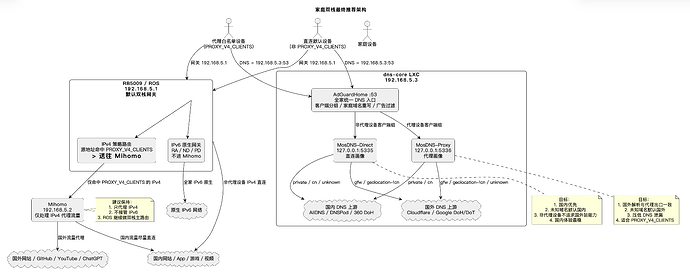
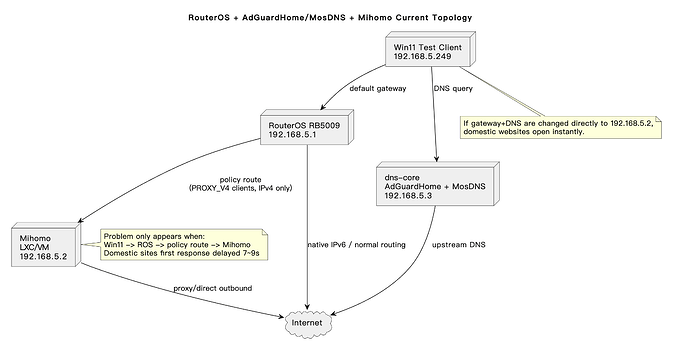
补充mihomo的配置。其中xxxxxx 是自己的ipv6代理域名



 cm123 04-21 12:295楼
 X-Clone 04-21 12:337楼
 onjim 05-16 02:2010楼
 看不到我👀 05-16 03:0811楼
 kong 05-21 18:1312楼
 u1y0ne 06-22 13:2013楼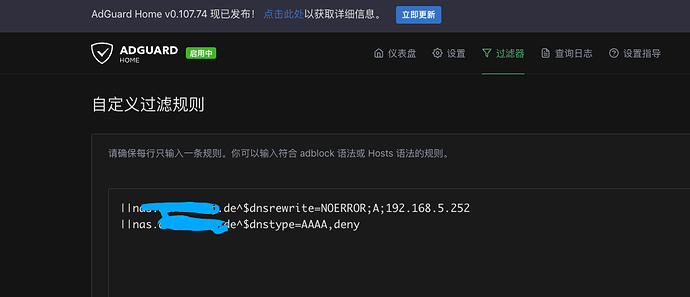

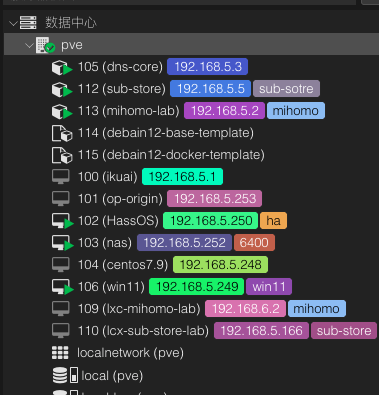
 补充 当前pve的网络都是共用vmb0 ->enp4s0 因为q1hy只有1个2.5g网口 考虑回家把enp5s0分配给mihomo去尝试是否能解决这个问题