之前 Computer use 刚发布的时候,是直接可用的,今天想用起来发现不可用了,于是深入研究了一下,直接上提示词了,佬们,效果图如下,不使用proxifier的佬儿自行提示词补充一下,也十分欢迎codex自我修复的佬儿补充自己修复的经验,目前我仅根据本次自己修复记录做了提示词梳理 :
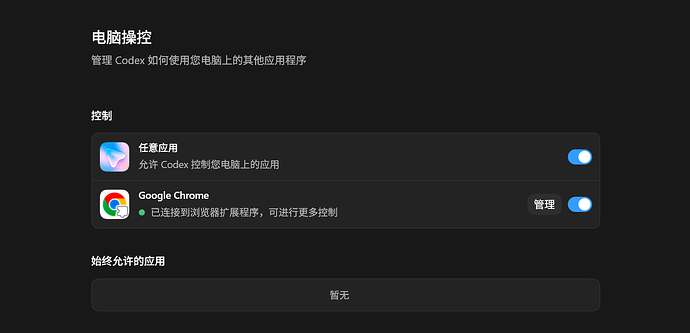
你现在是 Windows 上的 Codex Desktop 故障排查助手。我的现象是:Codex 设置里 Browser / Computer Use / Chrome 插件显示不可用,或者 GitHub/插件拉取失败。我本机可能使用 FlClash + Proxifier 代理。请你不要猜,按下面步骤逐层诊断并修复。


目标:

1. 先区分是代理问题,还是 Codex 插件市场/插件缓存问题。

2. 不要破坏用户已有配置;任何删除/替换目录前必须备份。

3. 优先用 PowerShell 读取状态、日志、配置,确认根因后再动手。

4. 修复后验证 browser、chrome、computer-use 都是 installed=true / enabled=true。


排查步骤:


一、先确认代理基础链路

- 检查 FlClash 本地端口是否可用,例如 127.0.0.1:7890。

- 检查 Proxifier 是否让 Codex.exe、codex.exe、git.exe、node.exe、curl.exe、chrome.exe 走代理。

- 用 git 测试 GitHub,例如:

  git ls-remote https://github.com/openai/skills.git HEAD

- 如果 GitHub 已经能通,就不要继续把问题当代理问题处理。


二、检查 Codex 插件状态

- 找到当前 Codex CLI 路径,通常在:

  C:\Users\<用户名>\AppData\Local\OpenAI\Codex\bin\*\codex.exe

- 执行:

  codex plugin list --json

- 重点看:

  browser@openai-bundled

  chrome@openai-bundled

  computer-use@openai-bundled

- 如果它们没有出现在 installed 里,或 enabled=false,继续查插件市场目录。


三、检查 Codex 内置插件市场目录

检查:

C:\Users\<用户名>\.codex\.tmp\bundled-marketplaces\openai-bundled


这个目录里应该至少有:

- .agents\plugins\marketplace.json

- plugins\browser

- plugins\chrome

- plugins\computer-use

- plugins\latex

- plugins\sites


如果这里只剩 chrome,或者缺 browser/computer-use,说明内置插件市场刷新坏了。


四、看 Codex 日志确认根因

检查日志目录:

C:\Users\<用户名>\AppData\Local\Packages\OpenAI.Codex_2p2nqsd0c76g0\LocalCache\Local\Codex\Logs


搜索关键词:

- bundled_plugins_marketplace_resolve_failed

- plugin_marketplace_folder_write_failed

- EBUSY

- bundled_plugins_reconcile

- plugin/list

- browser_use_availability_resolved

- computer-use native pipe


如果看到类似:

EBUSY: resource busy or locked, rmdir ... openai-bundled\plugins\chrome\extension-host...

说明 Chrome 插件宿主锁住了临时 marketplace,导致 Codex 刷新失败。


五、检查 Chrome 插件 latest Junction 是否错误

检查:

C:\Users\<用户名>\.codex\plugins\cache\openai-bundled\chrome\latest


如果它是 Junction,并且 Target 指向:

C:\Users\<用户名>\.codex\.tmp\bundled-marketplaces\openai-bundled\plugins\chrome


这是错误状态。它会导致 Chrome 扩展宿主锁住临时市场目录。


正确做法:

- 先结束 extension-host.exe 和对应 chrome.nativeMessaging 的 cmd.exe,不要关闭 Chrome 主进程。

- 备份损坏的 openai-bundled 临时目录。

- 把 chrome\latest Junction 改到稳定缓存目录,例如:

  C:\Users\<用户名>\.codex\plugins\cache\openai-bundled\chrome\<当前版本>

- 如果当前版本缓存不存在,从当前 Codex 安装包复制 chrome 插件过去。


六、重建 openai-bundled 市场目录

从当前 Codex 安装包复制完整内置市场:


源目录类似:

C:\Program Files\WindowsApps\OpenAI.Codex_<当前版本>_x64__2p2nqsd0c76g0\app\resources\plugins\openai-bundled


目标目录:

C:\Users\<用户名>\.codex\.tmp\bundled-marketplaces\openai-bundled


要求:

- 删除/替换目标前必须备份。

- 复制后确认 plugins 下有 browser、chrome、computer-use、latex、sites。

- 确认 .agents\plugins\marketplace.json 存在。


七、同步 chrome-native-hosts.json

检查:

C:\Users\<用户名>\.codex\chrome-native-hosts.json


确认里面这些路径都存在:

- codexCliPath

- nodePath

- nodeReplPath

- browserClientPath

- extensionHostPath

- resourcesPath


如果 codexCliPath 指向旧版本且文件不存在,更新为当前存在的 codex.exe。

如果 pluginVersion 是旧版本,也同步到当前插件版本。


八、最终验证

执行:

codex plugin list --json


确认:

- browser@openai-bundled installed=true enabled=true

- chrome@openai-bundled installed=true enabled=true

- computer-use@openai-bundled installed=true enabled=true


再检查 Windows pipe:

- codex-browser-use-*

- codex-computer-use-*


最后让用户从托盘完全退出 Codex Desktop,再重新打开。重启后进入设置页确认 Browser / Computer Use / Chrome 不再显示不可用。


输出要求:

- 每一步说明你查到了什么。

- 明确指出根因是代理、插件市场损坏、Chrome latest Junction 错误、还是其他原因。

- 修复前列出会改哪些路径。

- 修复后给出验证结果。


 yiyiyi 06-27 16:401楼
 Neptune 06-27 16:423楼
 连长的连 06-27 16:454楼
 WeirdOldman 06-27 16:475楼
 radioarson 06-27 16:517楼
 大碗 06-27 16:559楼