最近在折腾 Codex 对接 CPA 的账号池,链路大概是:
Codex → CC Switch → CPA 自定义 Responses 地址 → Codex 模型
CPA 里的模型是我自己在 CC Switch 里手动添加的。目前添加模型时能填写的内容比较少,基本只有:
模型 ID

上下文大小
后来我看了一下 CC Switch 生成的:
%USERPROFILE%\.codex\cc-switch-model-catalog.json
发现它和 Codex CLI 自己带的模型目录差别还挺大,让AI分析了一下。
官方目录可以用下面的命令查看:
codex debug models --bundled
发现的几个差异
CC Switch 生成的模型基本是套一个通用模板,而官方模型目录里有更多模型自己的配置。
比较明显的有:
base_instructions:CC Switch 里只有一小段通用 Prompt,官方模型里的内容长很多;
model_messages:官方目录里有完整的指令模板和 personality 配置,CC Switch 生成的目录里没有;
supported_reasoning_levels:CC Switch 原来所有模型都是统一的 none / high,官方不同模型支持的等级并不一样;
input_modalities:支持图片的官方模型是 text,image,CC Switch 原来通常只有 text;
supports_image_detail_original:官方部分模型为 true,CC Switch 原来是 false;
supports_parallel_tool_calls、support_verbosity、default_verbosity 等工具和输出相关字段也有差异;
truncation_policy、service_tiers、additional_speed_tiers 等字段也不是完全一致。
这个问题不知道论坛里面有没有其他人发现,我的使用方法不对?CCswitch是不是没考虑覆盖这种场景。
临时让AI写了个脚本合并配置文件
思路比较简单:
- 读取
codex debug models --bundled 的官方目录;
- 从官方目录动态找出
gpt-* 模型;
- 用自定义模型的
slug 去包含匹配官方模型 ID;
- 匹配到以后,用官方配置覆盖当前条目;
- 但保留自定义模型原来的
slug,避免影响 CPA 路由;
- 修改前自动备份,并支持只验证和预演。
比如:
自定义 slug:<provider-prefix>/gpt-5.6-luna

官方 slug:gpt-5.6-luna
脚本会使用官方 gpt-5.6-luna 的配置,但最后仍然保留自定义的 slug。
脚本
[CmdletBinding()]

param(

    [Parameter()]

    [string]$CatalogPath = (Join-Path $env:USERPROFILE '.codex\cc-switch-model-catalog.json'),


    [Parameter()]

    [string]$CodexCommand = 'codex.cmd',


    [Parameter()]

    [switch]$ValidateOnly,


    [Parameter()]

    [switch]$WhatIf

)


Set-StrictMode -Version Latest

$ErrorActionPreference = 'Stop'


function Read-JsonFile {

    param(

        [Parameter(Mandatory)]

        [string]$Path

    )


    if (-not (Test-Path -LiteralPath $Path -PathType Leaf)) {

        throw "Catalog file not found: $Path"

    }


    $text = Get-Content -LiteralPath $Path -Raw -Encoding UTF8

    if ([string]::IsNullOrWhiteSpace($text)) {

        throw "Catalog file is empty: $Path"

    }


    return ($text | ConvertFrom-Json)

}


function Get-OfficialCatalog {

    param(

        [Parameter(Mandatory)]

        [string]$Command

    )


    $commandInfo = Get-Command $Command -ErrorAction Stop | Select-Object -First 1

    $commandPath = $commandInfo.Source

    if ([string]::IsNullOrWhiteSpace($commandPath)) {

        $commandPath = $commandInfo.Definition

    }


    if ([string]::IsNullOrWhiteSpace($commandPath)) {

        throw "Unable to resolve Codex command: $Command"

    }


    $utf8 = [System.Text.UTF8Encoding]::new($false)

    $startInfo = New-Object System.Diagnostics.ProcessStartInfo

    $startInfo.UseShellExecute = $false

    $startInfo.CreateNoWindow = $true

    $startInfo.RedirectStandardOutput = $true

    $startInfo.RedirectStandardError = $true

    $startInfo.StandardOutputEncoding = $utf8

    $startInfo.StandardErrorEncoding = $utf8


    # ProcessStartInfo cannot execute .cmd/.bat files directly when shell

    # execution is disabled, so invoke those through cmd.exe. The encoding is

    # configured on the redirected streams before the child process starts.

    if ($commandPath -match '\.(cmd|bat)$') {

        $startInfo.FileName = $env:ComSpec

        $startInfo.Arguments = '/d /s /c ""' + $commandPath + '" debug models --bundled"'

    }

    else {

        $startInfo.FileName = $commandPath

        $startInfo.Arguments = 'debug models --bundled'

    }


    $process = New-Object System.Diagnostics.Process

    $process.StartInfo = $startInfo

    try {

        if (-not $process.Start()) {

            throw "Failed to start Codex command: $commandPath"

        }


        # Read both streams asynchronously so a full stderr buffer cannot

        # deadlock the child process while stdout is being consumed.

        $stdoutTask = $process.StandardOutput.ReadToEndAsync()

        $stderrTask = $process.StandardError.ReadToEndAsync()

        $process.WaitForExit()


        $exitCode = $process.ExitCode

        $output = $stdoutTask.Result

        $stderr = $stderrTask.Result

    }

    finally {

        $process.Dispose()

    }


    if ($exitCode -ne 0) {

        throw "Failed to read the Codex bundled catalog. Exit code: $exitCode`n$stderr"

    }


    if ([string]::IsNullOrWhiteSpace($output)) {

        throw "Codex bundled catalog command returned empty stdout."

    }


    try {

        return ($output | ConvertFrom-Json)

    }

    catch {

        throw "Codex bundled catalog is not valid JSON: $($_.Exception.ToString())"

    }

}


function Copy-JsonValue {

    param(

        [Parameter(Mandatory)]

        [object]$Value

    )


    return ($Value | ConvertTo-Json -Depth 100 | ConvertFrom-Json)

}


function Find-OfficialModel {

    param(

        [Parameter(Mandatory)]

        [string]$CustomSlug,


        [Parameter(Mandatory)]

        [object[]]$OfficialModels

    )


    # Only use gpt-* entries and prefer longer, more specific slugs.

    $candidates = @($OfficialModels | Where-Object { $_.slug -like 'gpt-*' })

    $candidates = @($candidates | Sort-Object -Property @{ Expression = { $_.slug.Length }; Descending = $true })


    foreach ($officialModel in $candidates) {

        if ($CustomSlug.IndexOf(

                [string]$officialModel.slug,

                [System.StringComparison]::OrdinalIgnoreCase

            ) -ge 0) {

            return $officialModel

        }

    }


    return $null

}


function Get-MergedCatalog {

    param(

        [Parameter(Mandatory)]

        [object]$CustomCatalog,


        [Parameter(Mandatory)]

        [object]$OfficialCatalog

    )


    if ($null -eq $CustomCatalog.models -or $CustomCatalog.models.Count -eq 0) {

        throw 'Custom catalog has no models.'

    }


    if ($null -eq $OfficialCatalog.models -or $OfficialCatalog.models.Count -eq 0) {

        throw 'Official catalog has no models.'

    }


    $results = @()

    $report = @()


    foreach ($customModel in $CustomCatalog.models) {

        $customSlug = [string]$customModel.slug

        if ([string]::IsNullOrWhiteSpace($customSlug)) {

            throw 'A custom model is missing slug.'

        }


        $officialModel = Find-OfficialModel `

            -CustomSlug $customSlug `

            -OfficialModels @($OfficialCatalog.models)


        if ($null -eq $officialModel) {

            $results += $customModel

            $report += [pscustomobject]@{

                Model = $customSlug

                Status = 'Skipped'

                MatchedOfficialModel = $null

            }

            continue

        }


        # Use the complete official model configuration.

        $result = Copy-JsonValue -Value $officialModel


        # Match by the official slug but preserve the custom routing ID.

        $result.slug = $customSlug

        if ($customSlug -ne $officialModel.slug) {

            $result.display_name = $customSlug

        }


        $results += $result

        $report += [pscustomobject]@{

            Model = $customSlug

            Status = 'Merged'

            MatchedOfficialModel = [string]$officialModel.slug

        }

    }


    return [pscustomobject]@{

        Catalog = [pscustomobject]@{ models = @($results) }

        Report = @($report)

    }

}


function Write-CatalogAtomically {

    param(

        [Parameter(Mandatory)]

        [string]$Path,


        [Parameter(Mandatory)]

        [object]$Catalog

    )


    $backupPath = "$Path.bak-official-$(Get-Date -Format 'yyyyMMdd-HHmmss')"

    $tempPath = "$Path.tmp"

    $json = $Catalog | ConvertTo-Json -Depth 100


    Copy-Item -LiteralPath $Path -Destination $backupPath -Force

    [System.IO.File]::WriteAllText(

        $tempPath,

        $json + [Environment]::NewLine,

        [System.Text.UTF8Encoding]::new($false)

    )


    # Parse the temporary file before replacing the original.

    Get-Content -LiteralPath $tempPath -Raw -Encoding UTF8 |

        ConvertFrom-Json |

        Out-Null


    Move-Item -LiteralPath $tempPath -Destination $Path -Force

    return $backupPath

}


$customCatalog = Read-JsonFile -Path $CatalogPath

$officialCatalog = Get-OfficialCatalog -Command $CodexCommand

$mergeResult = Get-MergedCatalog `

    -CustomCatalog $customCatalog `

    -OfficialCatalog $officialCatalog


$mergeResult.Report | Format-Table Model, Status, MatchedOfficialModel -AutoSize


$skipped = @($mergeResult.Report | Where-Object Status -eq 'Skipped')

if ($skipped.Count -gt 0) {

    Write-Warning "The following models did not match an official gpt-* entry and were kept unchanged:"

    $skipped | Format-Table Model -AutoSize

}


if ($ValidateOnly) {

    Write-Host "Validation completed without modifying: $CatalogPath"

    exit 0

}


if ($WhatIf) {

    Write-Host "WhatIf: would merge the Codex bundled catalog into: $CatalogPath"

    exit 0

}


$backupPath = Write-CatalogAtomically `

    -Path $CatalogPath `

    -Catalog $mergeResult.Catalog


Write-Host "Merge completed: $CatalogPath"

Write-Host "Backup: $backupPath"
使用方法
先只验证,不改文件:
.\tools\merge-codex-model-catalog.ps1 -ValidateOnly
确认匹配结果没问题后,可以预演一次:
.\tools\merge-codex-model-catalog.ps1 -WhatIf
最后再实际执行:
.\tools\merge-codex-model-catalog.ps1
脚本会自动备份原来的模型目录。如果 CPA 不支持官方目录里声明的某些工具或能力,可以用备份恢复,再单独调整相关字段。
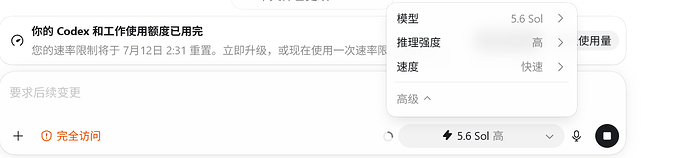
效果,这是直接配置的CPA地址



 Russell 07-12 01:301楼