
🚦 写了个 macOS 桌面红绿灯小工具,一眼看清 4 个 Claude/Codex agent 各自跑到哪了

makubex1324 2026-06-20 10:14 1
最近 vibe coding 上瘾,习惯同时开 3 、4 个 agent 干活:一个写代码、一个跑测试、一个改文档、一个挂掉了忘关。


结果就是:每天在 4 个终端窗口之间来回切,切过去才发现那个跑测试的半小时前就 ERROR 了,那个改文档的已经 SUCCESS 了但我没注意。


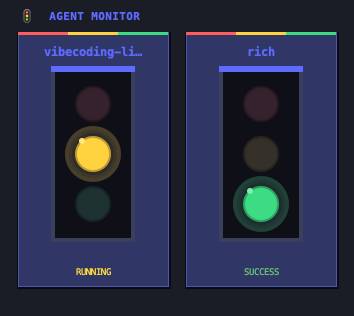
干脆写了个小工具,叫 agent-traffic-light,挂在桌面角落,每个 agent 会话一张三色灯卡片:


  • 🟡 黄 = 运行中

  • 🟢 绿 = 成功

  • 🔴 红 = 失败

  • ⚫ 灰 = 进程已经死了


窗口无边框、置顶、可拖拽,双击退出。


长什么样


示例


status-running status-success status-failed


怎么做的


非常轻量,只用 Python 3 自带的 tkinter ,零第三方依赖


原理:


  • agent 在状态切换时(开始 / 成功 / 失败)调一下 python main.py run <project_name>,发个 UDP 包给桌面端

  • 桌面端监听 127.0.0.1:18888,收到包就更新对应卡片

  • 每 3 秒检查一次卡片绑定的 PID ,进程没了自动标灰


怎么接入


Claude Code 和 Codex 都是改一个 hook 配置文件的事:


{
"UserPromptSubmit": [
{
"hooks": [{"type": "command", "command": "/usr/bin/python3 /path/to/main.py run $(basename $PWD)"}]
}
],
"Stop": [
{
"hooks": [{"type": "command", "command": "/usr/bin/python3 /path/to/main.py success $(basename $PWD)"}]
}
]
}

卡片名用 $(basename $PWD),所以同一个项目目录的会话会自动归到同一张卡。


跑起来


Mac 自带 Python + tkinter ,不用装任何东西,开箱即用


git clone https://github.com/stars1324/agent-traffic-light
cd agent-traffic-light
python3 main.py

GitHub 地址: https://github.com/stars1324/agent-traffic-light


多窗口并行确实舒服很多,不用一直盯着终端看哪个挂了

最新回复 (1)
  • Moishine 06-20 11:52
    1
    都这么急吗,我宁愿喝点水看着 agent 干活
* 帖子来源V2EX
返回